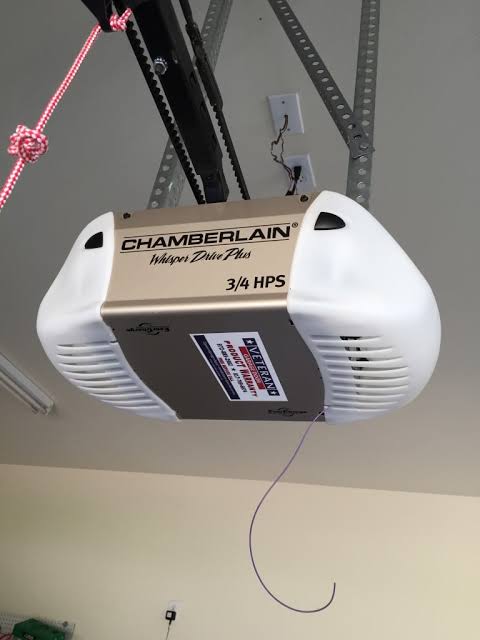
Have you ever woken up in the middle of the night to the sound of your garage door rumbling open, only to find no one there? It is a unsettling experience that compromises both your peace of mind and your home’s security. If you are asking, “Why is my Liftmaster garage door opening by itself,” you are not alone; this is a common issue with identifiable technical causes that can usually be resolved without calling a professional.
In this guide, we will break down the most frequent reasons behind this phantom operation, provide step-by-step troubleshooting fixes, and help you secure your home again.
1. Is Someone Else’s Remote Interfering With Yours?
One of the most surprising yet common reasons for a ghost-opening garage door is radio frequency interference. In older Liftmaster models (particularly those manufactured before 2011), the system often operated on fixed dip-switch codes or simple rolling codes that could occasionally overlap with a neighbor’s remote if they share the same frequency band.
The “Cross-Talk” Phenomenon
If you live in a densely populated neighborhood, it is possible that a neighbor recently bought a new universal remote or a car with an integrated garage opener that happens to sync with your receiver’s frequency. While modern Liftmaster units use Security+ 2.0 technology to prevent this, older units are more vulnerable.
How to Fix It:
- Reprogram Your Remotes: Clear the memory of your Liftmaster opener and reprogram all your remotes. This changes the rolling code sequence.
- Check for Universal Remotes: If you have old universal remotes lying around, discard them or ensure they are not being pressed accidentally in a junk drawer.
- Upgrade Your Opener: If your unit is over 15 years old, consider upgrading to a modern model with encrypted signals.
Pro Tip: If the door opens at random times that do not correlate with your family’s schedule, interference is a likely culprit.
2. Are Your Wall Control Wires Shorting Out?
The wall control panel (the button inside your garage) is connected to the motor unit via a low-voltage wire. Over time, this wire can become damaged, frayed, or pinched, leading to a short circuit. When the wires touch each other, it completes the circuit just as if you had pressed the button, causing the door to open or close unexpectedly.
Signs of a Wiring Short
- The door operates intermittently without input.
- The lights on the motor unit flicker when the door moves on its own.
- You notice visible damage to the wire running from the ceiling to the wall button.
Step-by-Step Diagnostic:
- Disconnect the Wall Button: Locate the two terminals on the back of your wall control panel where the wires connect. Unscrew them and disconnect the wires.
- Insulate the Ends: Wrap the exposed wire ends in electrical tape so they cannot touch each other or any metal part of the garage structure.
- Monitor for 24 Hours: If the door stops opening by itself, the issue was definitely a short in the wall control wiring.
- Replace the Wire: Run a new bell wire (typically 2-conductor, 22-gauge) from the motor to the wall button. Avoid stapling it too tightly, which can damage the insulation.
3. Could a Stuck Button Be the Culprit?
Sometimes, the solution is remarkably simple. The buttons on your handheld remote or your wall console can get stuck due to dirt, debris, or mechanical wear. A slightly depressed button can send a continuous or intermittent signal to the opener.
Inspection Checklist
- Handheld Remotes: Check if the rubber button has lost its elasticity. Press it firmly; it should click and return to its original position immediately. If it feels mushy or stays down, the remote is faulty.
- Wall Console: Remove the cover of the wall console. Check for dust buildup or corrosion on the contact points beneath the button.
- Car Visor Clips: Ensure your remote isn’t being pressed by a sun visor, gym bag, or other items in your car.
Solution: Clean the contacts with a cotton swab dipped in rubbing alcohol. If the button remains stuck, replace the remote or the wall console. These parts are inexpensive and easy to swap out.
4. Is Your Smart Home Integration Glitching?
Modern Liftmaster openers often integrate with Wi-Fi modules like MyQ. While convenient, smart home technology introduces new potential failure points. App glitches, Wi-Fi drops, or unauthorized access can cause the door to operate remotely.
Common Smart Issues
- App Bugs: An outdated version of the MyQ app may send erroneous commands.
- Wi-Fi Interference: Signal instability can cause the opener to misinterpret data packets.
- Shared Access: Did you give access to a dog walker, contractor, or family member who might have triggered it accidentally?
Troubleshooting Steps:
- Update the App: Ensure your MyQ app is updated to the latest version.
- Check Activity Log: Open the MyQ app and review the activity history. It will tell you exactly when the door was opened and which device triggered it. This is crucial for distinguishing between a hack, a glitch, or user error.
- Reset Wi-Fi Module: Unplug the Wi-Fi module from the opener, wait 10 seconds, and plug it back in. Reconnect it to your network.
- Secure Your Account: Change your MyQ password and enable Two-Factor Authentication (2FA) if available.
For more information on how radio frequencies work in consumer electronics, you can refer to this Wikipedia article on Radio Frequency.
5. Are the Safety Sensors Misaligned?
While misaligned safety sensors usually prevent the door from closing, they can sometimes cause erratic behavior in the logic board, especially if the beam is interrupted repeatedly during a cycle. However, a more relevant sensor issue involves the motion detection feature found in newer Liftmaster models.
Motion Detection Sensitivity
Some Liftmaster openers have a feature that turns on the light or keeps the door open longer when motion is detected. If the sensitivity is set too high, vibrations from a passing truck or a pet moving in the garage could trigger the system.
Adjustment Guide:
- Locate the sensitivity dial on the motor unit (refer to your specific model’s manual).
- Turn the dial down to reduce sensitivity.
- Ensure the safety eyes (sensors near the floor) are clean and perfectly aligned. A blinking LED on the sensor usually indicates misalignment.
Comparison: Mechanical vs. Digital Causes
| Feature | Mechanical/Wiring Issues | Digital/Smart Issues |
|---|---|---|
| Symptoms | Random opening, lights flickering | Opening at specific times, app errors |
| Primary Cause | Shorted wires, stuck buttons | App glitches, Wi-Fi drops, hacking |
| Fix Difficulty | Moderate (requires tools) | Easy (software reset) |
| Cost | Low (wire/button replacement) | Free (updates/password change) |
FAQ Section
Q1: Can a hacker open my Liftmaster garage door?
While theoretically possible, it is highly unlikely for modern Security+ 2.0 models. These systems use billions of unique code combinations. However, if you use an older model with fixed codes, or if your Wi-Fi password is weak, the risk increases. Always keep your firmware updated.
Q2: Why does my garage door open when it rains?
Moisture can cause short circuits in the wall control button or the external keypad if the weather sealing is compromised. Water conducts electricity, bridging the contacts and triggering the door. Check the weatherproofing on all external controls.
Q3: How do I reset my Liftmaster garage door opener?
To reset most Liftmaster models, locate the “Learn” button on the motor unit. Press and hold it until the indicator light goes out (usually about 6–10 seconds). This clears all paired remotes and keypads. You will need to reprogram all your devices afterward.
Q4: Is it dangerous if my garage door opens by itself?
Yes. It poses a significant security risk, allowing unauthorized entry into your home. It also presents a safety hazard if pets or children are in the garage and the door closes unexpectedly after opening. Address the issue immediately.
Q5: My door opens only at night. What is causing this?
This often points to temperature-related expansion/contraction of wires causing a short, or a neighbor using their remote at a similar time (interference). It could also be a scheduled routine in your smart home app that you forgot about. Check your MyQ schedules first.
Conclusion
Dealing with a garage door that opens on its own is frustrating, but understanding why is my Liftmaster garage door opening by itself is the first step toward a permanent fix. In most cases, the issue stems from simple causes like shorted wiring, stuck remote buttons, or minor smart home glitches.
By systematically checking your wall controls, reprogramming your remotes, and securing your Wi-Fi connection, you can restore both the functionality and security of your garage. Don’t let a phantom opener compromise your peace of mind.
Found this guide helpful? Share it with your neighbors on Facebook or Twitter to help them troubleshoot their garage door issues too! Stay safe and secure.
Leave a Reply