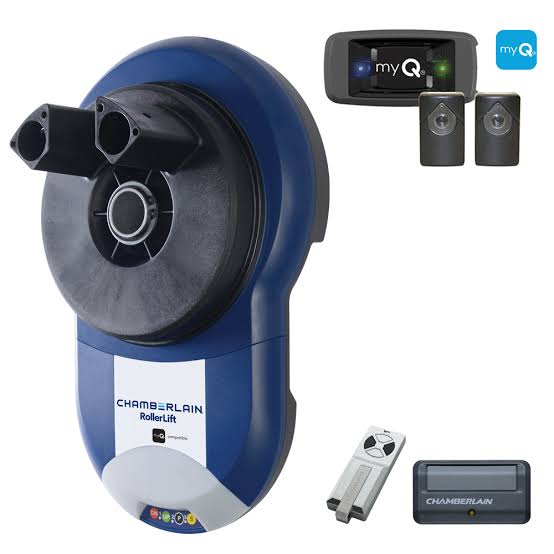
We have all been there—driving down the highway and suddenly panicking because you cannot remember if you closed the garage. Or perhaps you are at work and need to let a package delivery driver inside to prevent porch piracy. The Chamberlain Myq Connectivity Kit For Smart Garage Door Opener is the perfect, budget-friendly solution to bring peace of mind and modern convenience right to your smartphone.
What is the Chamberlain Myq Connectivity Kit For Smart Garage Door Opener?
Before we dive into the installation, let us understand what this device actually does. Think of it as a bridge between your traditional “dumb” garage door and your modern smart home ecosystem.
The kit primarily consists of two main components: a Wi-Fi-enabled smart hub and a wireless door sensor. The smart hub plugs into a standard wall outlet and connects to your home’s internet router. Meanwhile, the sensor attaches directly to your garage door panels.
When you use the myQ app on your phone, the app sends a signal to the smart hub. The hub then communicates with the door sensor to trigger your existing garage door opener’s motor. This simple setup allows you to open, close, and monitor your garage from literally anywhere in the world. It transforms a basic mechanical door into a secure, internet-connected smart device without the need to buy a brand-new, expensive garage opener.
Will It Work With My Existing Garage Door Opener?
One of the most common questions homeowners ask is about compatibility. Fortunately, the Chamberlain Myq Connectivity Kit For Smart Garage Door Opener is designed to work with a vast majority of existing systems.
If you own a Chamberlain, LiftMaster, or Craftsman garage door opener manufactured in 1993 or later, you are in luck. The year 1993 is a critical benchmark because the US government mandated that all garage doors must have an auto-reverse safety feature by that year.
To check if your specific model is compatible, look at the “Learn” button on the back or side of your motor head (the main unit hanging from your ceiling).
- Yellow, Purple, Orange, or Red Learn Button: Your opener is fully compatible and will work seamlessly.
- Green Learn Button: Your opener is compatible, but you might need an additional universal trigger accessory.
- No Learn Button (Dip Switches): If your opener uses old-style dip switches, it is likely too old, and you should consider upgrading the main motor unit for safety reasons.
Step-by-Step Installation Guide
Setting up your new smart garage kit is surprisingly straightforward. You do not need to be a tech wizard or hire an electrician. Follow these concrete steps to get your system running in under 15 minutes.
Step 1: Mount the Smart Hub Find a standard 120V power outlet in your garage. The smart hub must be plugged in and located within 15 feet of your garage door opener motor. Ensure there are no massive metal obstructions blocking the line of sight between the hub and the motor. Plug it in, and wait for the LED indicator to start blinking blue.
Step 2: Install the Door Sensor Take the wireless sensor and attach it to the top section of your actual garage door. Use the provided heavy-duty adhesive tape or the included screws. You must place the sensor exactly 6 inches away from the top edge of the door panel. Make sure the little arrow on the sensor is pointing strictly upward.
Step 3: Connect to Your Wi-Fi Network Download the myQ app from the Apple App Store or Google Play Store. Create a free account and log in. Tap the “Add a Device” icon and select “myQ Smart Garage”. The app will search for your hub. When prompted, enter your home Wi-Fi password. Note: The device strictly requires a 2.4GHz Wi-Fi band to function properly, as 5GHz signals struggle to penetrate thick garage walls.
Step 4: Test the System Once the app confirms the setup is complete, tap the large control button on your phone screen. Your garage door should respond instantly. You will also receive a push notification confirming the door’s status.
Pros and Cons of Upgrading to a Smart Garage
To help you make an informed decision, here is a quick breakdown of the advantages and potential drawbacks of this smart home upgrade.
| Feature | Pros (The Good) | Cons (The Limitations) |
|---|---|---|
| Convenience | Open/close from anywhere via smartphone. | Requires a stable internet connection to use app features. |
| Security | Real-time alerts if the door is left open. | Only supports 2.4GHz Wi-Fi (not 5GHz). |
| Cost | Very affordable compared to buying a new smart opener. | In-garage delivery features require a paid subscription. |
| Installation | DIY-friendly, takes less than 15 minutes. | The smart hub requires a nearby power outlet. |
Real-World Benefits and Expert Insights
Why should you bother connecting your garage to the internet? The benefits extend far beyond simple convenience. According to recent smart home statistics, over 43% of US households now utilize some form of smart home technology, with security being the primary driver.
Integrating your garage into the broader Internet of Things ecosystem means your home becomes highly responsive. For example, you can set up automations where your interior hallway lights turn on automatically the moment you open the garage door at night.
Security experts also highly recommend smart garage controllers. “A smart garage door is your first line of defense,” says Mark Stevens, a certified home security analyst. “Statistics show that nearly 30% of burglars enter through the garage. Being able to verify and close your garage door remotely while you are on vacation is a massive deterrent.”
Furthermore, if you frequently order packages online, this kit allows you to grant temporary, one-time access to delivery drivers (via partnerships like Amazon Key). This ensures your expensive packages are left safely inside your garage rather than on your front porch.
Frequently Asked Questions (FAQ)
1. Do I need to pay a monthly subscription for the myQ app? No, the core features of the myQ app are completely free. You can open, close, and monitor your garage door, as well as set up schedules and receive alerts without paying a dime. However, if you want to use the “In-Garage Delivery” feature for secure package drop-offs, a minor subscription fee applies to cover the partnership logistics.
2. What happens to my garage door if my home internet goes down? You will not be locked out! If your Wi-Fi router loses connection, the myQ app will not work. However, you can still operate your garage door normally using the physical wall button inside the garage, your vehicle’s HomeLink system, or the traditional handheld remote controls.
3. Can I control multiple garage doors with a single kit? One myQ Connectivity Kit is designed to control exactly one garage door. However, if you have a double-wide garage with two separate doors, you can easily add a second smart hub and sensor to the same myQ app account and control both doors independently from your phone.
4. Is the myQ app secure from hackers? Chamberlain takes digital security very seriously. The myQ app uses bank-level encryption to protect your data and commands. Furthermore, the system requires a unique, secure password for your account, and you can enable two-factor authentication (2FA) for an extra layer of protection against unauthorized access.
Conclusion
Upgrading to the Chamberlain Myq Connectivity Kit For Smart Garage Door Opener is a game-changer for modern homeowners. It eliminates the anxiety of an open garage, secures your online deliveries, and integrates your home into a seamless smart ecosystem—all without breaking the bank. With a simple 15-minute installation and a highly intuitive app, there is really no reason not to modernize your home’s entryway.
Leave a Reply