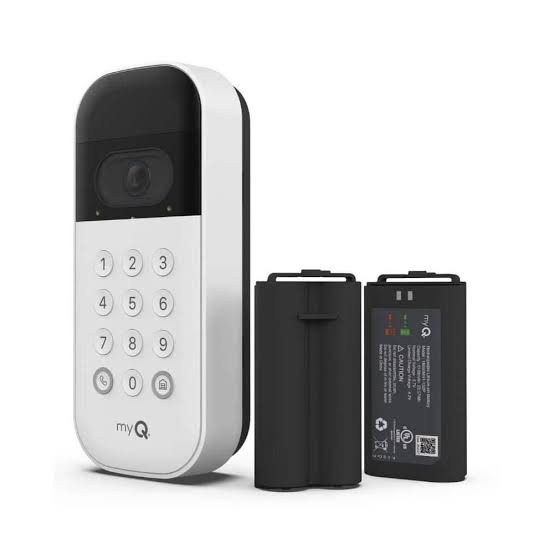
Have you ever stood in the rain, fumbling for your keys while trying to open your garage door? Or perhaps you’ve worried about who has access to your home when you’re away? The Chamberlain Wireless MyQ Video Smart Garage Door Opener Keypad offers a seamless solution to these everyday frustrations. This innovative device combines convenience, security, and smart technology to transform how you interact with your garage.
What Is the Chamberlain Wireless MyQ Video Smart Garage Door Opener Keypad?
The Chamberlain Wireless MyQ Video Smart Garage Door Opener Keypad is a cutting-edge accessory designed to work seamlessly with Chamberlain’s MyQ ecosystem. It allows users to control their garage door using a wireless keypad, eliminating the need for physical remotes or smartphone apps in certain scenarios. With integrated video capabilities, it also provides real-time monitoring of your garage entrance.
This device is particularly useful for households where multiple people need access to the garage, such as family members, delivery personnel, or service providers. By offering keyless entry and remote monitoring, it enhances both convenience and security.
Key Features at a Glance
- Wireless Connectivity: No complicated wiring required; easy installation.
- MyQ Integration: Works with the MyQ app for remote control and notifications.
- Video Monitoring: Built-in camera for live viewing and recorded footage.
- Weatherproof Design: Durable construction suitable for outdoor use.
- Customizable Access Codes: Assign unique codes to different users for better tracking.
Why Choose the Chamberlain Wireless MyQ Keypad Over Traditional Remotes?
Traditional garage door remotes have been the norm for decades, but they come with limitations. For instance, they can be lost, stolen, or duplicated without your knowledge. In contrast, the Chamberlain Wireless MyQ Keypad offers several advantages:
- Enhanced Security: Each user gets a unique code, which can be changed or deleted remotely via the MyQ app.
- Convenience: No need to carry a remote; simply enter your code on the keypad.
- Real-Time Alerts: Receive notifications whenever someone uses the keypad to open or close the garage door.
- Integration with Smart Home Systems: Compatible with Amazon Alexa, Google Assistant, and other smart home platforms.
According to a study by Statista, over 60% of homeowners prioritize security when choosing smart home devices. The Chamberlain Wireless MyQ Keypad addresses this concern effectively by providing robust access control and monitoring features.
How Does the Video Feature Enhance Security?
One of the standout features of the Chamberlain Wireless MyQ Video Smart Garage Door Opener Keypad is its built-in camera. This feature allows you to monitor activity around your garage door in real time. Here’s how it works:
- Live Viewing: Use the MyQ app to view live footage from the keypad’s camera.
- Motion Detection: The system alerts you if motion is detected near the garage door.
- Recorded Footage: Store clips of suspicious activity for later review.
For example, imagine receiving an alert that someone is approaching your garage late at night. You can quickly check the live feed to determine whether it’s a neighbor borrowing tools or a potential intruder. If necessary, you can take immediate action, such as contacting authorities or locking down the garage remotely.
Pro Tip: Position the keypad at eye level for optimal camera coverage. Avoid placing it too high or low, as this may reduce the effectiveness of the video feature.
Step-by-Step Installation Guide
Installing the Chamberlain Wireless MyQ Video Smart Garage Door Opener Keypad is straightforward, even for beginners. Follow these steps to ensure a smooth setup:
- Gather Tools and Materials:
- Screwdriver
- Drill (if mounting on brick or concrete)
- Batteries (included with the keypad)
- Choose the Right Location:
- Select a spot within range of your Wi-Fi network.
- Ensure the area is sheltered from direct sunlight and heavy rain.
- Mount the Keypad:
- Use the provided screws to attach the keypad to the wall.
- Make sure it’s securely fastened to prevent tampering.
- Pair with the MyQ App:
- Download the MyQ app on your smartphone.
- Follow the in-app instructions to connect the keypad to your garage door opener.
- Set Up User Codes:
- Create unique access codes for each user.
- Test the codes to ensure they work correctly.
- Enable Video Features:
- Configure motion detection settings in the app.
- Adjust camera angles for optimal coverage.
By following these steps, you’ll have your Chamberlain Wireless MyQ Keypad up and running in no time.
Pros and Cons of the Chamberlain Wireless MyQ Keypad
To help you make an informed decision, here’s a breakdown of the pros and cons:
| Pros | Cons |
|---|---|
| Easy wireless installation | Requires stable Wi-Fi connection |
| Enhanced security with unique codes | Initial cost may be higher |
| Real-time alerts and monitoring | Limited battery life (replaceable) |
| Compatible with smart home systems | May not work with older garage doors |
While the initial investment might seem steep, the long-term benefits of improved security and convenience often outweigh the costs.
Frequently Asked Questions (FAQs)
Q1: Can I use the Chamberlain Wireless MyQ Keypad with any garage door opener?
A: The keypad is compatible with most Chamberlain and LiftMaster garage door openers equipped with MyQ technology. Check your opener’s specifications to confirm compatibility.
Q2: How many user codes can I create?
A: You can create up to 250 unique user codes, making it ideal for large families or businesses.
Q3: What happens if the Wi-Fi goes down?
A: The keypad will still function locally, allowing users to enter codes manually. However, remote features like notifications and video monitoring won’t work until the connection is restored.
Q4: Is the keypad weatherproof?
A: Yes, the Chamberlain Wireless MyQ Keypad is designed to withstand various weather conditions, including rain and extreme temperatures.
Q5: Can I integrate the keypad with other smart home devices?
A: Absolutely! The keypad works seamlessly with popular smart home platforms like Amazon Alexa and Google Assistant.
Q6: How do I replace the batteries?
A: Simply open the battery compartment on the back of the keypad and insert new AA batteries. The MyQ app will notify you when the battery level is low.
Conclusion
The Chamberlain Wireless MyQ Video Smart Garage Door Opener Keypad is more than just a gadget—it’s a game-changer for modern homeowners. By combining keyless entry, real-time monitoring, and smart home integration, it addresses common pain points related to garage security and convenience. Whether you’re looking to simplify daily routines or enhance your home’s safety, this device delivers exceptional value.
If you found this article helpful, don’t forget to share it with friends and family who might benefit from learning about the Chamberlain Wireless MyQ Keypad. Together, we can make our homes smarter and safer!
Leave a Reply