Introduction
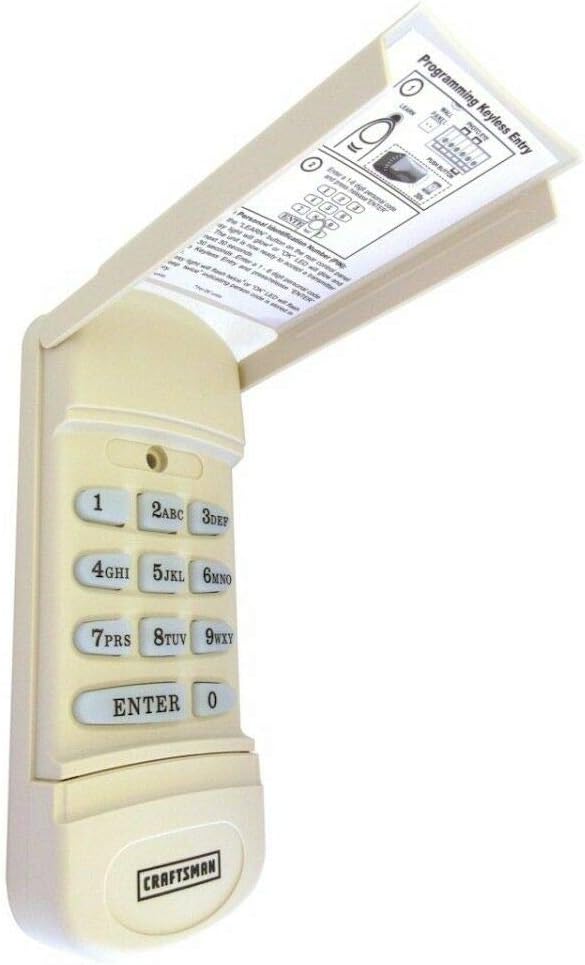
There is nothing more frustrating than arriving home after a long day, only to realize you cannot get into your garage because the keypad code isn’t working or you’ve forgotten it entirely. You are not alone; thousands of homeowners face this issue annually. Knowing how do you program a Craftsman garage door keypad is an essential skill that saves you the cost of a service call and ensures your home remains secure. This guide will walk you through the process clearly and safely.
Understanding Your Craftsman Opener: The “Learn” Button
Before you can program the keypad, you must understand the brain of your garage door system: the motor unit. Craftsman garage door openers are manufactured by the Chamberlain Group, meaning they share technology with LiftMaster and Chamberlain models.
The most critical component for programming is the “Learn” button located on the back or side of the motor head (the unit hanging from your garage ceiling). The color of this button determines the frequency and protocol your opener uses.
According to industry data, over 90% of garage door security breaches occur due to outdated “fixed-code” technology. Modern Craftsman openers use rolling code technology (often referred to as Security+), which changes the access code every time the remote is used to prevent code grabbing. You can read more about the evolution of this technology in the comprehensive history of the garage door opener on Wikipedia.
Identify Your Learn Button Color
To proceed, use a stepladder to safely inspect the motor unit. Locate the button (usually square or round) and match it to the table below:
| Learn Button Color | Frequency | Antenna Color | Compatibility |
|---|---|---|---|
| Yellow | 315 MHz | Yellow | Security+ (Most Common, 2011-Present) |
| Purple | 390 MHz | Purple | Security+ (2005-2011) |
| Red/Orange | 315 MHz | Orange | Standard (1995-2005) |
| Green | 390 MHz | Green | Legacy (Older Models) |
Note: If your motor has DIP switches (small toggle switches) instead of a Learn button, you have a very old model. Programming a keypad for these requires matching the switch pattern physically, which is different from the wireless method described below.
How Do You Program A Craftsman Garage Door Keypad? (Step-by-Step)
Now that you have identified your motor type, follow these specific steps. This process works for the vast majority of wireless Craftsman Keyless Entry pads.
Phase 1: Clear the Old Code (Optional but Recommended)
If you are buying a new keypad or suspect the old code is compromised, clear the memory first.
- Locate the Learn button on the motor header.
- Press and hold the Learn button for about 6–10 seconds.
- The indicator LED next to the button will turn off (or blink and turn off). This erases all paired remotes and keypads.
- Warning: This will disconnect all your car remotes. You will need to reprogram them immediately after.
Phase 2: Program the New PIN
- Wake up the keypad: Press and release the button on the outside of the keypad to light up the screen.
- Enter your desired PIN: Type in a 4-digit number of your choice (e.g., 1-2-3-4). Do not press “Enter” yet.
- Activate Learning Mode on the Motor:
- Go to the motor unit and press the Learn button once (do not hold it). The LED will light up or blink for 30 seconds, indicating it is ready to receive a signal.
- Send the Signal:
- Return to the keypad immediately.
- Press and hold the ENTER (or arrow) button.
- While holding the button on the keypad, the lights on the motor unit should flash, or you will hear a click.
- Confirmation: Release the button. The motor light will stop blinking, confirming the code is saved.
- Test: Enter your new PIN followed by “Enter”. The door should operate.
Troubleshooting Common Issues
Even with the correct steps, technology can sometimes be finicky. Here is a breakdown of common problems and how to fix them.
1. The Keypad Light Blinks but the Door Doesn’t Move
- Cause: The lock button might be activated on the indoor wall console, or the logic board is locked.
- Fix: Check your indoor wall control. If there is a “Lock” button or a light flashing rapidly, press and hold the Lock button for 3 seconds to disable the lock mode.
2. The Motor Light Blinks 5 Times
- Cause: This usually indicates that the RAM memory in the logic board has failed or the RPM sensor is problematic.
- Fix: Try resetting the opener by unplugging it for 30 seconds and plugging it back in. If the issue persists, the logic board may need replacement.
3. Keypad Works Intermittently
- Cause: Low battery or LED interference.
- Fix: Replace the battery (usually a 9V or CR2032 coin cell). Also, check if your keypad uses LED bulbs; sometimes cheap LED bulbs emit radio frequency interference that blocks the signal. Try changing the bulb in the opener to a rough-service incandescent bulb temporarily to test.
Expert Insight: Security Best Practices
According to home security specialists, it is recommended to change your garage door keypad PIN at least twice a year.
“The garage is often the weakest point of entry for a home. A static code that hasn’t been changed in years is a security risk. Programming your keypad regularly ensures that former residents, dog walkers, or neighbors who might have seen your code no longer have access.” — Home Safety Council Guidelines
By knowing how do you program a Craftsman garage door keypad, you are taking a proactive step in securing your property.
FAQ Section
Q1: How do I reset my Craftsman keypad if I forgot the PIN? A: If you forgot the PIN, you must clear the opener’s memory first. Locate the “Learn” button on the motor, hold it down until the light goes out (approx. 10 seconds). This wipes all codes. Then, follow the programming steps above to set a brand new PIN.
Q2: What battery does a Craftsman keypad use? A: Most modern Craftsman keypads use a CR2032 3V coin cell battery, while older models may require a standard 9V alkaline battery. Check the back of your specific keypad model to be sure.
Q3: Why is my keypad blinking purple? A: A blinking purple light on the keypad usually indicates that the battery is low and needs replacement. If the light is blinking on the motor unit, it may be searching for a signal or indicating a safety sensor obstruction.
Q4: Can I program a keypad without a ladder? A: Generally, no. You need physical access to the “Learn” button on the motor head to sync the keypad. However, if you have a smart garage controller (like myQ) installed, you might be able to manage some settings via an app, but the initial hardware pairing usually requires pressing the button on the motor.
Q5: Will any keypad work with my Craftsman opener? A: No. You must buy a keypad compatible with your specific frequency (315 MHz or 390 MHz). Look for “Craftsman” or “Chamberlain/LiftMaster” compatibility on the box. Universal keypads often work but must match the Learn button color logic.
Leave a Reply