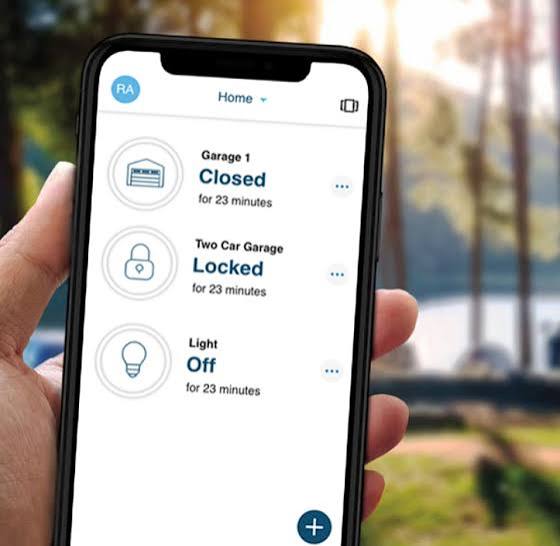
Have you ever pulled into your driveway during a heavy rainstorm, only to realize you left your physical remote inside the house? Or perhaps you’re halfway to work and suddenly panic, wondering if you actually closed the garage door behind you? You are not alone. Millions of US homeowners face these daily inconveniences and security concerns. If you have found yourself asking, “Is there an app to open my garage door?”, the answer is a resounding yes. Modern technology has transformed the humble garage door opener into a sophisticated smart home device that offers convenience, security, and peace of mind right from your smartphone.
How Smart Garage Door Openers Actually Work
Before diving into specific brands, it is essential to understand the mechanics behind these applications. A smart garage door system does not magically lift the door using Wi-Fi alone. Instead, it acts as a bridge between your existing garage door motor and your home’s internet connection.
Most systems utilize a small hardware controller that installs near your current garage door opener unit. This controller connects to your home Wi-Fi network and communicates with a dedicated mobile app on your iOS or Android device. When you tap “Open” or “Close” in the app, the signal travels from your phone to the cloud, down to your home router, and finally to the controller, which triggers the motor just like a physical remote would.
This integration allows for features that traditional remotes cannot offer, such as:
- Real-time status notifications: Know instantly if the door is open or closed.
- Remote access: Control your door from anywhere in the world.
- Voice control: Integrate with Amazon Alexa, Google Assistant, or Apple HomeKit.
Top-Rated Apps and Systems for US Homes
The market is flooded with options, but not all apps are created equal. Based on user reviews, reliability, and security features, here are the top contenders for American households.
1. MyQ (by Chamberlain/LiftMaster)
MyQ is arguably the most recognized name in the industry because Chamberlain and LiftMaster manufacture a vast majority of garage door openers sold in the US.
- Pros: Wide compatibility, affordable hardware, strong integration with other smart home platforms.
- Cons: Some advanced features require a subscription; recent changes to their API have affected third-party integrations.
2. Tailwind
Tailwind takes a different approach by focusing on automation rather than just remote control. It uses sensors to detect when your car arrives or leaves.
- Pros: “Set it and forget it” automation, no need to manually press buttons, excellent customer support.
- Cons: Higher upfront cost, requires precise sensor placement.
3. RatGDO (Rat Garage Door Opener)
For the tech-savvy DIY enthusiast, RatGDO is an open-source alternative that has gained massive popularity in online communities.
- Pros: Completely free software, highly customizable, no monthly fees, supports local control (no cloud dependency).
- Cons: Requires technical knowledge to install and configure, not plug-and-play for beginners.
| Feature | MyQ | Tailwind | RatGDO |
|---|---|---|---|
| Ease of Setup | High | Medium | Low (Technical) |
| Monthly Fee | Optional | No | No |
| Automation | Basic | Advanced | Customizable |
| Compatibility | Very High | High | Specific Models |
Compatibility: Will It Work With Your Existing Opener?
One of the most common questions users ask is whether they need to replace their entire garage door motor. In most cases, the answer is no. However, compatibility depends on the age and brand of your current opener.
Most smart controllers work with openers manufactured after 1993 that use standard safety sensors. If your opener has a “Learn Button” (usually yellow, purple, or orange), it is likely compatible. Brands like Chamberlain, LiftMaster, Craftsman, Genie, and Stanley are generally well-supported.
However, older models or proprietary systems may require additional adapters. For instance, some older Genie models use a different frequency that standard smart controllers cannot mimic without a specific add-on kit. Always check the manufacturer’s compatibility checker before purchasing. For a deeper understanding of garage door standards, you can refer to general industry specifications on Wikipedia.
Step-by-Step Guide to Installing a Smart Garage Controller
Installing a smart garage door controller is a straightforward process that typically takes less than 30 minutes. Here is a concrete guide to getting started.
- Power Down the System: Locate the power cord of your garage door opener and unplug it. This is a critical safety step to prevent accidental activation while wiring.
- Mount the Controller: Use the provided screws or adhesive strips to mount the smart controller box on the wall or ceiling near the motor unit. Ensure it is within 10 feet of the motor for optimal signal strength.
- Connect the Wires: Identify the two terminals on your motor unit labeled for “external push button” or “wall console.” Connect the two wires from the smart controller to these terminals. Polarity usually does not matter for these simple circuits.
- Install the Door Sensor: Place the magnetic sensor on the garage door track. One part goes on the moving door, and the other on the stationary frame. They must align perfectly when the door is closed.
- Restore Power and Connect to Wi-Fi: Plug the opener back in. Download the corresponding app (e.g., MyQ, Tailwind) on your smartphone. Follow the in-app instructions to connect the controller to your 2.4GHz Wi-Fi network. Note: Most smart home devices do not support 5GHz networks.
- Test the System: Stand clear of the door and use the app to open and close the garage. Verify that the status updates correctly in the app.
Security Concerns: Are Smart Garage Doors Safe?
Security is a valid concern when connecting physical entry points to the internet. Critics often point out that any internet-connected device is potentially vulnerable to hacking. However, reputable manufacturers employ robust encryption standards, such as AES-128 or AES-256 bit encryption, to protect data transmission.
To maximize security, follow these best practices:
- Enable Two-Factor Authentication (2FA): Always turn on 2FA in your app settings. This adds an extra layer of protection beyond just a password.
- Use Strong Passwords: Avoid using default passwords. Create a unique, complex password for your smart home account.
- Keep Firmware Updated: Manufacturers regularly release updates to patch security vulnerabilities. Enable automatic updates if available.
- Monitor Activity Logs: Regularly check the app’s activity log to ensure there are no unauthorized access attempts.
While no system is 100% hack-proof, the convenience and security features of modern smart garage apps far outweigh the risks for most users, especially when proper security hygiene is maintained.
FAQ Section
1. Can I use any app to open my garage door, or do I need a specific one?
You cannot use just any generic app. You must use the specific app designed for the smart controller hardware you install. For example, if you buy a MyQ controller, you must use the MyQ app. However, once set up, you can often integrate these apps with broader platforms like Apple Home, Google Home, or Amazon Alexa for unified control.
2. Do I need Wi-Fi in my garage for the app to work?
Yes, the smart controller needs a stable Wi-Fi connection to communicate with the app. If your Wi-Fi signal is weak in the garage, consider installing a Wi-Fi extender or a mesh network node nearby. Without Wi-Fi, the app will not be able to send commands to the door.
3. What happens if my internet goes down?
If your internet goes down, you will not be able to control the garage door remotely via the app. However, the physical remote controls and the wall-mounted button inside the garage will still work normally. The door operates independently of the internet for local control.
4. Are there monthly fees for using garage door apps?
It depends on the brand. MyQ, for instance, offers basic remote control for free but charges a monthly subscription for advanced features like video verification and extended history. Other brands like Tailwind and RatGDO do not charge monthly fees. Always check the pricing model before purchasing.
5. Can multiple family members use the app?
Yes, most smart garage apps allow you to invite multiple users. You can grant full access or limited access to family members, guests, or service providers. This is particularly useful for letting in dog walkers or delivery personnel without sharing your main password.
Conclusion
So, is there an app to open my garage door? Absolutely. Transforming your traditional garage into a smart entry point is one of the most impactful upgrades you can make for your home. It eliminates the anxiety of forgetting to close the door, provides seamless access for family members, and integrates beautifully with the modern smart home ecosystem.
Whether you choose a user-friendly option like MyQ, an automation-focused system like Tailwind, or a DIY project like RatGDO, the benefits are clear. You gain control, visibility, and peace of mind. Don’t let another rainstorm catch you unprepared. Explore these options today and step into the future of home convenience.
Found this guide helpful? Share it with your neighbors on Facebook or Twitter to help them upgrade their homes too!
Leave a Reply