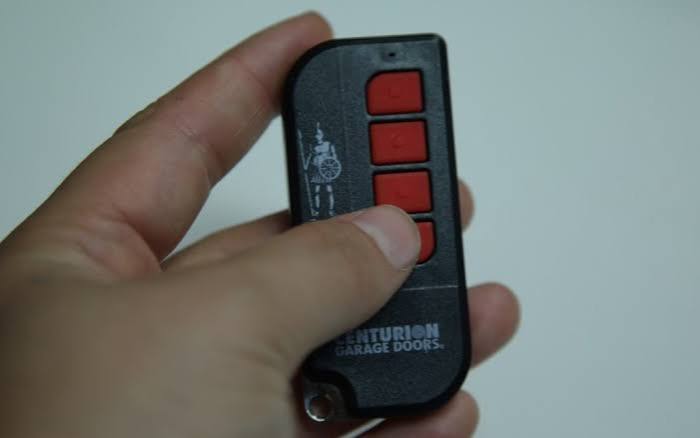
Struggling to sync your new clicker is a common frustration, but figuring out how to set up remote control for garage door opener systems is actually quite simple. We know how annoying it is to get stuck outside in the rain or deal with a dead battery, so let’s get your door working smoothly in just a few easy steps.
How To Set Up Remote Control For Garage Door Opener: Essential Tools
Before we dive into the technical steps, let’s make sure you have everything you need. Gathering your tools beforehand prevents you from climbing up and down a ladder multiple times.
Here is what you will need:
- A sturdy step ladder: Ensure it is tall enough for you to comfortably reach the motor head.
- The new remote control: Make sure it is compatible with your specific opener brand.
- Fresh batteries: Most modern remotes use a CR2032 3-volt lithium battery. Pro tip: Always check the battery compartment before starting.
- A flashlight: The ceiling of your garage can be dimly lit, and finding small buttons requires good visibility.
According to the International Door Association (IDA), over 70% of homeowners use their garage as their primary entrance. Because of this high traffic, having a reliable, well-programmed remote is essential for your daily convenience and home security.
How Do I Identify My Garage Door Opener Type?
Not all garage door openers are created equal. To successfully program your remote, you first need to identify the “Learn” button on your motor unit. This button is usually located on the back or side of the motor hanging from your garage ceiling.
The color of the Learn button tells you exactly what technology your system uses:
- Yellow or Purple Button: These use Security+ 2.0 or Security+ rolling code technology. They are the most common in modern homes (typically Chamberlain or LiftMaster brands).
- Red or Orange Button: These usually indicate an Intellicode system, commonly found on Genie openers.
- Green Button: This indicates an older, legacy model that might require DIP switch matching rather than a simple button press.
The modern motorized system has come a long way since C.C. Johnson invented the first electric door opener in 1926 (Source: Wikipedia). Today, we rely on advanced rolling code technology, which changes the access code every single time you use the remote to prevent code theft.
Step-by-Step: How to Program a Standard Garage Door Remote
Now that you know your button color, let’s walk through the exact process. This method applies to 90% of modern rolling-code openers.
Step 1: Clear the Old Memory (Optional but Recommended) If you are replacing a lost remote or experiencing glitches, clear the old codes first. Press and hold the Learn button on the motor for about 6 to 10 seconds until the LED light turns off. Warning: This will erase all previously paired remotes and keypads, so you will need to reprogram them all.
Step 2: Activate the Learning Mode Briefly press and release the Learn button. The LED indicator light will turn on or start blinking. This means the opener is now in “learning mode” and is actively searching for a new signal.
Step 3: Sync the Remote You have a strict 30-second window to complete this step. Walk over to your new remote control and press and hold the main button you want to use. Hold it down for about 2 to 3 seconds, then release it.
Step 4: Confirm the Connection Watch the motor head on the ceiling. If the programming was successful, the LED light will flash, or you will hear a distinct “click” sound from the unit. Test the remote by pressing the button again to see if the door actuates.
How Do I Sync a Garage Door Remote to My Car’s HomeLink?
Many US drivers prefer using the built-in buttons in their car visor. If you drive a vehicle equipped with the HomeLink system, you can bypass the physical clicker entirely.
- Clear the Car’s Memory: Turn your ignition on. Press and hold the two outer HomeLink buttons in your car for about 20 seconds until the indicator light flashes rapidly.
- Initiate Learning: Hold your physical garage door remote 1 to 3 inches away from the HomeLink button you want to program.
- Transmit the Signal: Press and hold the button on your physical remote, and simultaneously press and hold the desired HomeLink button in your car.
- Finalize at the Motor: For rolling-code openers, you must go to your garage motor head and press the Learn button (as detailed in the previous section). You then have 30 seconds to go back to your car and firmly press the programmed HomeLink button to sync it.
Note: Always consult your vehicle’s owner manual, as some newer cars require you to access the infotainment screen to enable HomeLink training.
Universal vs. Manufacturer Remotes: Pros and Cons
When buying a new clicker, you will often choose between a universal remote and an Original Equipment Manufacturer (OEM) remote. Here is a quick comparison to help you decide.
| Feature | Universal Remote (e.g., Chamberlain Universal) | OEM Remote (e.g., LiftMaster/Genie Original) |
|---|---|---|
| Compatibility | Works with 90%+ of major brands. | Works only with the specific brand/model. |
| Price | Generally cheaper ($20 – $35). | Slightly more expensive ($35 – $55). |
| Setup Ease | Requires selecting a specific dial number or dip-switch setting before programming. | Plug-and-play; no extra configuration needed. |
| Reliability | Excellent, but occasionally struggles with very old openers. | Flawless; guaranteed to work perfectly. |
Expert Recommendation: If you have a standard, modern opener, a universal remote is a fantastic, cost-effective choice. However, if you have a smart opener with Wi-Fi capabilities or battery backup, stick to the OEM remote to ensure all advanced features function correctly.
Troubleshooting Common Setup Issues
Even with a perfect guide, things can occasionally go wrong. Here is how to solve the most frequent problems:
- The LED on the motor blinks continuously: This usually means the remote is not compatible, or the battery is inserted backward. Take the battery out, wait 10 seconds, and reinsert it making sure the positive (+) side is facing up.
- The remote only works when I am 5 feet away: This is a classic sign of radio frequency (RF) interference. LED light bulbs in your garage can sometimes emit RF noise that blocks the remote signal. Try unscrewing the garage lights temporarily to see if the range improves.
- The door moves an inch and then stops: Your safety sensors (the little “eyes” near the floor on both sides of the door track) are likely misaligned. Check if the lights on the sensors are glowing steadily. If they are blinking, gently adjust the brackets until they align perfectly.
Frequently Asked Questions
1. Why won’t my new remote work with my old opener?
If your opener is more than 15–20 years old, it likely uses fixed DIP-switch technology rather than modern rolling codes. Modern universal remotes are designed for rolling codes. You will need to buy a specific universal remote that explicitly states it is compatible with “DIP-switch” or “older models” on the packaging.
2. How many remotes can I program to one garage door opener?
Most modern residential garage door openers can hold between 4 to 8 different remote controls in their memory at the same time. This allows every family member to have their own clicker, plus a keypad and a car HomeLink system.
3. Do I really need a ladder to program the remote?
For standard wall-mounted remotes, yes, you must reach the motor head to press the Learn button. However, if your system has a wired wall control panel near your interior garage door, some modern models allow you to enter the “programming menu” directly through the wall panel’s screen or buttons, eliminating the need for a ladder.
4. How often should I change or reset my garage door remote code?
While rolling code technology automatically changes the code every time you use it, it is a good security practice to perform a full memory reset (holding the Learn button for 10 seconds) once a year. This ensures that any lost or stolen remotes are completely wiped from the system’s memory.
Leave a Reply