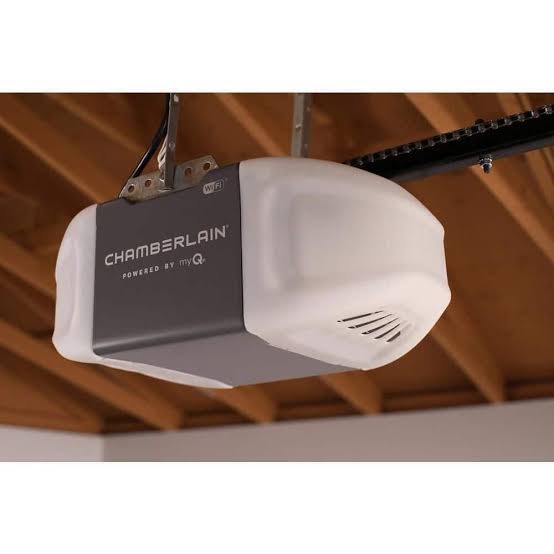
Introduction
Are you tired of dealing with a loud, outdated garage door opener that leaves you guessing whether you remembered to close the door? We completely understand how frustrating and stressful it can be to worry about your home’s security every time you leave, especially when you are already running late for work or a family vacation. Upgrading to the Chamberlain 1/2 Hp Smart Chain Drive Garage Door Opener C2405 is the perfect solution to bring peace of mind, convenience, and modern smart features right to your fingertips.
What Makes the Chamberlain 1/2 Hp Smart Chain Drive Garage Door Opener C2405 a Top Choice?
When it comes to securing your home, reliability is everything. A garage door opener is a motorized device that opens and closes your garage doors, but not all openers are created equal. The Chamberlain C2405 stands out because it combines raw power with intelligent technology.
Here is why homeowners love this specific model:
- Powerful 1/2 HP Motor: This motor provides the strength needed to lift standard residential garage doors smoothly. It handles the heavy lifting without straining, ensuring a longer lifespan for the entire system.
- Durable Chain Drive System: Chain drives are known for their exceptional strength and longevity. While they might not be as whisper-quiet as belt drives, they are incredibly reliable and require less maintenance over the years.
- Built-in myQ Technology: You can monitor and control your garage door from anywhere using your smartphone. The myQ app is not just about opening and closing the door; it provides a history of who came and went, allowing you to grant temporary access to dog walkers or delivery drivers.
- Integrated LED Lighting: The built-in bright LED light ensures you can see clearly when entering or exiting your garage at night, eliminating the need for separate lighting fixtures.
According to a recent survey by the National Association of Home Builders, over 60% of homebuyers consider smart home features a major factor in their purchasing decision. Integrating a smart garage door opener like the C2405 not only improves your daily life but can also boost your property’s overall appeal.
Chamberlain C2405 Pros and Cons: Is It Right for You?
Before making a purchase, it is essential to weigh the benefits against the drawbacks. Here is a quick breakdown to help you decide.
The Advantages
- Exceptional Durability: The steel-reinforced chain drive is built to withstand years of heavy use.
- Smartphone Control: The myQ app is free to use and incredibly user-friendly for beginners.
- Security Features: Rolling code technology changes the access code every time you use the remote, preventing code theft.
- Easy Troubleshooting: The built-in diagnostics system alerts you via the app if the safety sensors are blocked or misaligned.
The Drawbacks
- Noise Level: Because it uses a chain drive, it produces more vibration and noise compared to belt drive models. If your garage is directly below a bedroom, this might be a consideration.
- Wi-Fi Dependency: To use the smart features, you need a stable 2.4 GHz Wi-Fi network reaching your garage.
- No Battery Backup: Unlike some premium models, the C2405 does not include a battery backup, meaning you will need to use the manual release during a power outage.
How to Install Your Chamberlain C2405 Step-by-Step
Installing a new garage door opener might seem intimidating, but it is a manageable DIY project if you follow the instructions carefully. Here is a simplified guide to get you started.
Safety First: Always disconnect the power to your old opener before starting the removal process. Additionally, make sure the garage door is fully closed and disconnected from the old opener’s trolley to prevent it from slamming shut.
Step 1: Unbox and Inventory Your Parts Lay out all the components on the floor. You should have the motor unit, rail sections, chain, trolley, header bracket, door arm, wall control panel, and two safety sensor eyes. Ensure you have a sturdy stepladder, a drill, a socket set, and a measuring tape.
Step 2: Install the Header Bracket Locate the center of your garage door above the top panel. Measure and mark the spot for the header bracket. Use 5/16-inch lag screws to secure the bracket firmly to the structural support above the door. This bracket bears the brunt of the motor’s pulling force, so it must be rock solid.
Step 3: Mount the Rail and Motor Unit Assemble the rail sections according to the manual. Once assembled, attach the motor unit to the ceiling using the provided hanging angle and brackets. Ensure the rail is perfectly level and aligned with the center of the header bracket. A misaligned rail will cause the chain to wear out prematurely.
Step 4: Attach the Trolley and Door Arm Thread the chain through the rail and attach it to the trolley. Next, connect the door arm to the trolley and the top panel of your garage door. Make sure the arm is angled correctly to prevent binding when the door opens and closes.
Step 5: Wire the Wall Control and Safety Sensors Run the low-voltage wires from the motor to the interior wall control panel. Mount the wall control at least 5 feet above the floor to keep it out of the reach of small children. Next, install the safety sensors on both sides of the garage door track. They must be exactly 6 inches above the floor and perfectly aligned with each other. If the LED lights on the sensors blink, adjust them until they glow steadily.
Step 6: Program the Remote and Connect to Wi-Fi Finally, plug in the motor unit. Press the “Learn” button on the motor to sync your remote controls. To activate the smart features, download the myQ app, create an account, and follow the on-screen prompts to connect the opener to your 2.4 GHz Wi-Fi network.
Frequently Asked Questions About the Chamberlain C2405
1. Is the Chamberlain 1/2 HP chain drive too noisy for attached garages?
While chain drives are inherently louder than belt drives, the Chamberlain C2405 is designed with vibration-reduction technology. It is certainly not silent, but it produces a standard industrial hum rather than a harsh grinding noise. For most attached garages, the noise is perfectly acceptable and comparable to other chain drive models on the market.
2. Do I need a separate hub to use the myQ app with the C2405?
No, you do not need an external hub. The Chamberlain C2405 features built-in myQ Wi-Fi connectivity. You simply need to download the app on your iOS or Android device and connect the opener directly to your home’s wireless network. This saves you money and reduces clutter.
3. What happens if my Wi-Fi goes down? Can I still open the garage?
Absolutely. The smart features are an added layer of convenience, but the core functionality of the garage door opener remains completely independent of your internet connection. You can still use the included remote controls, the wired wall button, and the keypad to operate the door normally.
4. How much clearance do I need above the door for the C2405 installation?
You typically need a minimum of 2 to 3 inches of clearance above the highest point of your garage door’s travel to accommodate the motor unit and the rail. However, it is always best to consult the specific clearance diagram in the user manual, as requirements can vary slightly based on your door’s track radius.
5. Can I integrate the Chamberlain C2405 with voice assistants like Alexa or Google Home?
Yes, you can! Once your opener is connected to the myQ app, you can link your myQ account to compatible voice assistants. This allows you to use simple voice commands to check the status of your garage door or close it if you forgot. Note that some voice integrations may require a separate myQ subscription depending on current platform policies.
6. Does the Chamberlain C2405 work with all types of garage doors?
The Chamberlain C2405 is compatible with most standard single-panel and sectional residential garage doors. However, if you have an unusually heavy custom wooden door or a one-piece door without extension springs, you may need to verify the door’s weight against the opener’s 1/2 HP lifting capacity.
Leave a Reply