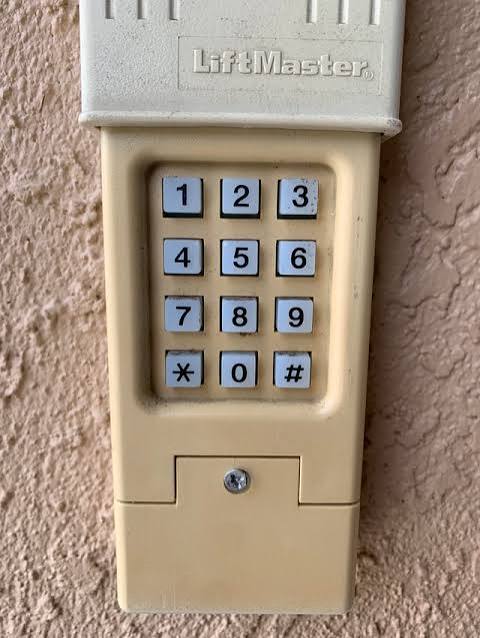
Have you ever stood outside your garage, fingers hovering over the keypad, only to realize the code has slipped your mind? It is a frustrating scenario that happens to the best of us, leaving you locked out of your own home. If you are wondering how to reset garage door keypad without old code, you are in the right place. This guide will walk you through simple, proven methods to regain access quickly and securely, regardless of your opener brand.
Why You Might Need to Reset Your Keypad
Before diving into the technical steps, it helps to understand why this issue occurs. Most modern garage door openers use rolling codes or fixed codes that can become unsynchronized if the battery dies or if the system glitches. Additionally, if you have moved into a new home, the previous owners likely did not share the existing code for security reasons.
According to the International Door Association, nearly 30% of service calls related to garage doors involve access control issues, such as forgotten codes or malfunctioning keypads. Knowing how to handle this yourself saves you the cost of a professional service call, which can range from $150 to $300.
Step 1: Locate the “Learn” Button on Your Motor Unit
The most common way to reset a keypad without knowing the previous code is by accessing the main motor unit inside your garage. This method effectively wipes the memory of all previously programmed remotes and keypads, allowing you to start fresh.
Where to Find the Button
- Safety First: Ensure the garage door is closed before starting.
- Locate the Motor: Look for the main opener box attached to the ceiling.
- Find the Button: On the back or side of the motor unit, look for a small button. It is usually colored yellow, purple, red, or green.
- Note: The color often indicates the frequency and technology type (e.g., yellow for Security+ 2.0).
If you cannot find a colored button, look for a small pinhole labeled “Reset” or “Program.” You may need a paperclip to press this.
Step 2: Clear the Existing Memory
To reset the system without the old code, you must clear the opener’s memory. This step is crucial because it removes any conflicting signals from old devices.
Instructions by Brand Color Code
| Button Color | Action Required | Wait Time |
|---|---|---|
| Yellow | Press and hold until the indicator light turns off. | ~6 seconds |
| Purple | Press and hold until the indicator light turns off. | ~6 seconds |
| Red | Press and release quickly. Then press and hold again. | ~10 seconds |
| Green | Press and hold until the light blinks. | ~6 seconds |
Expert Tip: When the LED light next to the button goes out or blinks, the memory is cleared. All previous remotes and keypads will no longer work. You will need to reprogram every device you use to access the garage.
Step 3: Reprogram Your Wireless Keypad
Now that the system is clean, you can program your keypad with a new code. Since you don’t have the old code, this fresh start is your best option.
General Programming Steps
- Enter Programming Mode: Press the “Learn” button on the motor unit once. The LED light should turn on or blink steadily. You typically have 30 seconds to complete the next steps.
- Go to the Keypad: Walk over to your wireless keypad outside.
- Enter New Code: Type in your desired 4-digit PIN. Choose something memorable but not obvious (avoid 1234 or your birth year).
- Press Enter: Hit the “Enter” or “Send” button on the keypad.
- Confirm Success: The lights on the motor unit should blink or turn off, indicating the code has been accepted.
Brand-Specific Nuances
LiftMaster and Chamberlain
For these brands, after pressing the Learn button, you may need to enter the new code twice on the keypad. If the light on the keypad flashes rapidly, it means the signal was received.
Genie Openers
Genie models often require you to press the “Program” button on the keypad first, then enter the code, and finally press “Program” again. Refer to your specific model’s manual if the standard method fails.
Craftsman
Craftsman openers are similar to LiftMaster. Ensure you press the Learn button firmly. If the light does not stay on, try pressing it again. You have a limited window to input the new code on the keypad.
Troubleshooting Common Issues
Even with the right steps, things can go wrong. Here are solutions to frequent problems.
The Keypad Won’t Program
- Check Batteries: Weak batteries are the number one cause of failure. Replace them with fresh alkaline batteries, even if the old ones seem to have power.
- Distance: Stand within 5 feet of the motor unit while programming. Signal strength decreases with distance and obstacles.
- Interference: LED light bulbs in the garage opener can sometimes interfere with radio signals. Try turning off the garage lights during programming.
The Light Doesn’t Blink on the Motor Unit
- Lock Feature: Check if the “Lock” button on your wall console is pressed. If the system is locked, it will not accept new codes. Unlock it and try again.
- Faulty Board: If the Learn button does not respond at all, the logic board may be damaged. In this case, professional repair is recommended.
I Still Have the Old Remote, Can I Use It?
Yes. If you have a working handheld remote, you can sometimes use it to sync the keypad without resetting the entire system. However, since your goal is to reset without the old code (implying you might not have access to working remotes either), the “Learn” button method is the most reliable universal fix.
Security Best Practices After Resetting
Once you have successfully learned how to reset garage door keypad without old code, take steps to secure your new setup.
- Change Codes Regularly: Update your PIN every 6–12 months.
- Avoid Simple Patterns: Do not use sequential numbers.
- Cover the Keypad: If possible, install a weatherproof cover to prevent wear and tear on the buttons, which can lead to malfunctions.
- Dispose of Old Remotes: If you found old remotes in the house, remove their batteries and recycle them properly to prevent unauthorized access.
FAQ Section
Q1: Can I reset my garage door keypad without climbing a ladder?
A: In most cases, no. The “Learn” button is located on the motor unit mounted on the ceiling. You will need a sturdy ladder to reach it safely. Some newer smart openers allow resetting via a mobile app, which eliminates the need for physical access.
Q2: Will resetting the keypad erase my car’s built-in HomeLink system?
A: Yes. Clearing the memory on the motor unit removes all programmed devices, including HomeLink systems in your vehicle. You will need to reprogram your car’s transmitter following the same steps used for the keypad.
Q3: What if I don’t know the brand of my garage door opener?
A: Look for a label on the motor unit. It will list the manufacturer, model number, and serial number. You can also search online using the color of the Learn button, as this is often unique to specific brands (e.g., Yellow for LiftMaster/Chamberlain).
Q4: How long does the new code last?
A: The code remains active indefinitely until you change it or reset the system again. However, batteries in the keypad typically last 1–2 years. Keep spare batteries on hand to avoid being locked out due to power failure.
Q5: Is it safe to reset the keypad myself?
A: Yes, it is completely safe as long as you follow basic precautions. Ensure the garage door is closed, use a stable ladder, and do not touch any high-voltage wiring inside the motor unit. The “Learn” button is designed for user interaction.
Q6: What if the keypad works intermittently after resetting?
A: This usually indicates a signal interference issue or weak batteries. Try replacing the batteries first. If the problem persists, check for nearby sources of radio frequency interference, such as large metal objects or other wireless devices.
Leave a Reply