Introduction
Imagine arriving home after a long day, your arms full of groceries, only to realize you’ve left the remote inside or the battery has died. It is a frustrating scenario that many homeowners face. If you are asking, “How do you program a garage door opener keypad,” you are taking the right step toward convenient, keyless entry. This guide will walk you through the process simply and effectively, ensuring you never get locked out of your own garage again.
How Do You Program A Garage Door Opener Keypad: Step-by-Step
The process of programming a keypad is generally universal across major brands, though specific button colors may vary. The core mechanism relies on syncing the keypad’s frequency with the motor unit’s receiver.
Before we dive into the steps, it is helpful to understand the technology. According to Wikipedia, modern garage door openers utilize radio frequency and “rolling code” technology to enhance security, preventing code grabbing by thieves.
1. Locate the “Learn” Button
Climb up to your garage door opener motor (the unit hanging from the ceiling). Look for a button labeled “Learn” or “Smart.” It is usually located on the back or side of the unit, near the antenna wire.
- Note: The color of this button is crucial for identifying your system type (Yellow, Purple, Orange, or Red/Green).
2. Clear the Old Code (Optional but Recommended)
If you are troubleshooting or suspect someone else has your code, clear the memory first. Press and hold the Learn button for about 6–10 seconds until the indicator light turns off. This erases all paired remotes and keypads. Warning: You will need to reprogram all your car remotes after doing this.
3. Enter Your Desired PIN
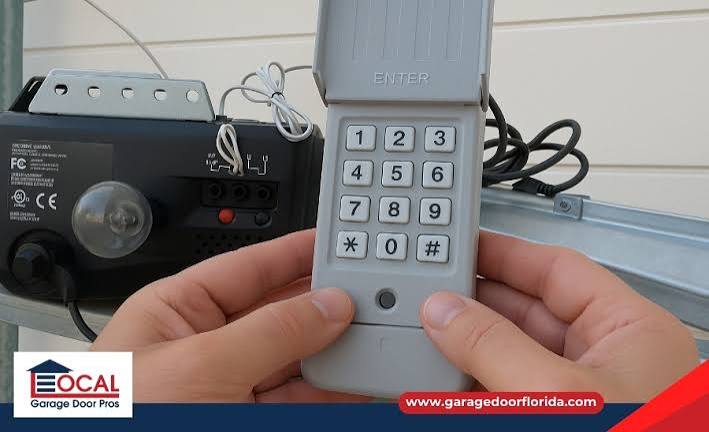
On your external keypad, type in the 4-digit Personal Identification Number (PIN) you wish to use. Write this down so you don’t forget it!
4. Sync the Keypad
- Press and release the Learn button on the motor unit. The indicator light will turn on or blink.
- You have roughly 30 seconds to complete the next step.
- Go back to your keypad and press and hold the “Enter” (or “Send”) button.
- Concrete Detail: Hold it until you see the garage door lights flash or hear the unit click. This usually takes about 5–10 seconds.
5. Test the System
Enter your new PIN followed by “Enter.” The door should activate immediately.
Identifying Your Opener Type: The Button Color Guide
Not all openers communicate the same way. The color of the Learn button determines the specific protocol your device uses. This is a critical detail often overlooked by beginners.
| Button Color | Brand Compatibility | Frequency / Protocol |
|---|---|---|
| Yellow | Chamberlain, LiftMaster (2011-Present) | Security+ 2.0 (1 Billion Code) |
| Purple | Chamberlain, LiftMaster (2005-2011) | Security+ (Rolling Code) |
| Orange/Red | Chamberlain, LiftMaster (1997-2005) | Security+ (Rolling Code) |
| Green/Red | Genie, Old Chamberlain | Fixed Code or Intellicode |
Expert Insight:
“Homeowners often fail because they press the Learn button twice or wait too long between steps. The window for syncing is strictly timed. Once the light stops blinking, the motor is no longer listening.” — Senior Technician at Garage Door Pros.
Troubleshooting: Why Won’t My Keypad Sync?
If you have followed the steps above and the door still won’t respond, do not panic. Here are the most common culprits:
- Weak Battery: This is the cause in 80% of cases. Even if the lights on the keypad turn on, the battery might not have enough amperage to send a strong signal to the motor. Replace the battery (usually a 9V or AA/AAA) with a fresh one.
- Dirty Contacts: If the keypad is old, the contacts behind the buttons may be oxidized.
- Frequency Interference: LED bulbs in the garage opener can sometimes block radio frequencies. Try unscrewing the light bulb temporarily to see if programming works.
- Locked Motor Unit: Check if the motor unit has a “Lock” feature enabled (common on some wall consoles). If the light on the wall console is blinking, the system is locked and won’t accept new keypads.
Comparison: Keypad vs. Remote vs. Smart Control
Why bother with a keypad when you have a remote? Here is a quick breakdown of the benefits.
| Feature | Wireless Keypad | Car Remote | Smartphone Control |
|---|---|---|---|
| Convenience | High (No keys/chips needed) | Medium (Must be in car) | High (Anywhere) |
| Security | High (Unique PIN) | Medium (Can be stolen/copied) | Very High (Encrypted) |
| Guest Access | Easy (Share PIN temporarily) | Difficult (Must lend remote) | Possible (Virtual keys) |
| Cost | $30 – $60 | Included | $50+ (requires Wi-Fi hub) |
Key Takeaway: A keypad is the most cost-effective way to secure entry for guests, dog walkers, or children who do not carry a car remote.
Frequently Asked Questions (FAQ)
1. Can I program a keypad without a ladder? Generally, no. You must access the motor unit to press the Learn button. However, if you have a smart garage hub installed, you might be able to use “virtual remotes” to trigger the learning mode via an app, but this is rare for standard setups.
2. How do I change the PIN on my existing keypad? Most keypads have a specific sequence to change the code. Typically, you enter your old PIN, press the “Prog” or “Star” button, enter the new PIN, and press “Prog” again. Consult your specific manual for the exact sequence.
3. Why does my keypad work sometimes but not always? This is almost always a battery issue or extreme weather interference. Cold temperatures drain batteries faster, and moisture can affect signal transmission. Replace the battery and check for water damage.
4. Is it safe to use a keypad outside? Yes. Modern keypads use “rolling codes” (specifically Intellicode or Security+ 2.0 technology). This means the code changes every time you use it, making it nearly impossible for thieves to “record” your entry code and use it later.
5. Can I use one keypad for two different doors? Standard wireless keypads are designed for one door. However, if both doors use the same brand and frequency, some advanced models allow you to program two different PINs (one for each door) into the same keypad memory.
Conclusion
Learning how do you program a garage door opener keypad is a valuable DIY skill that enhances both the security and convenience of your home. By following the steps above—identifying your Learn button color and syncing within the 30-second window—you can set up keyless entry in minutes.
Don’t let a dead remote ruin your day. Secure your garage and simplify your entry routine today.
Leave a Reply