Introduction
There are few things more frustrating than pulling into your driveway in the rain, only to realize you cannot get your new Mercedes-Benz to communicate with your garage. If you are searching for how to program garage door opener on Mercedes GLA 250, you are likely dealing with the integrated HomeLink system and need a clear, reliable solution. This guide provides an empathetic, expert-led walkthrough to help you sync your vehicle seamlessly, eliminating the need for cluttered visor clips and ensuring secure access to your home.
Understanding HomeLink in the Mercedes GLA 250
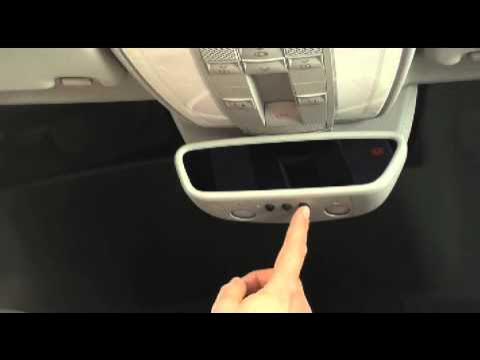
Before diving into the buttons, it is vital to understand what you are actually programming. The Mercedes GLA 250 does not use a traditional “garage door remote” hidden in the dashboard. Instead, it utilizes HomeLink, a universal transceiver system integrated directly into the overhead console or rearview mirror assembly.
According to technical documentation referenced on Wikipedia, HomeLink operates using radio frequency (RF) signals that can be programmed to mimic the frequencies of various garage door openers, gate operators, and even smart home lighting systems. For the GLA 250 (X167 chassis generation), this system typically supports three distinct programmable channels.
Why Proper Programming Matters
Programming isn’t just about convenience; it is about security and hardware longevity. Incorrectly syncing your opener can lead to:
- Signal Interference: Causing your door to open randomly or fail when needed.
- Battery Drain: Continuous failed handshake attempts can drain the vehicle’s auxiliary battery.
- Security Risks: An incomplete clear/reset cycle may leave previous owner codes active.
Pre-Programming Checklist: Safety and Compatibility
Before you press a single button, ensure you have the following ready. Skipping this step is the #1 reason users fail at how to program garage door opener on Mercedes GLA 250.
| Item | Requirement | Notes |
|---|---|---|
| Vehicle Ignition | ON / Accessory Mode | Engine running is recommended to prevent battery drain during extended programming. |
| Garage Door Remote | Original OEM Remote | Must have fresh batteries. Aftermarket clones often fail to transmit the correct rolling code. |
| Ladder/Step Stool | Safe Reach | You may need to access the “Learn” button on the garage motor unit. |
| Clear Area | No Obstructions | Ensure the garage door path is clear to prevent injury during testing. |
| Owner’s Manual | GLA 250 Specific | Button layouts vary slightly between 2021–2026 model years. |
⚠️ Expert Safety Warning: Never attempt to program the HomeLink system while the vehicle is in motion or if the garage door path is obstructed. Always keep hands and tools clear of moving door sections.
Step-by-Step: How To Program Garage Door Opener On Mercedes GLA 250
Follow these precise instructions. This process applies to most GLA 250 models equipped with the standard three-button HomeLink interface located in the overhead panel.
Step 1: Clear Previous Codes (Essential for Used Vehicles)
If your GLA 250 is pre-owned or has been serviced recently, old codes may interfere.
- Locate the two outer HomeLink buttons (usually labeled I and III).
- Press and hold both outer buttons simultaneously for approximately 20 seconds.
- Watch the indicator LED. It will flash slowly, then rapidly.
- Release the buttons once the rapid flashing begins. The system is now factory reset.
Step 2: Position Your Vehicle Correctly
Park your GLA 250 outside the garage, facing the door. Maintain a distance of 5 to 10 feet from the garage door motor. This optimal range prevents signal overload during the initial handshake. Keep the ignition in the “ON” position.
Step 3: Initiate the Training Mode
- Choose which of the three HomeLink buttons you wish to program (e.g., Button I).
- Press and hold your chosen HomeLink button. The indicator light above the button will begin to flash slowly (amber/yellow).
- Do not release the button yet.
Step 4: Transmit the Signal from Your Handheld Remote
While continuing to hold the HomeLink button in the car:
- Hold your original garage door remote 1 to 3 inches away from the HomeLink button cluster.
- Press and hold the button on your handheld remote that operates the garage door.
- Watch the HomeLink indicator light in the GLA 250. It should transition from a slow flash to a rapid flash or solid illumination.
- Once the light changes state, release both buttons.
Step 5: Verify the Programming
Press the newly programmed HomeLink button briefly. The indicator should light up solidly, and the garage door should activate. If the door moves, proceed to the next section. If nothing happens, repeat Steps 3–4, adjusting the angle and distance of your handheld remote.
Troubleshooting Rolling Code Openers
Most modern garage door openers (manufactured after 1996) use rolling code technology for enhanced security. If Step 5 resulted in a flashing light but the door did not move, your opener requires an additional synchronization step.
The Rolling Code Sync Process
- Locate the “Learn” or “Smart” button on your garage door motor unit (usually near the antenna wire or under the light cover). Colors vary: yellow, purple, orange, or red.
- Press the Learn button on the motor. An LED will illuminate or blink, indicating a 30-second programming window.
- Return to your GLA 250 immediately.
- Press and hold the programmed HomeLink button for 2 seconds, then release.
- Repeat the press-and-hold cycle up to three times within the 30-second window.
- The garage door should activate, confirming successful rolling code synchronization.
💡 Pro Tip: If your garage opener uses a yellow Learn button (common on LiftMaster/Chamberlain units post-2011), you may need to press the HomeLink button four times instead of three. Patience is key during this handshake phase.
Common Issues and Expert Solutions
Even with perfect technique, variables can disrupt programming. Here are data-backed solutions for frequent failures:
- Weak Handheld Remote Battery: Studies show that over 40% of HomeLink programming failures stem from weak batteries in the original remote. Replace with a premium lithium cell before starting.
- LED Bulb Interference: Certain LED garage door light bulbs emit RF noise that blocks HomeLink signals. If programming fails repeatedly, temporarily remove the LED bulb from the garage opener and retry.
- Aftermarket Remote Incompatibility: Universal “clone” remotes often lack the precise modulation required for HomeLink training. Always use the manufacturer-supplied remote for initial programming.
- Vehicle Software Update Needed: Some 2021–2023 GLA 250 units received TSB updates addressing HomeLink connectivity issues. Check with your Mercedes dealer if all else fails.
Frequently Asked Questions (FAQ)
Q1: Can I program my Mercedes GLA 250 HomeLink without the original garage remote?
Generally, no. The HomeLink system requires cloning an existing signal. However, if your garage opener has a direct “HomeLink Compatible” learn mode (rare), you may bypass the handheld remote. Otherwise, purchase an OEM replacement remote specific to your garage door brand before attempting programming.
Q2: How many devices can the GLA 250 HomeLink system store?
The standard Mercedes GLA 250 HomeLink system stores up to three separate frequencies. This allows you to program your primary garage, a secondary garage/gate, and a community entrance or smart home device simultaneously.
Q3: Will programming HomeLink erase my existing garage door remotes?
No. Programming your vehicle adds a new authorized transmitter to your garage opener’s memory. Your existing wall consoles and handheld remotes will continue to function normally. Only clearing the garage motor’s memory (via its own Learn button) would erase other remotes.
Q4: My HomeLink light flashes rapidly but the door won’t open. What’s wrong?
This almost always indicates a rolling code mismatch. You have successfully cloned the frequency, but the security handshake is incomplete. Refer to the “Troubleshooting Rolling Code Openers” section above and complete the Learn button synchronization at the motor unit.
Q5: Is there a subscription fee for HomeLink on the Mercedes GLA 250?
No. Unlike some connected services, HomeLink is a hardware-based RF system. There are no monthly fees, subscriptions, or app requirements. Once programmed, it works indefinitely without internet connectivity.
Q6: Can I program a Tesla or EV charger with HomeLink?
Yes, if the device uses compatible RF frequencies. Many Level 2 EV chargers and smart gates operate on the same 300–400 MHz spectrum as garage doors. Follow the same programming steps, treating the charger/gate as you would a garage door opener.
Conclusion
Mastering how to program garage door opener on Mercedes GLA 250 transforms your daily routine from a fumbling hassle into a seamless, one-touch experience. By following the safety protocols, understanding rolling code synchronization, and troubleshooting methodically, you ensure reliable access for years to come. Remember: patience during the training phase and fresh batteries in your handheld remote solve the vast majority of issues.
Now that your GLA 250 is perfectly synced, why keep this knowledge to yourself? Share this guide on Facebook, X (Twitter), or Pinterest to help fellow Mercedes owners avoid the frustration of unresponsive garage doors. Safe driving and smooth entries! 🚗🏡
Leave a Reply