Introduction
There is nothing quite as frustrating as pulling into your driveway after a long day, only to realize you cannot get your vehicle’s built-in system to sync with your home. If you are currently searching for how to program a Jeep Grand Cherokee garage door opener, you are likely dealing with this exact inconvenience. The good news is that the HomeLink system integrated into your Jeep is powerful and user-friendly once you understand the specific sequence required for your model year and opener type. This guide will walk you through the process safely and efficiently so you can enjoy seamless entry to your home.
Understanding Your Jeep’s HomeLink System
Before diving into buttons and lights, it is vital to understand what you are actually programming. The Jeep Grand Cherokee utilizes the HomeLink Wireless Control System. This is not merely a remote; it is a transceiver that replaces your handheld clicker.
According to automotive technology standards, HomeLink operates on radio frequencies typically between 288 MHz and 390 MHz. However, modern security has evolved significantly. Most garage doors manufactured after 1996 utilize “rolling code” technology. This means the access code changes every time the button is pressed, preventing thieves from capturing your signal. Understanding whether your door uses fixed code (older) or rolling code (newer) dictates which programming path you must follow below.
Note: Always check your overhead console or rearview mirror for the HomeLink logo. Some base trim levels of older Grand Cherokees may have non-functional buttons or require an aftermarket module.
Pre-Programming Safety and Preparation Checklist
Safety and preparation are often overlooked in tutorials, but they prevent damage to your vehicle’s electrical system and your garage door motor. Please complete these steps before attempting to program:
- Clear the Area: Ensure no people, pets, or objects are near the garage door during programming. The door may cycle unexpectedly.
- Check Battery Health: A weak car battery can cause programming failures. Ensure your Jeep is running or in accessory mode with a healthy charge.
- Locate the Learn Button: Find the “Learn” or “Smart” button on your garage door motor unit hanging from the ceiling. It is usually yellow, orange, red, or purple.
- Erase Previous Codes (Recommended): If this is a used Jeep, clear old memory first. Press and hold the two outer HomeLink buttons for 10–20 seconds until the indicator light flashes rapidly.
- Consult Manuals: Have both your Jeep Owner’s Manual and garage door manual handy for model-specific nuances.
Step-by-Step: How to Program Fixed Code Openers (Pre-1996)
If your garage door opener was manufactured before 1996, it likely uses a fixed DIP switch or binary code. Follow these precise steps:
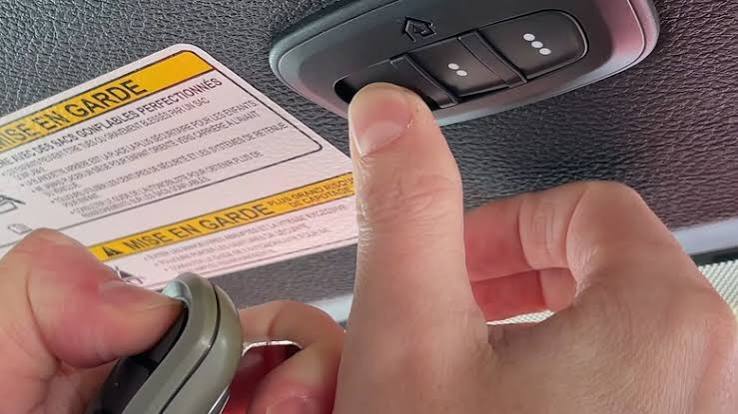
- Initiate Training Mode: Turn your Jeep’s ignition to the “ON/RUN” position. Press and hold the desired HomeLink button for 20 seconds until the indicator light begins to flash slowly.
- Position Handheld Remote: Hold your original garage door remote 1–3 inches away from the HomeLink buttons. Do not touch the buttons with the remote.
- Simultaneous Press: Press and hold both the handheld remote button and the chosen HomeLink button simultaneously.
- Watch the Light: Keep holding until the HomeLink indicator light changes from a slow flash to a rapid, solid flash. This confirms the frequency has been captured.
- Test: Release both buttons. Press the programmed HomeLink button once. The door should activate. If it does not, repeat step 3, adjusting the distance of the remote slightly.
Step-by-Step: How to Program Rolling Code Openers (Post-1996)
This is the most common scenario for Jeep Grand Cherokee owners today. After completing the initial training in the previous section (steps 1–4), you must perform a synchronization step at the garage door motor itself.
Phase 1: Initial Training
Complete steps 1 through 4 from the “Fixed Code” section above. Even though the light flashes rapidly, the door likely will not open yet. This is normal.
Phase 2: Motor Unit Synchronization
- Locate the Learn Button: Go to your garage ceiling unit. Press the colored “Learn” button briefly. An LED will illuminate or begin blinking, indicating the unit is in pairing mode. You typically have 30 seconds to complete the next step.
- Return to Vehicle: Quickly return to your Jeep within that 30-second window.
- Triple Press Sequence: Firmly press and release the programmed HomeLink button. Wait two seconds. Press and release again. Wait two seconds. Press and release a third time.
- Confirmation: During the third press, the garage door should cycle (open or close). This confirms the rolling codes have successfully synced.
Expert Tip: If the door does not move after the third press, try holding the HomeLink button down continuously for 3–5 seconds instead of pressing three times. Some newer LiftMaster/Chamberlain units prefer a sustained signal during the learn phase.
Programming Smart Garage Controllers and Wi-Fi Openers
Modern openers like MyQ or Aladdin Connect sometimes require a different approach because they bridge RF signals with Wi-Fi networks.
| Feature | Traditional Rolling Code | Smart/Wi-Fi Enabled Opener |
|---|---|---|
| Signal Type | Direct RF (315/390 MHz) | RF + Cloud Bridge |
| Programming Location | Motor Unit Learn Button | Often via App + Motor Unit |
| Compatibility Check | Universal | May require HomeLink Bridge |
| Feedback | Light Flash Only | App Notification + Light |
| Reset Frequency | Rarely Needed | After Wi-Fi Password Change |
If your smart opener fails to pair using standard rolling code steps, visit the manufacturer’s compatibility website. Many now offer direct integration guides specifically for Stellantis/Jeep vehicles.
Troubleshooting Common Programming Failures
Even professionals encounter hiccups. Use this diagnostic list if your Jeep Grand Cherokee garage door opener refuses to sync:
- Light Never Flashes Rapidly: You may be out of frequency range. Try repositioning the handheld remote at different angles and distances (up to 6 inches). Ensure the remote battery is fresh.
- Door Opens Then Immediately Reverses: This is rarely a programming issue. Check your safety sensors near the floor. If they are misaligned or dirty, the door’s safety protocol overrides the HomeLink signal.
- Works Intermittently: Signal interference is the culprit. LED bulbs in your garage opener housing can emit RF noise that blocks HomeLink signals. Swap them for incandescent or “garage door safe” LED bulbs.
- Only Works When Close: Your vehicle’s antenna amplifier may be failing, or the HomeLink module needs a hard reset by disconnecting the negative battery terminal for 5 minutes.
- Canadian Models: Vehicles sold in Canada sometimes operate on different frequencies due to regulatory differences. Verify your VIN origin if purchasing a used import.
Frequently Asked Questions (FAQ)
1. Can I program my Jeep Grand Cherokee HomeLink without the original remote?
Yes, but it requires accessing the garage door motor unit directly. Put the motor into “Learn Mode” using its physical button, then press and hold the HomeLink button in your Jeep until the door cycles. Note that this method does not work for all brands; some strictly require the original remote to clone the frequency first.
2. Why did my programmed HomeLink stop working suddenly?
Sudden failure usually indicates one of three issues: a dead battery in the garage door remote (if cloning failed silently), a power outage that reset the motor’s memory, or new RF interference from recently installed electronics. Start by re-syncing at the motor unit using the triple-press method.
3. How many devices can my Jeep Grand Cherokee HomeLink store?
Most Jeep Grand Cherokee models feature three programmable buttons. Each button can store one unique device. You can mix garage doors, gate operators, security lights, and smart plugs across these three slots. To add a fourth device, you must erase and overwrite an existing slot.
4. Is HomeLink compatible with all garage door brands?
HomeLink is compatible with over 95% of North American garage door openers, including LiftMaster, Chamberlain, Genie, Craftsman, and Overhead Door. However, some European or proprietary commercial systems may require a HomeLink Compatibility Bridge, sold separately. Always check the official compatibility tool online before purchasing accessories.
5. Does programming HomeLink affect my Jeep’s warranty or electronics?
No. HomeLink is an OEM-integrated feature designed for consumer use. Programming it does not modify your vehicle’s ECU, Uconnect system, or electrical architecture. It is entirely safe and warranty-compliant.
6. Can I program HomeLink while the engine is off?
Technically yes, but it is not recommended. Programming can take several attempts and drain your battery if the ignition is only in “ACC” mode for an extended period. Always program with the engine running in a well-ventilated area, or ensure your battery is fully charged and monitored.
Conclusion
Mastering how to program a Jeep Grand Cherokee garage door opener transforms daily convenience and enhances your home security posture. Whether you own a classic WK2 or the latest WL model, the HomeLink system is designed to integrate seamlessly into your lifestyle when configured correctly. Remember to prioritize safety, verify your opener type, and follow the rolling code synchronization steps precisely.
Did this guide help you regain seamless garage access? Share this article on Facebook, X (Twitter), or Reddit to help fellow Jeep owners eliminate driveway frustration. Your share could save someone hours of troubleshooting tonight! Happy driving, and welcome home.
Leave a Reply