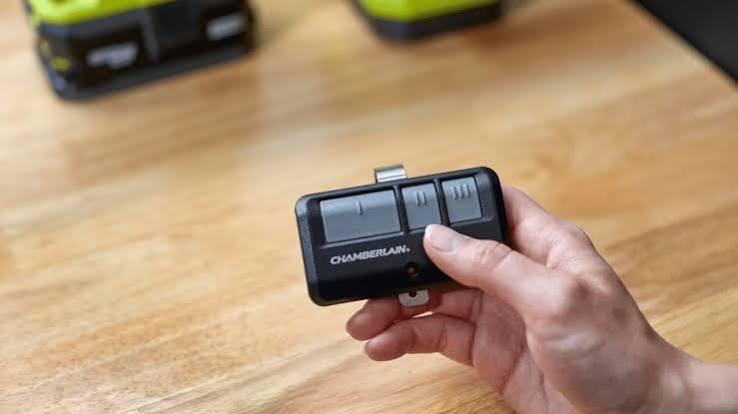
Have you ever stood in the rain, fumbling with a broken or lost garage door remote? It is a frustrating experience that disrupts your daily routine and compromises your home’s security. If you are wondering how to add remote control to garage door opener, you are not alone. Whether you bought a new car, lost your old clicker, or simply want a spare for a family member, adding a new remote is a straightforward task that you can handle yourself without calling a professional technician.
Understanding Your Garage Door Opener System
Before diving into the programming steps, it is crucial to identify the type of system you have. Not all garage door openers work the same way, and using the wrong method can lead to frustration. Most modern openers fall into two categories: those with a “Learn” button and older models that use DIP switches.
The “Learn” Button Method (Modern Systems)
The vast majority of garage door openers manufactured after 1993 use a smart technology system involving a Learn button. This button is typically located on the motor unit hanging from your garage ceiling. It is often colored yellow, red, purple, or green, depending on the brand.
According to industry standards, this method uses rolling code technology, which changes the access code every time you use the remote. This feature significantly enhances security by preventing code-grabbing thieves from copying your signal. You can read more about the evolution of garage door security protocols on Wikipedia.
The DIP Switch Method (Older Systems)
If your opener is an older model, it might use tiny switches called DIP switches inside both the motor unit and the remote. In this case, “programming” simply means matching the switch positions exactly. While less secure than modern systems, these are still common in many homes.
Step-by-Step Guide: How to Program a New Remote
Here is the universal process for most major brands like LiftMaster, Chamberlain, Genie, and Craftsman. Always refer to your specific manual if available, but these steps cover 90% of residential units.
Step 1: Locate the Learn Button
Climb a sturdy ladder to access the motor unit. Look for a small button labeled “Learn,” “Smart,” or “Program.” It is usually near the antenna wire hanging down from the unit. Note: Do not press the large lock button if present; look for the smaller colored button.
Step 2: Clear Old Codes (Optional but Recommended)
If you are replacing a lost remote or suspect unauthorized access, clear the memory first. Press and hold the Learn button for about 6–10 seconds until the indicator light turns off. This erases all previously paired remotes and keypads, so you will need to reprogram them all.
Step 3: Initiate Programming Mode
Press and release the Learn button quickly. The indicator light will either turn on steadily or start blinking, signaling that the opener is ready to receive a new signal. You typically have 30 seconds to complete the next step before the mode times out.
Step 4: Sync the Remote
Within those 30 seconds, go to your new remote control. Press and hold the button you wish to use for opening the door. Keep holding it until you see the lights on the motor unit blink or hear a click. This confirms that the code has been successfully transmitted and stored.
Step 5: Test the Connection
Step away from the ladder and test the remote. Press the button once. The garage door should activate immediately. If it does not, repeat Steps 3 and 4, ensuring you are within range and the remote has fresh batteries.
Troubleshooting Common Issues
Even with simple instructions, things can go wrong. Here are the most common hurdles and how to overcome them.
| Issue | Possible Cause | Solution |
|---|---|---|
| Remote not responding | Dead batteries | Replace with fresh alkaline batteries. |
| Light blinks but door doesn’t move | Interference | Unplug nearby LED bulbs or routers temporarily. |
| Learn button light stays off | Power issue | Check if the opener is plugged in and the circuit breaker is on. |
| Remote works intermittently | Range issues | Reprogram closer to the motor unit; check antenna orientation. |
Why Does My Remote Have Short Range?
Interference is the primary culprit. Modern LED light bulbs, especially cheap ones, can emit radio frequency noise that interferes with garage door signals. Try turning off the garage light fixture and testing the remote again. If the range improves, replace the bulb with a high-quality, shielded LED designed for garage openers.
Choosing the Right Universal Remote
If you do not have an original brand-specific remote, you can use a universal one. However, compatibility is key.
- Check Frequency: Most modern openers operate at 315 MHz or 390 MHz. Ensure your universal remote matches this frequency.
- Brand Compatibility: Look for packaging that lists your specific brand (e.g., “Works with Genie and LiftMaster”).
- Security Features: Opt for remotes that support rolling codes if your opener supports it. Fixed-code universals are easier to hack.
Safety Precautions During Installation
Safety should always be your top priority when working with garage door mechanisms.
- Disconnect Power: If you are installing new wiring or opening the motor casing, always unplug the unit first.
- Use Stable Ladders: Never stand on the garage door tracks or unstable objects. Use a proper A-frame ladder.
- Keep Hands Clear: When testing, keep your hands and feet away from moving parts like springs and cables. These are under high tension and can cause serious injury.
- Photo-Eye Sensors: Ensure the safety sensors at the bottom of the door tracks are aligned and clean. If blocked, the door will not close, even if the remote works perfectly.
FAQ Section
1. Can I program a remote without the Learn button?
If your opener lacks a Learn button, it likely uses DIP switches. You must open both the motor unit and the remote, then match the switch positions exactly. If neither exists, your opener may be too old to support modern remotes, and you might need a receiver kit.
2. How many remotes can I add to my garage door opener?
Most modern openers allow you to program between 5 to 8 remotes and keypads. However, check your specific model’s manual, as some high-end commercial units support more devices.
3. Why did my remote stop working after changing the battery?
Sometimes, changing the battery resets the remote’s internal memory. If this happens, simply repeat the programming process. Also, ensure the battery is inserted with the correct polarity (+/-).
4. Is it safe to buy used garage door remotes online?
It is generally not recommended. Used remotes may still be linked to the previous owner’s system, and clearing them can be difficult. Moreover, older used remotes may lack modern security features, making your home vulnerable. Always buy new from reputable retailers.
5. What should I do if I lose all my remotes?
If you have no working remotes, you can still open the door using the wall-mounted keypad inside the garage. To add new remotes, you will need to access the motor unit’s Learn button. If you cannot reach the unit safely, consider hiring a professional technician.
6. Can I use a smartphone app instead of a physical remote?
Yes, many modern openers support Wi-Fi connectivity via apps like MyQ or Aladdin Connect. This allows you to open and close your door from anywhere. However, a physical remote is still essential as a backup during internet outages.
Conclusion
Learning how to add remote control to garage door opener is a valuable skill that saves you time and money. By identifying your system type, following the simple Learn button steps, and troubleshooting common interference issues, you can ensure seamless access to your garage. Remember to prioritize safety and choose high-quality remotes to maintain your home’s security.
Did you find this guide helpful? Share it with your friends and family on social media so they can also master their garage door setups! Don’t forget to leave a comment below if you have any unique tips or questions.
Leave a Reply