Introduction
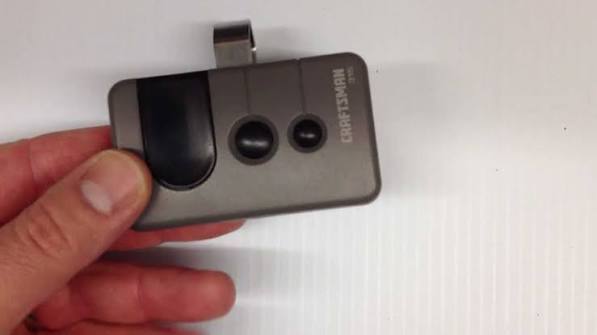
Is your new Craftsman garage door remote refusing to work? You’re not alone—thousands of homeowners face this frustrating issue every year. Learning how to program a Craftsman garage door opener remote doesn’t have to be complicated or time-consuming. With the right steps and a bit of patience, you’ll have your garage door responding to your remote in no time.
This comprehensive guide walks you through every programming method, from basic button sequences to advanced smart features. Whether you have an older model or the latest Wi-Fi-enabled opener, we’ve got you covered with clear, actionable instructions.
Understanding Your Craftsman Garage Door Opener Model
Before diving into programming, identifying your specific Craftsman model is crucial. Different models use different programming methods, and using the wrong technique can waste valuable time.
Common Craftsman Opener Series
Craftsman produces several garage door opener lines, each with unique characteristics:
- 1/2 HP Chain Drive Models: Traditional openers with reliable performance
- 3/4 HP Belt Drive Models: Quieter operation with enhanced durability
- Smart Garage Door Openers: Wi-Fi enabled with smartphone integration
- Jackshaft Openers: Space-saving design for garages with limited ceiling space
To find your model number, look for a label on the motor unit (usually mounted on the ceiling). The model number typically appears as a combination of letters and numbers, such as “139.53985” or “CMXGMDO11001.”
Pro Tip: Take a photo of your model number with your phone before starting. This makes it easier to reference specific instructions later.
According to Wikipedia’s entry on garage door openers, modern garage door openers use rolling code technology that changes the access code with each use, significantly enhancing security compared to older fixed-code systems.
Method 1: Programming Using the Learn Button
The Learn button method works for most Craftsman garage door openers manufactured after 1993. This is the most common programming approach.
Step-by-Step Instructions
Step 1: Locate the Learn Button Find the Learn button on your garage door opener motor unit. It’s typically located on the back or side panel and may be colored yellow, purple, red, or green depending on your model.
Step 2: Clear Existing Codes (If Needed) If you’re replacing an old remote or experiencing issues, press and hold the Learn button for 6-10 seconds until the indicator light turns off. This clears all previously programmed remotes.
Step 3: Press the Learn Button Press and release the Learn button once. The indicator light should illuminate or begin blinking, signaling that the opener is ready to receive a new code.
Step 4: Program Your Remote Within 30 seconds, press and hold the desired button on your remote control. Keep holding until the opener’s lights flash or you hear two clicks. This confirms successful programming.
Step 5: Test the Remote Stand within range (typically 100-150 feet) and press the programmed button. Your garage door should respond immediately.
Important Timing Notes
- You have approximately 30 seconds to press the remote button after activating the Learn button
- If the indicator light stops blinking before you complete the process, start over
- Some models require pressing the remote button twice instead of holding it
Method 2: Programming Without a Learn Button
Older Craftsman models (pre-1993) may not have a Learn button. These units use dip switches or rotary codes instead.
Dip Switch Programming
Step 1: Access the Dip Switches Open the battery compartment on both your remote and the motor unit. You’ll see a series of small switches (usually 8-12).
Step 2: Match the Switch Positions Set the switches on your remote to exactly match the positions on the motor unit. Each switch must be in the same up or down position.
Step 3: Close and Test Replace the battery covers and test your remote. If the door doesn’t respond, double-check that all switches match perfectly.
Rotary Code Programming
Some models use numbered dials instead of switches:
- Set the dial numbers on your remote to match those on the motor unit
- Ensure each number corresponds exactly
- Test the remote from various distances
Warning: Dip switch systems are less secure than modern rolling code technology. Consider upgrading your opener if you’re still using this system.
Method 3: Programming Multiple Remotes and Keypads
Many households need multiple access points. Here’s how to program additional devices.
Programming Additional Remotes
You can typically program up to 8 remotes to a single Craftsman opener:
- Follow the Learn button method for each remote
- Use different buttons on each remote if desired
- Test each remote individually after programming
Programming Wireless Keypads
Wireless keypads add convenient exterior access:
Step 1: Enter your desired 4-digit PIN on the keypad Step 2: Press and hold the Learn button on the motor unit Step 3: Within 30 seconds, enter your PIN on the keypad again and press ENTER Step 4: The opener lights should flash, confirming successful programming
Creating Temporary Access Codes
For guests or service providers:
- Most Craftsman openers allow temporary codes
- These codes can be set to expire after a specific number of uses
- Consult your manual for exact procedures, as they vary by model
Troubleshooting Common Programming Issues
Even with careful following of instructions, problems can arise. Here are solutions to frequent issues.
Remote Not Responding After Programming
| Problem | Possible Cause | Solution |
|---|---|---|
| No response at all | Dead batteries | Replace remote batteries with fresh ones |
| Intermittent response | Weak signal | Reposition antenna or move closer |
| Works sometimes | Interference | Check for nearby electronic devices |
| Never worked | Wrong programming method | Verify your model and retry correct method |
Indicator Light Issues
- Light doesn’t illuminate: Check power supply to opener; ensure it’s plugged in
- Light stays solid: Press Learn button again to reset
- Light blinks rapidly: Possible error; consult manual for specific blink patterns
Range Problems
If your remote only works when very close to the garage:
- Check and replace batteries
- Ensure the opener’s antenna hangs freely (not coiled or blocked)
- Remove potential sources of interference (LED bulbs, wireless routers)
- Consider installing a range extender
Security Concerns
If you suspect unauthorized access:
- Clear all codes by holding the Learn button for 10 seconds
- Reprogram only your trusted remotes
- Change your wireless keypad PIN
- Consider upgrading to a newer model with enhanced security features
Advanced Features: Smart Garage Door Integration
Modern Craftsman openers offer smartphone connectivity through the Craftsman app or compatible platforms like MyQ.
Setting Up Wi-Fi Connectivity
- Download the Craftsman app from your device’s app store
- Create an account or log in
- Follow in-app instructions to connect your opener to Wi-Fi
- Enable remote access and notifications as desired
Benefits of Smart Integration
- Monitor door status from anywhere
- Receive alerts when the door opens or closes
- Grant temporary access to visitors remotely
- Integrate with smart home systems like Alexa or Google Home
FAQ Section
How long does it take to program a Craftsman garage door remote?
Programming typically takes 2-5 minutes per remote when following the correct method. The actual button-pressing sequence takes only seconds, but locating components and testing adds time.
Can I program a universal remote to work with my Craftsman opener?
Yes, most universal remotes can be programmed to work with Craftsman openers. Follow the universal remote’s instructions, selecting Craftsman as the brand. You’ll still need to use the Learn button on your opener.
Why won’t my Craftsman remote program even after following all steps?
Common reasons include dead batteries, incorrect programming method for your model, interference from other devices, or a faulty remote. Try replacing batteries first, then verify you’re using the correct method for your specific model.
How many remotes can I program to one Craftsman garage door opener?
Most Craftsman openers support 6-8 remotes simultaneously. Some newer smart models may support more. Check your specific model’s manual for exact capacity.
Do I need to reprogram my remote after a power outage?
Generally, no. Craftsman openers retain programmed codes in non-volatile memory. However, if codes were cleared or the opener was reset, you’ll need to reprogram all remotes.
Is it safe to leave my garage door opener plugged in during programming?
Yes, the opener must remain powered during programming. In fact, disconnecting power will interrupt the process and may require you to start over.
Leave a Reply