Introduction
Struggling to sync your new 2024 Honda Pilot with your garage door? You’re not alone. Many drivers find the HomeLink programming process confusing at first, but it’s actually quite straightforward once you know the right steps. This comprehensive guide will walk you through exactly how to program 2024 Honda Pilot garage door opener systems quickly and safely, saving you time and frustration.
The 2024 Honda Pilot comes equipped with Honda’s advanced HomeLink system, allowing seamless integration with most garage door openers, gate operators, and home automation devices. Whether you’re a tech-savvy driver or prefer simple solutions, this tutorial covers everything you need to know.
Understanding the HomeLink System in Your 2024 Honda Pilot
What Is HomeLink and Why Does It Matter?
HomeLink is a universal transceiver system built into many modern vehicles, including the 2024 Honda Pilot. This technology allows your car to communicate with various radio-frequency devices around your home, primarily garage door openers. According to Wikipedia, HomeLink has been integrated into over 50 million vehicles worldwide since its introduction in 1992.
The system works by learning and replicating the signal from your existing garage door remote. Once programmed, you can open and close your garage door directly from your vehicle’s overhead console buttons, eliminating the need to fumble with separate remotes.
Benefits of Using HomeLink in Your Honda Pilot
- Convenience: No more searching for lost garage remotes
- Security: Encrypted signals prevent unauthorized access
- Versatility: Works with 95% of garage door opener brands
- Integration: Seamlessly connects with smart home systems
Step-by-Step Guide: How to Program 2024 Honda Pilot Garage Door Opener
Preparation Before Programming
Before starting the programming process, gather these essential items:
- Your existing garage door remote control
- A ladder (if needed to reach the garage door opener motor)
- Ensure your Honda Pilot is parked safely outside the garage
- Make sure the vehicle’s ignition is accessible
Important Safety Note: Always ensure the garage door area is clear of people and obstacles before testing the programmed system.
Method 1: Standard Programming Procedure
Follow these precise steps to program your HomeLink system:
Step 1: Clear Existing Memory
- Turn your Honda Pilot’s ignition to the “ON” position (do not start the engine)
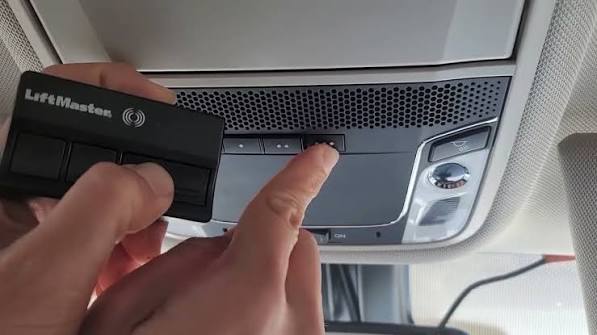
- Locate the three HomeLink buttons on your overhead console
- Press and hold the outer two buttons simultaneously for approximately 20 seconds
- Release when the indicator light begins flashing rapidly
- This clears any previously programmed devices
Step 2: Position Your Vehicle
- Park your 2024 Honda Pilot 6-10 feet away from the garage door opener motor
- Ensure you have a clear line of sight to the motor unit
- Keep the ignition in the “ON” position throughout the process
Step 3: Initiate Learning Mode
- Choose which HomeLink button you want to program (1, 2, or 3)
- Press and hold your chosen button until the indicator light changes from slow to rapid flashing (about 20 seconds)
- Release the button once rapid flashing begins
Step 4: Train the System
- Within 30 seconds, take your original garage door remote
- Hold it 1-3 inches from the HomeLink buttons
- Press and hold both the garage remote button AND the HomeLink button simultaneously
- Continue holding until the HomeLink indicator light flashes rapidly, then slowly
- This indicates successful programming
Step 5: Test the Connection
- Press the programmed HomeLink button
- Your garage door should activate within 2-3 seconds
- If nothing happens, repeat Steps 3-4
Method 2: Rolling Code Systems (For Newer Garage Openers)
Many modern garage door openers use rolling code technology for enhanced security. If Method 1 doesn’t work, try this approach:
Additional Step for Rolling Codes:
- After completing Step 4 above, locate the “Learn” or “Smart” button on your garage door opener motor
- Press this button once (the motor’s LED will typically blink)
- Within 30 seconds, return to your Honda and press the programmed HomeLink button twice
- Wait 2 seconds between presses
- Test the system again
Troubleshooting Common Issues
| Problem | Possible Cause | Solution |
|---|---|---|
| Light won’t flash | Weak battery in remote | Replace remote battery |
| Door doesn’t respond | Wrong distance from motor | Move vehicle closer (6-10 feet) |
| Intermittent operation | Signal interference | Reprogram in different location |
| Won’t clear memory | Incorrect button combination | Hold outer buttons for full 20 seconds |
Advanced Tips for Optimal Performance
Maximizing Signal Strength
To ensure reliable operation of your programmed HomeLink system:
- Maintain proper distance: Keep your vehicle 6-10 feet from the garage door motor during programming
- Avoid interference: Turn off other electronic devices that might cause signal interference
- Check antenna position: Ensure your garage door opener’s antenna hangs vertically
- Update firmware: Some newer garage openers may require firmware updates for optimal HomeLink compatibility
Security Best Practices
When using HomeLink in your 2024 Honda Pilot:
- Regularly update codes: Reprogram annually or if you suspect unauthorized access
- Use unique buttons: Assign different devices to separate HomeLink buttons
- Monitor activity: Check for unusual garage door operations
- Keep backups: Maintain your original remote as a backup option
Frequently Asked Questions
Q1: How long does it take to program the 2024 Honda Pilot garage door opener?
A: The entire programming process typically takes 5-10 minutes per device. This includes clearing old memories, positioning your vehicle, and completing the training sequence. Most users successfully program their first device within this timeframe.
Q2: Can I program multiple garage doors to my Honda Pilot?
A: Yes, the 2024 Honda Pilot’s HomeLink system can store up to three different devices. Each of the three buttons can be programmed to control a separate garage door, gate operator, or other compatible RF device. Simply repeat the programming process for each additional device using a different button.
Q3: What should I do if my garage door opener uses rolling codes?
A: Rolling code systems require an additional step after initial programming. After completing the standard procedure, locate the “Learn” button on your garage door motor, press it once, then return to your vehicle and press the programmed HomeLink button twice with 2-second intervals. This synchronizes the rolling code sequence between your vehicle and garage opener.
Q4: Will programming HomeLink void my vehicle warranty?
A: No, programming the HomeLink system will not void your Honda warranty. HomeLink is a factory-installed feature designed specifically for user programming. However, improper modifications to your vehicle’s electrical system could affect warranty coverage, so follow the official procedures outlined in your owner’s manual.
Q5: Can I erase and reprogram HomeLink if I sell my vehicle?
A: Absolutely. To clear all HomeLink memory, press and hold the outer two buttons for 20 seconds until the indicator light flashes rapidly. This returns the system to its factory default state. It’s recommended to clear HomeLink memory before selling or trading in your vehicle for security purposes.
Q6: What garage door brands are compatible with Honda HomeLink?
A: HomeLink is compatible with approximately 95% of garage door opener brands, including major manufacturers like Chamberlain, LiftMaster, Genie, Craftsman, and Sommer. If you encounter compatibility issues, consult your garage door opener’s manual or contact the manufacturer for specific HomeLink programming instructions.
Conclusion
Learning how to program 2024 Honda Pilot garage door opener systems doesn’t have to be complicated. With the right guidance and patience, you can have your HomeLink system working perfectly in under 10 minutes. The convenience of controlling your garage door directly from your vehicle’s console makes every trip smoother and more secure.
Remember to follow the safety guidelines, maintain proper distances during programming, and don’t hesitate to try the rolling code method if the standard procedure doesn’t work initially. Your 2024 Honda Pilot’s HomeLink system is designed to make your life easier—take advantage of this fantastic feature!
Found this guide helpful? Share it with fellow Honda owners on social media who might be struggling with their HomeLink setup. Your experience could save someone else hours of frustration! Don’t forget to bookmark this page for future reference when programming additional devices.
Leave a Reply