Introduction
Struggling to sync your new 2022 Dodge Ram with your garage door? You’re not alone. Many truck owners find the programming process confusing, but mastering how to program 2022 Dodge Ram garage door opener systems can save you countless trips in and out of your vehicle. This comprehensive guide will walk you through every step, ensuring your HomeLink system works perfectly with your garage door opener from day one.
The 2022 Dodge Ram comes equipped with the HomeLink universal transceiver, a sophisticated system that can control up to three different garage doors, gate operators, or home automation devices. Understanding this technology transforms your daily routine, allowing you to open your garage without fumbling for separate remotes while keeping your hands on the wheel.
Understanding Your 2022 Dodge Ram’s HomeLink System
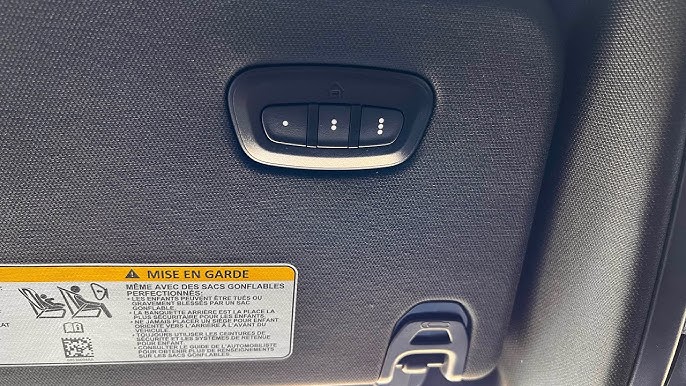
Before diving into the programming process, it’s essential to understand what you’re working with. The HomeLink system in your 2022 Ram is located on the overhead console, typically featuring three buttons that can be programmed to control various devices around your home.
What Is HomeLink Technology?
HomeLink is a universal wireless control system integrated into many modern vehicles, including the 2022 Dodge Ram. This technology uses radio frequency signals to communicate with garage door openers, security gates, lighting systems, and other compatible home automation devices. According to HomeLink’s official documentation, the system operates on multiple frequencies to ensure compatibility with most major garage door opener brands manufactured after 1985.
The beauty of HomeLink lies in its versatility. Unlike traditional garage door remotes that work with only one specific brand, HomeLink can learn and replicate signals from various manufacturers, making it an ideal solution for households with multiple garage doors or mixed-brand systems.
Identifying Your Garage Door Opener Type
Before programming begins, determine your garage door opener’s characteristics:
| Opener Type | Frequency Range | Programming Method |
|---|---|---|
| Older Models (pre-1993) | 300-400 MHz | Standard learning |
| Mid-Range (1993-2005) | 315-390 MHz | Standard learning |
| Newer Models (2006+) | 315-433 MHz | Rolling code required |
| Smart Openers | Various | App-based + HomeLink |
Important: If your garage door opener was manufactured after 1993, it likely uses rolling code technology, which requires additional steps during programming for enhanced security.
Step-by-Step Programming Guide
Now let’s get into the practical steps for programming your 2022 Dodge Ram’s HomeLink system. Follow these instructions carefully for best results.
Preparation Phase
Time Required: 15-30 minutes
Tools Needed:
- Your 2022 Dodge Ram
- Original garage door remote
- Ladder (if needed to access garage door opener motor)
- Helper (recommended but not required)
Step 1: Clear Existing Programs
If your HomeLink buttons have been previously programmed, clear them first:
- Press and hold the two outer HomeLink buttons simultaneously
- Continue holding for approximately 20 seconds
- Watch for the indicator light to flash slowly, then rapidly
- Release both buttons when the rapid flashing begins
- All three buttons are now cleared and ready for new programming
Step 2: Position Your Vehicle
Park your 2022 Dodge Ram outside your garage, ensuring:
- The vehicle is 5-10 feet from the garage door
- The engine is running (for consistent electrical power)
- All garage doors are closed for safety
- You have clear access to both the HomeLink buttons and your original remote
Programming Process
Step 3: Initiate Learning Mode
- Choose which HomeLink button you want to program (1, 2, or 3)
- Press and hold the chosen HomeLink button
- While holding the HomeLink button, bring your original garage remote within 1-3 inches of the HomeLink buttons
- Press and hold the button on your original remote that controls the desired garage door
- Continue holding both buttons until the HomeLink indicator light changes from slow to rapid flashing
- This process typically takes 20-30 seconds
Step 4: Test the Connection
- Release both buttons
- Press the programmed HomeLink button firmly
- Observe if the garage door responds
- If successful, the door should begin opening or closing
Rolling Code Programming (If Required)
If your garage door didn’t respond in Step 4, you likely have a rolling code opener requiring additional steps:
Step 5: Locate the Learn Button
- Find your garage door opener motor unit (usually mounted on the ceiling)
- Look for a “Learn,” “Smart,” or “Program” button
- The button color varies by manufacturer:
- Yellow: Chamberlain/LiftMaster
- Purple: Chamberlain/LiftMaster (newer models)
- Red: Genie
- Orange: Craftsman
- Green: Other brands
Step 6: Complete Rolling Code Sync
- Press the Learn button on your garage door opener motor
- The indicator light will illuminate or flash
- Within 30 seconds, return to your 2022 Dodge Ram
- Press and hold the programmed HomeLink button for 2 seconds
- Release, then press and hold again for 2 seconds
- Repeat this press-release-hold cycle up to three times
- Watch for the garage door to activate, confirming successful programming
Troubleshooting Common Issues
Even with careful following of instructions, problems can arise. Here are solutions to frequent challenges:
Problem: HomeLink Light Doesn’t Flash Rapidly
Solutions:
- Ensure batteries in your original remote are fresh
- Move the remote closer to the HomeLink buttons (within 1 inch)
- Try different angles between the remote and HomeLink
- Check if your vehicle’s battery is fully charged
Problem: Garage Door Responds Intermittently
Solutions:
- Reprogram using the rolling code method
- Check for interference from other electronic devices
- Ensure no obstacles block the garage door sensors
- Verify the garage door opener’s range hasn’t been affected
Problem: Multiple Doors Won’t Program
Solutions:
- Program one door at a time, testing each before proceeding
- Use different HomeLink buttons for each door
- Ensure adequate spacing between programming sessions
- Consider professional installation for complex setups
Advanced Tips for Optimal Performance
Maintaining Your HomeLink System
To ensure long-term reliability of your programmed 2022 Dodge Ram garage door opener:
- Regular Testing: Test your HomeLink monthly to ensure continued functionality
- Battery Maintenance: Replace your original remote’s batteries annually
- Software Updates: Check with your Dodge dealer for any HomeLink firmware updates
- Professional Inspection: Have your garage door system serviced annually
Security Considerations
Modern garage door openers use sophisticated encryption to prevent unauthorized access. When programming your HomeLink system:
- Keep your original remote secure
- Never share your programming sequence with unauthorized individuals
- Consider changing your garage door opener’s codes periodically
- Monitor for unusual garage door activity
Integrating with Smart Home Systems
Many 2022 Dodge Ram owners also have smart garage door openers. If you’re using a Wi-Fi-enabled opener:
- Program HomeLink as described above
- Connect your garage opener to your home Wi-Fi network
- Download the manufacturer’s app (MyQ, Genie Intellicode, etc.)
- Link the app with your HomeLink for dual control options
This setup provides redundancy—if one system fails, you have backup access methods.
Frequently Asked Questions
Q: Can I program more than three devices to my 2022 Dodge Ram’s HomeLink?
A: No, the 2022 Dodge Ram’s HomeLink system supports a maximum of three devices. Each button controls one device. If you need to control more than three devices, consider upgrading to a newer vehicle model with expanded HomeLink capabilities or using alternative smart home solutions.
Q: What should I do if my garage door opener is very old (pre-1985)?
A: Garage door openers manufactured before 1985 may not be compatible with HomeLink due to outdated frequency standards. In this case, consider upgrading your garage door opener to a modern unit with rolling code technology. Most major manufacturers offer retrofit kits that can modernize older systems.
Q: Will programming HomeLink void my garage door warranty?
A: No, programming your vehicle’s HomeLink system will not void your garage door opener’s warranty. HomeLink is designed to work with existing garage door systems without modification. However, always consult your garage door opener’s manual for specific warranty terms.
Q: How long does the programming process typically take?
A: The complete programming process usually takes 15-30 minutes, depending on your garage door opener type and whether rolling code programming is required. First-time users may need additional time for familiarization with the process.
Q: Can I reprogram a HomeLink button if I move to a new house?
A: Yes, you can easily reprogram any HomeLink button. Simply clear the existing program using the two-button hold method described earlier, then follow the standard programming steps for your new garage door opener. This flexibility makes HomeLink ideal for homeowners who relocate frequently.
Q: What if my 2022 Dodge Ram doesn’t have HomeLink?
A: Some trim levels of the 2022 Dodge Ram may not include HomeLink as standard equipment. Check your vehicle’s specifications or consult your owner’s manual. If HomeLink isn’t included, you can purchase aftermarket universal garage door remotes or consider having HomeLink installed by a qualified technician.
Conclusion
Learning how to program 2022 Dodge Ram garage door opener systems doesn’t have to be intimidating. With the right preparation and step-by-step approach, you can successfully integrate your vehicle with your home’s garage door system in under 30 minutes. The convenience of controlling your garage door directly from your truck’s overhead console enhances both security and daily efficiency.
Remember to test your system regularly, maintain your equipment properly, and don’t hesitate to consult professional help if you encounter persistent issues. Your 2022 Dodge Ram’s HomeLink system represents the perfect marriage of automotive convenience and home automation technology.
Found this guide helpful? Share it with fellow Dodge Ram owners on social media! Tag us in your successful programming stories—we love hearing about your tech victories.
Leave a Reply