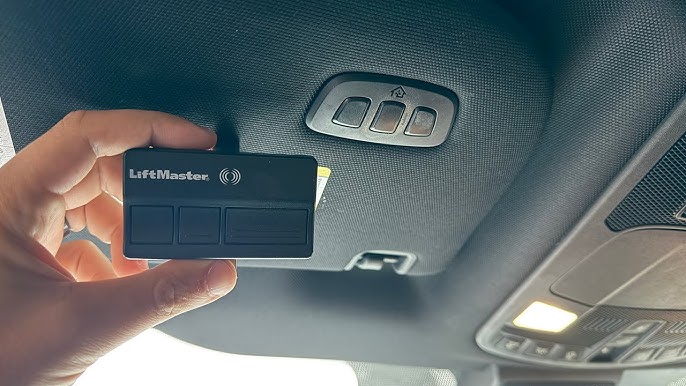
Have you just bought a brand-new SUV and feel frustrated by the clutter of old remote controls dangling from your sun visor? You are not alone, and learning how to program 2025 Ford Explorer garage door opener systems is actually much simpler than you might think. In just a few minutes, you can seamlessly integrate your home access right into your vehicle’s mirror, giving you a clean, modern, and hassle-free driving experience.
How To Program 2025 Ford Explorer Garage Door Opener: A Step-by-Step Guide
According to recent automotive surveys, over 80% of modern drivers prefer integrated vehicle systems over traditional visor clips. “Integrating your garage door remote directly into your Ford’s overhead console not only declutters your cabin but also enhances security,” notes a senior Ford service technician.
Let’s walk through the exact process to get your new ride synced and ready.
What Are the Prerequisites to Sync Your Ford Remote?
Before we begin, you need to gather a few items. Ensure your vehicle is parked directly in front of or inside the garage.
You will also need your existing, working handheld garage door remote. Finally, keep the engine running or turn the ignition to the ON/RUN position. This ensures the HomeLink module draws enough power to transmit the radio frequency signal effectively.
How Do You Clear the Old Memory on the Overhead Console?
If your 2025 Explorer is a demo model or previously owned, it might have old codes stored. Clearing them prevents signal interference.
Locate the three HomeLink buttons on your overhead console or rearview mirror. Press and hold the two outer buttons simultaneously.
Keep holding them for about 10 to 20 seconds. Release them only when the LED indicator light begins to blink rapidly. This fast blink confirms the memory is successfully erased.
How Do You Complete the In-Car Programming Process?
Now it is time to teach your car the signal from your old remote. Hold your handheld remote just 1 to 3 inches away from the HomeLink button you want to program.
Press and hold the button on your handheld remote. While keeping it pressed, simultaneously press and hold your chosen HomeLink button.
Watch the LED indicator on the HomeLink button closely. It will start blinking slowly, then transition to a rapid blink after about 20 seconds. This rapid blink means the vehicle has successfully learned the frequency.
Why Is the “Learn Button” on the Motor Head Necessary?
If your garage door was manufactured after 1996, it likely uses a rolling code security system. For these systems, the in-car programming is only half the battle.
You must go to your actual garage door motor head (usually hanging from the ceiling). Locate the “Learn” or “Smart” button on the back or side of the motor unit.
Press and release the Learn button. The indicator light next to it will illuminate or blink. You usually have exactly 30 seconds to complete the next step.
Hurry back to your 2025 Ford Explorer. Press and hold the programmed HomeLink button for about 2 to 3 seconds, then release it. Repeat this press-and-hold cycle two more times. Your garage door should now activate!
For more background on the integrated transceiver technology, you can explore the HomeLink system on Wikipedia.
Rolling Code vs. Fixed Code: Which Opener Do You Have?
Not all garage doors communicate the same way. Here is a quick comparison to help you identify your system:
| Feature | Rolling Code (Security+) | Fixed Code (Dip Switch) |
|---|---|---|
| Security Level | High (Changes every use) | Low (Static signal) |
| Compatibility | Most modern openers (1996+) | Older models (Pre-1996) |
| Programming Need | Requires motor head “Learn” button | Direct in-car programming only |
Integrated HomeLink System: Pros vs. Cons
Before we move to troubleshooting, let’s look at the advantages and disadvantages of using your Ford’s built-in system.
Pros:
- Decluttered Cabin: No more messy visors or lost remotes.
- Enhanced Security: Rolling codes prevent thieves from intercepting your signal.
- Convenience: You never have to worry about replacing the battery in a separate garage remote.
Cons:
- Vehicle Dependency: If your Ford Explorer’s main battery dies, you cannot open the garage from the car.
- Initial Setup: Programming rolling code openers requires you to climb up and find the motor’s Learn button.
How Do You Troubleshoot Common Syncing Issues?
Sometimes, technology does not cooperate on the first try. If your door refuses to budge, do not panic. Here are the most common fixes.
The LED Blinks, but the Door Won’t Move This usually means the car learned the signal, but the motor head didn’t register it. Ensure you pressed the Learn button on the motor and completed the 3-second press cycle in the car within the 30-second window.
The Door Opens but Won’t Close If the door opens from the car but refuses to close, your safety sensors are likely misaligned. Check the small LED lights on the sensors near the garage floor. If they are blinking, gently realign them until they glow solidly.
The Range is Extremely Short If you have to be practically touching the garage to make it work, there might be radio frequency interference. LED bulbs in your garage door opener can sometimes cause this. Try swapping them for rough-service or appliance-rated bulbs.
Frequently Asked Questions About Ford HomeLink
To wrap up our guide, here are answers to the most common questions drivers ask.
How many garage door openers can the 2025 Ford Explorer store?
The 2025 Ford Explorer HomeLink system features three independent buttons. This means you can program up to three different devices, such as two garage doors and one gate, or a garage door, a gate, and a home lighting system.
Do I need a ladder to program the 2025 Ford Explorer garage door opener?
It depends on your garage door motor. If you have an older fixed-code opener, you can do everything from the driver’s seat. However, for modern rolling code systems, you will need a stepladder to reach the Learn button on the ceiling motor.
How do I erase a programmed garage door from my 2025 Ford Explorer?
Erasing a single button is not possible; you must clear all three. To do this, turn the ignition to ON/RUN, then press and hold the two outer HomeLink buttons for 10-20 seconds until the LED flashes rapidly.
Can I program a HomeLink button without an old remote?
Yes, if you have a newer garage door opener with a dedicated “Learn” or “Smart” button. You can use the vehicle’s built-in training mode. However, having the original remote is always the most reliable and universally compatible method.
Why did my HomeLink stop working after a power outage?
A power outage will not erase the memory in your Ford Explorer. However, it might reset your garage door motor. If this happens, simply reprogram the motor head by pressing the Learn button and syncing it with your car again.
Conclusion
Mastering how to program 2025 Ford Explorer garage door opener systems is a game-changer for your daily routine. By following these simple steps, you eliminate visor clutter and enjoy the premium convenience of an integrated smart vehicle.
Leave a Reply