Introduction
Are you struggling to sync your new garage door remote with your 2019 Ford Explorer? You’re not alone—thousands of Ford owners face this challenge every year when trying to integrate their vehicle’s built-in HomeLink garage door opener with their home security system. Learning how to program 2019 Ford Explorer garage door opener correctly can save you time, frustration, and potentially costly service calls. In this comprehensive guide, we’ll walk you through the exact steps needed to get your garage door working seamlessly with your Ford Explorer’s integrated system.
Understanding Your 2019 Ford Explorer’s HomeLink System
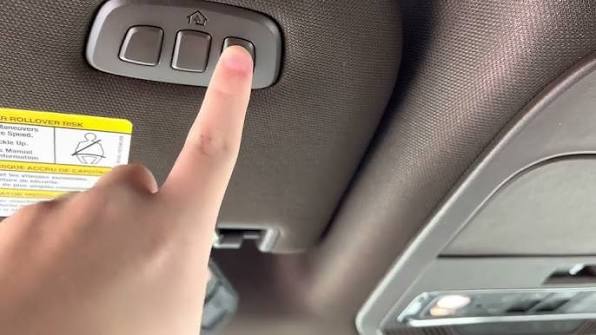
Before diving into the programming process, it’s essential to understand what you’re working with. The 2019 Ford Explorer comes equipped with a HomeLink wireless control system that can operate up to three different garage doors, gates, or other compatible devices. This feature is typically located on the driver’s side sun visor or overhead console, depending on your trim level.
The HomeLink system uses radio frequency technology similar to most modern garage door openers, operating primarily in the 315 MHz and 390 MHz frequency bands. According to Wikipedia’s article on HomeLink, this universal transmitter system has been integrated into millions of vehicles worldwide since its introduction in 1992.
Key Components You’ll Need:
- Your 2019 Ford Explorer with functioning HomeLink system
- Original garage door remote control
- Access to your garage door motor unit
- A ladder (if needed to reach the motor unit)
- Approximately 15-20 minutes of uninterrupted time
Step-by-Step Programming Instructions
Step 1: Prepare Your Vehicle and Garage Door Opener
Before beginning the programming process, ensure your vehicle is parked outside your garage with the engine running. This ensures consistent power to the HomeLink system throughout the programming sequence. Clear any previously programmed buttons if you’re replacing an old garage door opener.
To clear existing programs:
- Press and hold the two outer HomeLink buttons simultaneously
- Continue holding for 20 seconds until the indicator light begins to flash rapidly
- Release both buttons when the light changes from solid to flashing
Step 2: Position Your Remote Control
Hold your original garage door remote 1-3 inches away from the HomeLink buttons you wish to program. The proximity is crucial for successful signal transmission during the learning phase. Make sure your remote has fresh batteries to ensure strong signal strength.
Step 3: Initiate the Programming Sequence
Choose which HomeLink button you want to program (1, 2, or 3) and follow these precise steps:
- Press and hold both the chosen HomeLink button AND the corresponding button on your handheld remote simultaneously
- Continue holding both buttons until the HomeLink indicator light changes from slow blinking to rapid flashing
- This process typically takes 20-30 seconds, so be patient and maintain steady pressure on both buttons
Pro Tip: If the light doesn’t change after 30 seconds, try moving the remote slightly closer or further from the HomeLink module.
Step 4: Program the Garage Door Motor Unit
Now you need to teach your garage door motor to recognize the HomeLink signal:
- Locate the “Learn” or “Smart” button on your garage door motor unit (usually found on the back or side of the motor housing)
- Press and release the Learn button—the indicator light should begin blinking
- Within 30 seconds, return to your vehicle and press the programmed HomeLink button three times
- Wait for the garage door to respond by opening or closing
Step 5: Test and Verify the Connection
After completing the programming sequence:
- Test the connection by pressing the programmed HomeLink button
- The garage door should respond within 2-3 seconds
- Test multiple times to ensure consistent operation
- Try operating the door from different distances to verify range
Troubleshooting Common Programming Issues
Even with careful following of instructions, you might encounter some challenges. Here are solutions to the most common problems:
Problem: HomeLink Light Doesn’t Flash Rapidly
Solutions:
- Ensure you’re holding both buttons firmly and simultaneously
- Check that your remote control batteries are fresh
- Try repositioning the remote 1-2 inches closer to the HomeLink module
- Verify your vehicle’s engine is running for consistent power
Problem: Garage Door Motor Doesn’t Respond
Solutions:
- Confirm you pressed the Learn button within the 30-second window
- Check that your garage door motor is compatible with HomeLink systems
- Ensure no obstructions are blocking the motor’s receiver
- Try reprogramming from step 1, paying close attention to timing
Problem: Intermittent Operation
Solutions:
- Reprogram the button following the complete sequence
- Check for interference from other electronic devices
- Ensure the HomeLink antenna isn’t obstructed
- Consider having a professional inspect the garage door motor’s receiver
Compatibility Considerations
Not all garage door openers work seamlessly with HomeLink systems. Here’s what you need to know about compatibility:
| Garage Door Brand | HomeLink Compatibility | Special Requirements |
|---|---|---|
| Chamberlain | Excellent | Standard programming works |
| LiftMaster | Excellent | May require rolling code setup |
| Genie | Good | Some models need additional steps |
| Craftsman | Good | Older models may need adapter |
| Stanley | Fair | May require professional assistance |
Rolling Code Technology: Most modern garage door openers use rolling code security, which changes the access code with each use. The 2019 Ford Explorer’s HomeLink system supports rolling code technology, but the programming process may require additional steps for these newer systems.
Advanced Tips for Optimal Performance
Maximizing Signal Strength
- Keep the HomeLink area clean and free from metallic objects
- Avoid parking near large metal structures that might interfere with signals
- Regularly test the system to ensure continued proper operation
Multiple Device Programming
Your 2019 Ford Explorer can store up to three different devices. To program additional devices:
- Choose an unused HomeLink button
- Follow the same programming sequence
- Label each button clearly for easy identification
- Test each device individually after programming
Maintenance Best Practices
- Replace remote control batteries annually
- Clean HomeLink buttons regularly with a soft, dry cloth
- Test the system monthly to ensure continued functionality
- Keep your garage door motor well-maintained and lubricated
Frequently Asked Questions
Q: How long does it take to program a 2019 Ford Explorer garage door opener?
A: The complete programming process typically takes 15-20 minutes when following the instructions carefully. However, allow extra time if you encounter any issues or need to troubleshoot compatibility problems.
Q: Can I program multiple garage doors to my Ford Explorer?
A: Yes, the 2019 Ford Explorer’s HomeLink system can store up to three different devices. Each button (1, 2, and 3) can be programmed to control a separate garage door, gate, or other compatible device.
Q: What should I do if my garage door uses rolling code technology?
A: Rolling code garage door openers require the standard programming sequence plus an additional step at the motor unit. After programming the HomeLink button, you’ll need to press the Learn button on your motor unit and then press the HomeLink button three times within 30 seconds to complete the rolling code synchronization.
Q: Why won’t my HomeLink system retain the programming?
A: If the programming doesn’t stick, check your vehicle’s battery health, ensure you’re following the timing requirements precisely, and verify that you’re holding the buttons firmly throughout the process. In rare cases, the HomeLink module itself may need replacement.
Q: Is professional installation necessary for HomeLink programming?
A: No, HomeLink programming is designed as a DIY process that most vehicle owners can complete successfully. However, if you encounter persistent issues or have an older garage door system, consulting a professional installer might be worthwhile.
Q: Can weather affect HomeLink performance?
A: Extreme temperatures can occasionally affect electronic components, but the HomeLink system is designed to operate reliably in normal weather conditions. If you experience seasonal performance issues, consider having your system inspected.
Conclusion
Learning how to program 2019 Ford Explorer garage door opener doesn’t have to be complicated when you follow the right steps. With patience and attention to detail, you can successfully integrate your vehicle’s HomeLink system with your garage door opener, enjoying the convenience of hands-free operation every time you arrive home.
Remember, the key to success lies in following the timing requirements precisely, ensuring good signal strength between your remote and HomeLink module, and properly syncing with your garage door motor unit. If you encounter any difficulties, don’t hesitate to revisit the troubleshooting section or consult your vehicle’s owner manual for additional guidance.
Did this guide help you successfully program your 2019 Ford Explorer’s garage door opener? Share your experience in the comments below or spread the word to fellow Ford owners who might benefit from these instructions. Your success story could help someone else avoid hours of frustration!
Safe driving and happy garaging!
Leave a Reply