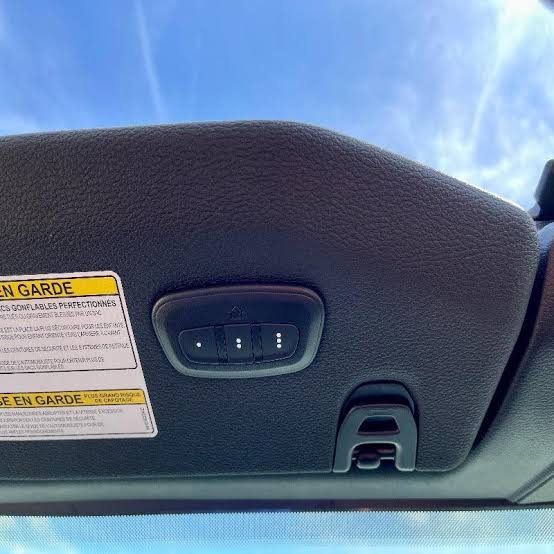
Introduction
Struggling to sync your garage door remote with your 2019 Jeep Cherokee? You’re not alone — thousands of Jeep owners face the same confusing HomeLink setup every year, especially when rolling code technology gets in the way. In this complete guide, you’ll learn how to program 2019 Jeep Cherokee garage door opener systems in just a few simple steps, whether you’re a first-time user or reprogramming after a battery change. Grab your remote, park safely outside your garage, and let’s get started.
Why Your 2019 Jeep Cherokee Uses HomeLink
Before we jump into the steps, let’s understand what you’re working with. Your 2019 Jeep Cherokee comes equipped with the HomeLink Universal Transceiver, a built-in wireless control system integrated into the overhead console or rearview mirror
www.capitalone.com. HomeLink has been installed in more than 100 million vehicles worldwide since its introduction roughly 30 years ago
www.capitalone.com. It operates on a radio frequency range of 288 to 433 MHz and can control up to three devices simultaneously — perfect for your main garage door, side gate, or even home lighting systems.
According to Gentex Corporation, the manufacturer behind HomeLink, the system is available as standard or optional equipment on over 300 vehicle models around the world
www.facebook.com. This means the technology is well-tested, highly reliable, and designed to work with virtually any garage door opener manufactured after 1993.
“HomeLink allows users to program in-vehicle buttons to activate garage doors, estate gates, and a myriad of smart home devices.” — Gentex Corporation
ir.gentex.com
What You’ll Need Before You Start
Gather these items before beginning the programming process to avoid interruptions:
- Your 2019 Jeep Cherokee (parked outside the garage with the engine running)
- Your existing garage door remote (with a fresh battery)
- A ladder (to reach the Learn button on the garage motor, if needed)
- About 10–15 minutes of uninterrupted time
Safety Tip: Keep the garage area clear of people, pets, and obstacles during setup. HomeLink officially cautions that doors may activate unexpectedly during programming
www.capitalone.com. Also, never attempt to use HomeLink with garage door openers manufactured before April 1982, as they lack essential safety features like auto-reverse mechanisms
www.capitalone.com.
Step-by-Step: How To Program 2019 Jeep Cherokee Garage Door Opener
Step 1: Clear Previous HomeLink Settings
Before programming a new device, erase any old codes to prevent interference.
- Turn the ignition to the ON/RUN position (the engine can stay off, but many owners prefer to keep it running for consistent electrical power).
- Locate the three HomeLink buttons on your overhead console or rearview mirror.
- Press and hold the two outer buttons (I and III) simultaneously for about 10 to 20 seconds www.jeepgarage.org.
- Release when the indicator light begins to flash rapidly — this confirms all previous codes have been erased.
Step 2: Position Your Remote Correctly
- Hold your handheld garage door remote 1 to 3 inches (3 to 8 cm) away from the HomeLink button you want to program www.jeepforum.com.
- Make sure the remote’s antenna (if visible) is pointing toward the HomeLink button for optimal signal transfer.
Step 3: Begin the Training Process
- Press and hold both the desired HomeLink button and the button on your handheld remote at the same time.
- Watch the HomeLink indicator light closely:
- Slow blink → Signal not yet captured; keep holding.
- Rapid blink → Rolling code detected; proceed to Step 4.
- Solid light → Fixed code successfully programmed; skip to testing.
- Hold both buttons for approximately 20 seconds until the light changes behavior.
Step 4: Sync Rolling Code Systems (For Openers Made After 1995)
Most modern garage door openers — including popular brands like Chamberlain, LiftMaster, Craftsman, and Genie — use rolling code technology for enhanced security
www.capitalone.com. Each time you press the remote, a new encrypted code is transmitted, preventing thieves from capturing and replaying your signal.
To sync a rolling code opener:
- Locate the “Learn” or “Smart” button on your garage door opener motor head (usually found on the back or side of the unit hanging from your garage ceiling).
- Press and release the Learn button — the indicator light on the motor will illuminate or blink.
- Return to your Jeep within 30 seconds.
- Press the programmed HomeLink button firmly for 2 seconds, then release.
- Repeat this press-hold-release cycle three times total to complete synchronization www.jeepforum.com.
Step 5: Test the System
- Park your Jeep in the driveway with a clear view of the garage door.
- Press the programmed HomeLink button and confirm the door opens.
- Press it again to verify the door closes.
- Test the range by slowly backing up and pressing the button at various distances.
Fixed Code vs. Rolling Code: Quick Comparison
| Feature | Fixed Code Openers (Pre-1996) | Rolling Code Openers (1996+) |
|---|---|---|
| Security Level | Low (same code every time) | High (code changes each use) |
| Programming Difficulty | Easy (Step 3 only) | Moderate (requires Learn button sync) |
| Compatible Brands | Older models only | Chamberlain, LiftMaster, Genie, Craftsman |
| Needs Compatibility Bridge? | Sometimes | Rarely |
| Vulnerability to Code Grabbing | High | Very Low |
If you’re unsure which type you have, look for a colored Learn button (usually yellow, purple, orange, or red) on the motor unit — its presence confirms a rolling code system
www.capitalone.com.
Troubleshooting Common Issues
Even with careful steps, things can go wrong. Here’s how to fix the most frequent problems:
The HomeLink Light Never Flashes
- Check the remote battery. A weak battery is the #1 cause of failed programming. Replace it with a fresh one and try again.
- Adjust the distance. Move the remote closer (1 inch) or slightly farther (up to 3 inches) from the HomeLink button.
- Change the angle. Tilt the remote slightly — signal orientation matters more than you’d think.
The Door Works Once, Then Stops
This usually indicates an incomplete rolling code sync. Return to Step 4 and repeat the Learn button sequence three times. Make sure you complete all three presses within 30 seconds of activating the Learn button.
Limited Operating Range
- Ensure the garage opener’s antenna is hanging straight down and not obstructed.
- Reposition the Jeep during testing — metal structures and thick walls can interfere with the signal.
- If range remains poor, consider installing a HomeLink Compatibility Bridge, which extends signal strength for stubborn systems.
The System Works With One Button But Not Others
Each HomeLink button can be programmed independently. Repeat the full process for each button you want to use, assigning one button per device.
Expert Tips for a Smooth Setup
According to automotive technicians and HomeLink specialists, these pro tips can save you significant frustration:
- Always program outside the garage. The metal door itself can block the signal during initial training.
- Keep the engine running. Stable voltage prevents intermittent signal drops during programming.
- Press the remote button every 2 seconds during the training sequence — this refreshes the signal and helps HomeLink capture it more reliably www.capitalone.com.
- Clean the remote contacts. If your remote is old, wipe the battery contacts with a cotton swab and rubbing alcohol.
- Consult your owner’s manual. The 2019 Jeep Cherokee Owner’s Manual (published by Mopar) contains model-specific HomeLink illustrations and button locations vehicleinfo.mopar.com.
For additional reference, you can explore the HomeLink Wikipedia entry to learn more about the technology’s history and development.
FAQ Section
1. Can I program more than one garage door in my 2019 Jeep Cherokee?
Yes. The HomeLink system supports up to three separate devices simultaneously
www.tesla.com. You can assign one button to your main garage door, another to a side gate, and a third to home lighting or a security system. Each button is programmed independently using the same steps outlined above.
2. Will programming HomeLink erase my existing handheld remotes?
No. Programming HomeLink does not affect your existing remotes in any way
www.capitalone.com. Both systems operate independently, so you can continue using your handheld remotes as backups. This is especially useful if a family member doesn’t have a Jeep equipped with HomeLink.
3. Does HomeLink work with all garage door opener brands?
HomeLink is compatible with nearly all major garage door opener brands manufactured after 1993, including Chamberlain, LiftMaster, Craftsman, Genie, and Sommer
www.capitalone.com. However, some very old openers (pre-1982) or certain European brands may require a HomeLink Compatibility Bridge — a small plug-in device that translates signals between the two systems.
4. How long does the programming process take?
For most users, the entire process takes between 5 and 15 minutes. Fixed-code openers are typically faster to program (around 5 minutes), while rolling code systems require the additional Learn button sync, which adds a few extra minutes. First-time users should allow up to 20 minutes to account for troubleshooting.
5. What do I do if my Jeep Cherokee doesn’t have HomeLink buttons?
Not every 2019 Jeep Cherokee trim comes with HomeLink standard. If your vehicle lacks the built-in buttons, you have two options:
- Purchase an aftermarket HomeLink visor clip-on (available for around $30–$50 on Amazon or at auto parts stores).
- Visit a Jeep dealership to have an OEM HomeLink module installed in your overhead console.
6. Is it safe to use HomeLink with older garage door openers?
HomeLink officially recommends against using the system with garage door openers manufactured before April 1982
www.capitalone.com. These older units lack modern safety features such as auto-reverse sensors, which are critical for preventing accidents. According to the U.S. Consumer Product Safety Commission, garage door accidents have historically caused serious injuries and fatalities, particularly among children
www.cpsc.gov. If your opener is older than 1996, consider upgrading to a modern rolling code unit for both compatibility and safety.
Conclusion
Learning how to program 2019 Jeep Cherokee garage door opener systems is a straightforward process that pays off every single day. No more fumbling for remotes in the cup holder, no more dead batteries at the worst possible moment — just a seamless tap of a button as you pull into the driveway. By following the steps above, you’ll have your HomeLink system synced with your garage, gate, or smart home devices in under 15 minutes.
Remember the key takeaways:
- ✅ Always clear old codes before programming new ones.
- ✅ Keep the remote 1–3 inches from the HomeLink button.
- ✅ Don’t forget the Learn button sync for rolling code systems.
- ✅ Test thoroughly before calling the job done.
Leave a Reply