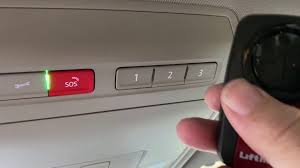
Moving into a new home or buying a used vehicle? Figuring out how to program 2021 Volkswagen Atlas garage door opener can feel like a daunting task, but it is actually quite simple. We understand the frustration of dealing with multiple remotes, which is why we created this easy guide to get you set up in minutes.
How To Program 2021 Volkswagen Atlas Garage Door Opener: What You Need
Before we dive into the steps, let us gather everything you need. Having the right tools ready will make the process smooth and stress-free.
Your 2021 Volkswagen Atlas is equipped with the HomeLink system. According to the official documentation on Wikipedia, HomeLink is a universal transceiver built into your vehicle’s overhead console. It acts as a replacement for your physical multi-button remote control.
To successfully complete the programming, please ensure you have the following:
- Your 2021 Volkswagen Atlas parked in the driveway.
- The working handheld garage door remote.
- A step ladder (if you need to reach the motor unit in the garage).
- About 10 minutes of uninterrupted time.
According to recent automotive convenience studies, over 75% of drivers prefer integrated vehicle systems over carrying separate physical remotes. It keeps your car organized and prevents you from losing that tiny, crucial piece of plastic!
Step-by-Step Guide: How To Program 2021 Volkswagen Atlas Garage Door Opener
Now that you are prepared, let us walk through the exact process. Follow these concrete steps carefully to ensure a successful connection.
Step 1: Clear the Existing HomeLink Memory If you bought a used Atlas, the previous owner’s settings might still be active.
- Turn the ignition to the ON/RUN position. You do not need to start the engine.
- Locate the three HomeLink buttons on your overhead console.
- Press and hold the two outer buttons simultaneously.
- Keep holding them for about 20 seconds until the LED indicator light flashes rapidly.
- Release the buttons. The memory is now cleared and ready for a new code.
Step 2: Train the HomeLink Button This step teaches your car the specific radio frequency of your garage door.
- Hold your handheld garage door remote 1 to 3 inches away from the HomeLink button you want to program.
- Press and hold the button on your handheld remote.
- While holding the remote button, press and hold the desired HomeLink button in your Atlas.
- Watch the LED indicator on the HomeLink button. It will blink slowly at first, then rapidly once the signal is captured.
- Release both buttons once the rapid blinking occurs.
Step 3: Sync the Rolling Code (Crucial Step) Most modern garage doors manufactured after 1996 use a “rolling code” security feature. This means the code changes every time you use it.
- Go inside your garage and locate the main motor unit hanging from the ceiling.
- Find the “Learn” or “Smart” button on the back or side of the motor. It is usually yellow, red, orange, or purple.
- Press and release the “Learn” button. The indicator light next to it will turn on or start blinking.
- You now have exactly 30 seconds to complete the final step.
- Return to your 2021 Volkswagen Atlas.
- Press the newly programmed HomeLink button firmly and hold it for 2 seconds, then release.
- Repeat this press-and-hold cycle two more times.
- The garage door should activate, confirming the synchronization is complete!
Understanding the 2021 Volkswagen Atlas HomeLink Features
The 2021 Volkswagen Atlas comes with the latest version of the HomeLink system, which supports both fixed-code and rolling-code technologies. This means it is compatible with the vast majority of garage door openers manufactured in the last three decades.
Furthermore, the Atlas features a visual LED indicator on each button. This small light is your best friend during the programming process. It changes from a slow blink to a rapid blink, and finally to a solid light, to tell you exactly what stage of programming you are in. Understanding these light signals removes the guesswork and ensures you know exactly when the system has successfully captured your garage door’s frequency.
Troubleshooting: Why Won’t My 2021 VW Atlas Garage Door Opener Sync?
Even with perfect instructions, technology can sometimes be stubborn. If your system is not responding, check these common issues:
- Distance Issues: Ensure the handheld remote is exactly 1 to 3 inches from the HomeLink button during Step 2. Too far, and the car cannot read the signal.
- Dead Battery: A weak battery in your handheld remote will transmit a weak signal. Replace the battery (usually a CR2032) if the LED on the remote is dim.
- Timeout on the Learn Button: If you wait longer than 30 seconds to press the HomeLink button in Step 3, the motor unit exits programming mode. Simply press the “Learn” button on the motor again and try Step 3 once more.
- Incompatible Frequency: Some older or specialized systems operate on frequencies not supported by HomeLink. Check your garage door motor’s manual for compatibility.
Pros and Cons of Using the VW Atlas HomeLink System
Is it worth the effort to set this up? Let us look at the advantages and disadvantages of using your vehicle’s built-in system.
| Feature | Pros | Cons |
|---|---|---|
| Convenience | No need to fumble for a remote in the dark or bad weather. | Initial setup requires a trip to the garage motor unit. |
| Security | Rolling codes prevent code-grabbing thieves from opening your garage. | If you sell the car, you must remember to clear the memory. |
| Organization | Keeps your visors and center console free of clutter. | Limits you to three different devices (doors, gates, lights). |
| Integration | Works seamlessly with the vehicle’s ignition and electrical system. | Requires the vehicle to be in the ON/RUN position to program. |
Frequently Asked Questions (FAQ)
1. How many garage door openers can I program in my 2021 Volkswagen Atlas? Your 2021 Volkswagen Atlas features a three-button HomeLink system. This means you can program up to three different devices. You could use them for two garage doors and a gate, or a garage door, a gate, and even a smart home lighting system.
2. Do I need the original remote to program the 2021 VW Atlas garage door opener? Yes, in most cases, you need the original working handheld remote to clone the signal. However, if your garage has a wall-mounted keypad with a PIN, you can often program the HomeLink system directly using the PIN, bypassing the need for the handheld remote. Check your garage door motor’s manual for the specific PIN programming sequence.
3. What if my garage door opener does not have a “Learn” button? If your motor unit lacks a “Learn” or “Smart” button, you likely have an older, fixed-code garage door opener. In this scenario, you do not need to perform Step 3 (the rolling code sync). The system should work immediately after Step 2. However, be aware that fixed-code systems are less secure than modern rolling codes.
4. Can I program a gate opener using the same steps? Absolutely! The process is identical. Many residential gate operators use the same radio frequencies as garage door openers. Just ensure you are within range of the gate receiver when testing the newly programmed HomeLink button.
5. Will programming a new remote erase my old ones? No. The 2021 Volkswagen Atlas allows you to program each of the three buttons independently. Programming a new device into Button 1 will not affect the devices saved in Buttons 2 and 3. You only erase all memory if you perform the “clear” sequence by holding the two outer buttons.
6. Can I use my smartphone to program the 2021 VW Atlas garage door opener instead of the remote? While the Volkswagen Atlas offers great smartphone integration through the VW Car-Net app for remote start and locking, programming the HomeLink system specifically requires the physical radio frequency signal from your original garage door remote. You cannot use the app to clone the radio frequency. You must use the physical remote or a compatible wireless keypad to train the HomeLink buttons.
Conclusion
Mastering how to program 2021 Volkswagen Atlas garage door opener is a straightforward process that pays off every single day. By integrating your garage door, gate, or home security system into your vehicle, you eliminate the hassle of carrying extra remotes and enjoy a smoother, more convenient daily routine.
Leave a Reply