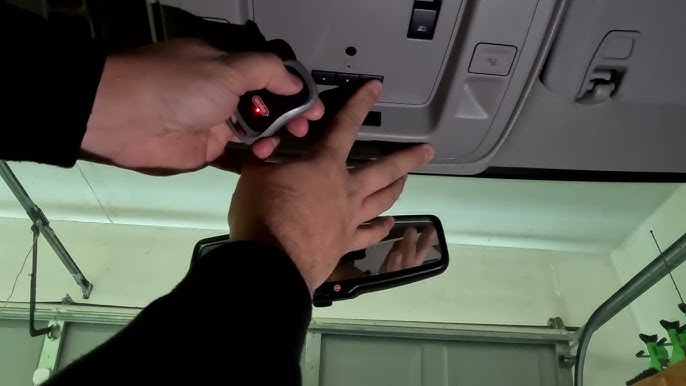
Have you ever pulled into your driveway, pressed the button in your new truck, and watched nothing happen? It is a frustrating experience that many new vehicle owners face. If you are wondering how to program 2025 Chevy Silverado garage door opener, you are not alone. This guide will walk you through the process simply and safely, ensuring you can open your garage without leaving the comfort of your cabin.
Understanding the HomeLink System in Your 2025 Silverado
Before diving into the buttons, it is helpful to understand what you are working with. The 2025 Chevrolet Silverado comes equipped with the HomeLink universal transceiver. This system is designed to replace up to three handheld remote controls for devices like garage doors, gate operators, and even home lighting systems.
Unlike older models that required complex wiring or professional installation, the modern HomeLink system is built directly into your rearview mirror or overhead console. According to Wikipedia, HomeLink is the most widely installed universal wireless control system in vehicles today, known for its compatibility with over 95% of garage door openers manufactured since 1982.
Why Programming Might Fail Initially
Many users assume the process is instant. However, interference from LED bulbs in your garage or distance from the opener motor can cause delays. Understanding these variables helps troubleshoot issues before they become headaches.
Step-by-Step Guide: How to Program 2025 Chevy Silverado Garage Door Opener
Programming your HomeLink system requires patience and precision. Follow these steps exactly to ensure successful synchronization between your truck and your garage door.
Step 1: Clear Existing Codes (If Necessary)
If your Silverado was previously owned or if you are reprogramming a button, you must clear the memory first.
- Press and hold the two outer HomeLink buttons simultaneously.
- Keep holding them for about 20 seconds.
- Watch for the indicator light to flash rapidly. This confirms the memory is cleared.
- Release the buttons once the flashing stops.
Step 2: Position Your Vehicle Correctly
Distance matters. Park your 2025 Silverado outside your garage, facing the door.
- Ensure you are within 5 to 10 feet of the garage door opener motor.
- Keep the engine running to prevent battery drain during the process.
- Make sure there are no people or objects in the path of the garage door.
Step 3: Initiate Learning Mode on HomeLink
- Choose the HomeLink button you wish to program.
- Press and hold this button.
- Simultaneously, press and hold your original handheld garage door remote button.
- Hold both until the HomeLink indicator light changes from a slow blink to a rapid flash.
- This usually takes between 20 to 30 seconds. Once it flashes rapidly, release both buttons.
Step 4: Train the Garage Door Opener Motor
This is the critical step where the actual “handshake” occurs between your truck and the garage motor.
- Locate the “Learn” or “Smart” button on your garage door opener motor unit (usually hanging from the ceiling).
- Press and release this button. You typically have 30 seconds to complete the next action.
- Return to your Silverado.
- Press and hold the programmed HomeLink button for 2 seconds, then release.
- Repeat this press-hold-release cycle three times.
Step 5: Test the Connection
Press the HomeLink button firmly. Your garage door should activate. If it does not, repeat Step 4, ensuring you are pressing the motor’s learn button correctly.
Troubleshooting Common Issues
Even with careful following, things can go wrong. Here are the most common hurdles and how to overcome them.
| Issue | Possible Cause | Solution |
|---|---|---|
| Light flashes but door doesn’t move | Rolling code mismatch | Repeat Step 4 multiple times; ensure you hit the motor’s learn button. |
| No response from HomeLink | Dead battery in remote | Replace the battery in your handheld remote before trying again. |
| Intermittent operation | Signal interference | Change the light bulb in your garage opener to an incandescent one temporarily. |
| Button won’t clear | Holding time too short | Ensure you hold the two outer buttons for a full 20 seconds until the light changes behavior. |
The LED Bulb Problem
A lesser-known fact is that LED garage door opener bulbs can emit radio frequency interference that blocks the HomeLink signal. If you have tried everything and it still fails, try unscrewing the LED bulb in your garage opener motor and testing with the light off. If it works, consider buying a “HomeLink compatible” LED bulb or reverting to an incandescent bulb.
Advanced Tips for Rolling Code Systems
Most garage door openers manufactured after 1995 use rolling code technology. This security feature changes the code every time you press the button to prevent hacking. The 2025 Chevy Silverado is fully compatible with these systems, but the programming process is slightly more sensitive.
- Patience is Key: When training rolling codes, you may need to press the HomeLink button up to five times during the final training phase (Step 4 above).
- Check the Manual: Some brands, like LiftMaster or Chamberlain, have specific color-coded learn buttons. A yellow button often indicates a different protocol than a purple or red one. Refer to your garage opener’s manual for brand-specific nuances.
Frequently Asked Questions (FAQ)
1. Can I program more than one garage door to my 2025 Silverado?
Yes. The HomeLink system in the 2025 Chevy Silverado can store up to three different devices. You can program a second garage door, a gate, or even a home security system by repeating the programming steps for a different button.
2. What if I don’t have my original handheld remote?
If you have lost your original remote, you cannot program HomeLink using the standard method. You will need to purchase a compatible universal remote or contact your garage door manufacturer to get a new remote. Alternatively, some modern openers allow programming via a keypad on the wall inside the garage.
3. Does programming HomeLink void my warranty?
No. Programming the HomeLink system is a standard user feature and does not void your vehicle’s warranty. However, always ensure you are following safety guidelines to avoid damaging the garage door mechanism.
4. Why does my garage door close immediately after opening?
This is usually a safety sensor issue, not a HomeLink problem. Check the photo-eye sensors at the bottom of your garage door tracks. If they are misaligned or blocked by dirt, the door will reverse automatically. Clean the lenses and realign them to fix this.
5. Is the process different for the High Country or ZR2 trims?
No. The HomeLink system is standardized across all 2025 Chevy Silverado trims, including the Work Truck, LT, RST, ZR2, and High Country. The location of the buttons might vary slightly (mirror vs. overhead console), but the programming logic remains the same.
6. How do I know if my garage door opener is compatible?
Most openers made after 1982 are compatible. You can check the HomeLink compatibility database online by entering your garage door opener’s brand and model number. If your opener is very old (pre-1995), you might need a compatibility bridge kit, which is available from the HomeLink website.
Conclusion
Learning how to program 2025 Chevy Silverado garage door opener is a straightforward process that enhances your daily convenience. By following the steps outlined above—clearing memory, positioning your vehicle, and training the motor—you can enjoy seamless access to your home. Remember to troubleshoot potential interference from LED bulbs and be patient with rolling code systems.
Now that your garage door is synced, take a moment to appreciate the technology at your fingertips. If you found this guide helpful, please share it with fellow Silverado owners on social media or in your local community groups. Happy driving!
Leave a Reply