Introduction
There are few things more frustrating than pulling into your driveway after a long day, only to realize you still have to dig for a separate remote because your vehicle’s built-in system isn’t synced. If you are searching for how to program 2019 Jeep Grand Cherokee garage door opener functionality, you are likely dealing with this exact inconvenience or perhaps setting up a new home. The good news is that the 2019 Grand Cherokee’s HomeLink system is robust and user-friendly once you understand the specific sequence required for your opener type.
In this comprehensive guide, we will walk you through every step of the programming process with empathy and precision. Whether you have a standard fixed-code opener or a modern rolling-code security system, these instructions are designed to get you connected safely and quickly. Let’s turn that frustration into seamless, button-press convenience.
Understanding Your 2019 Jeep Grand Cherokee HomeLink System
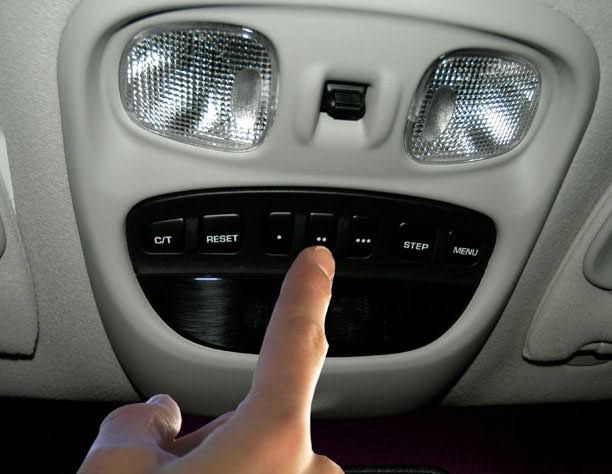
Before diving into buttons and LEDs, it is vital to understand what you are working with. The 2019 Jeep Grand Cherokee comes equipped with the HomeLink Wireless Control System, typically integrated into the overhead console or the rearview mirror assembly. This system replaces up to three handheld remotes and can operate garage doors, gates, lighting, and even security systems.
According to automotive electronics standards, HomeLink operates on radio frequencies between 288 MHz and 390 MHz. However, the method of programming depends entirely on the age and technology of your garage door opener motor.
Fixed Code vs. Rolling Code: Why It Matters
| Feature | Fixed Code (Older) | Rolling Code (Newer/Standard) |
|---|---|---|
| Security Level | Low (Static signal) | High (Signal changes every use) |
| Manufacture Date | Typically pre-1996 | Post-1996 to Present |
| Programming Steps | Vehicle-only sync | Vehicle sync + Motor “Learn” button |
| LED Indicator | Solid light when done | Rapid flash during training |
| Compatibility | Legacy openers | All modern Chamberlain/LiftMaster/Genie |
Identifying your opener type saves time. If your garage door motor has a colored “Learn” or “Smart” button on the back panel, you have a rolling-code system. This distinction is critical because rolling-code systems require an extra synchronization step at the garage door motor itself to ensure security protocols are met. For deeper technical context on how these radio frequency protocols evolved, you can refer to the Wikipedia entry on Garage Door Openers, which details the transition from dip switches to encrypted rolling codes.
Step-by-Step: How to Program 2019 Jeep Grand Cherokee Garage Door Opener
This tutorial assumes you have a rolling-code opener, as this covers the vast majority of 2019 vehicle owners. Please read all steps before beginning.
Phase 1: Clearing Previous Codes (Recommended)
If you purchased the Jeep used or are reprogramming a button, start fresh to avoid signal conflicts.
- Locate the HomeLink buttons in your overhead console.
- Press and hold the two outer buttons simultaneously.
- Hold for approximately 10–20 seconds until the indicator LED flashes rapidly.
- Release both buttons. The system is now erased and ready for new programming.
⚠️ Safety Warning: Never program HomeLink while the vehicle is running in an enclosed garage. Carbon monoxide buildup can occur rapidly. Always park outside with the engine off or in a well-ventilated area. Additionally, keep hands clear of moving door parts during testing.
Phase 2: Programming the Vehicle Button
- Turn your Jeep’s ignition to the ON/RUN position (engine does not need to be running, but electrical power must be active).
- Hold your original garage door remote 1–3 inches away from the HomeLink buttons. This proximity is crucial for signal capture.
- Simultaneously press and hold the desired HomeLink button AND your handheld remote’s transmit button.
- Watch the HomeLink LED. It will blink slowly at first, then transition to a rapid flash. This rapid flash indicates successful frequency capture.
- Release both buttons once the rapid flashing begins.
Phase 3: Synchronizing with the Garage Door Motor (Rolling Code Only)
This is the step most people miss when asking how to program 2019 Jeep Grand Cherokee garage door opener systems. Without this, the car may recognize the signal, but the door won’t move.
- Go to your garage door motor unit. Locate the “Learn” or “Smart” button. It is usually yellow, orange, purple, or red and located near the antenna wire or light lens.
- Press and release the Learn button. You typically have 30 seconds to complete the next step before the motor exits learning mode.
- Return to your Jeep immediately.
- Press and hold the programmed HomeLink button for 2 seconds, then release. Repeat this press-hold-release cycle up to three times.
- Test the button. The garage door should activate. If it moves, congratulations—you’ve successfully completed the programming!
Troubleshooting Common Programming Failures
Even with perfect execution, technology sometimes hiccups. Here are data-backed solutions for the most frequent issues encountered by Jeep owners.
LED Flashes Slowly But Never Rapidly
- Cause: Signal interference or incompatible frequency.
- Fix: Try holding the remote at different angles or distances (0.5 inches to 6 inches). Some 2019 models struggle with older 315 MHz remotes. Ensure your remote battery is fresh; weak batteries transmit degraded signals that HomeLink cannot learn.
Rapid Flash Achieved But Door Doesn’t Move After Learn Button
- Cause: Missed the 30-second window or insufficient button presses.
- Fix: Repeat Phase 3. Press the motor’s Learn button again and return to the vehicle faster. Perform the press-hold-release cycle firmly and deliberately three full times.
Works Intermittently or Only When Very Close
- Cause: Antenna obstruction or vehicle RF noise.
- Fix: Check if aftermarket accessories (dash cams, phone chargers) are plugged in near the overhead console. Unplug them and retest. Also, inspect the garage door motor’s antenna wire—it should hang vertically and not be coiled or touching metal.
HomeLink Buttons Are Unresponsive
- Cause: Blown fuse or system lockout.
- Fix: Check Fuse F40 (or consult your 2019 Grand Cherokee owner’s manual for the specific HomeLink fuse location). If the fuse is intact, disconnect the vehicle battery for 5 minutes to perform a hard reset of the body control module.
Frequently Asked Questions (FAQ)
Q1: Can I program my 2019 Jeep Grand Cherokee without the original remote?
Generally, no. HomeLink requires cloning an existing signal. However, if your garage door opener supports direct Wi-Fi or Bluetooth pairing via a manufacturer app (like MyQ), some newer integrations allow setup without a physical remote. For traditional RF systems, you must obtain a replacement remote compatible with your motor before programming the Jeep.
Q2: How many devices can I store in my 2019 Grand Cherokee HomeLink?
The system stores up to three distinct devices. Each button corresponds to one device. If you need to add a fourth device, you must erase one of the existing buttons using the two-outer-button reset method described in Phase 1.
Q3: Does programming HomeLink affect my Jeep’s warranty or Uconnect system?
No. HomeLink is a standalone RF module that does not interface with Uconnect’s infotainment software or the vehicle’s CAN bus in a way that voids warranty coverage. It is an OEM-approved accessory designed specifically for your 2019 model year.
Q4: Why does my HomeLink work for the garage but not for my community gate?
Community gates often use commercial-grade operators with different security protocols or require a separate access code. Some gates also operate on frequencies outside HomeLink’s range. Verify with your HOA or property manager whether the gate operator is HomeLink-compatible. Many communities provide a dedicated transponder tag instead.
Q5: Is there a difference between HomeLink and Car2U?
Yes. While both serve similar purposes, they use different communication protocols. The 2019 Jeep Grand Cherokee uses HomeLink. Car2U was used in earlier Chrysler/FCA vehicles but was phased out. Do not follow Car2U tutorials, as the button sequences and LED indicators differ significantly.
Q6: Can I program HomeLink to control smart home lights or locks?
Absolutely. HomeLink supports Z-Wave and other smart home protocols when paired with a compatible bridge device. Brands like Leviton and Lutron offer HomeLink-enabled switches and outlets. The programming process mirrors garage door setup: put the smart device in pairing mode, then train the HomeLink button using the same press-and-hold technique.
Conclusion
Mastering how to program 2019 Jeep Grand Cherokee garage door opener functionality transforms daily convenience and enhances your vehicle’s utility. By understanding the difference between fixed and rolling codes, following the precise three-phase programming sequence, and applying targeted troubleshooting when needed, you can achieve reliable operation without dealership visits. Remember to always prioritize safety by programming in ventilated areas and keeping clear of moving mechanisms.
Your 2019 Grand Cherokee was engineered to integrate seamlessly with your home—now it finally does. If this guide saved you time or solved a persistent issue, please share it on social media to help fellow Jeep owners reclaim their evenings from fumbling for remotes. Tag us with your success story; we love seeing our community thrive! Safe driving and smooth entries ahead.
Leave a Reply