Introduction
Losing your garage door remote or needing an extra one for a family member can be a frustrating hassle. You want a solution that is compact, reliable, and easy to program without calling a technician. The Chamberlain MC100 P2 Mini Black Universal Garage Door Remote Control offers exactly that—a sleek, portable device designed to simplify your daily routine while keeping your home secure.
In this comprehensive guide, we will explore why this mini remote has become a favorite among US homeowners. We will cover its compatibility, step-by-step programming instructions, and expert tips to ensure you get the most out of your purchase. Whether you are a tech novice or a DIY enthusiast, this article will provide all the information you need to make an informed decision.
Why Choose the Chamberlain MC100 P2 Mini?
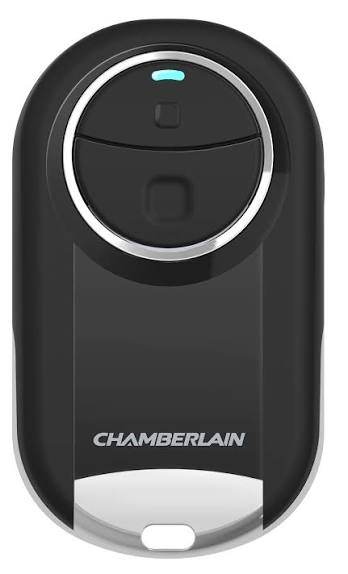
When selecting a garage door opener accessory, size and convenience often top the list of priorities. The Chamberlain MC100 P2 stands out because it combines robust functionality with a minimalist design. Unlike bulky traditional remotes, this “mini” version fits easily into your pocket, purse, or even attaches to your keychain without adding significant weight.
Compact Design Meets Durability
The first thing you notice about the MC100 P2 is its form factor. It is significantly smaller than standard remotes, making it ideal for users who carry minimal items. Despite its small size, it is built with durable materials that withstand daily wear and tear. The black finish not only looks professional but also helps hide minor scratches and dirt, maintaining a clean appearance over time.
Universal Compatibility
One of the biggest concerns for buyers is whether the remote will work with their existing system. The Chamberlain MC100 P2 is designed as a universal remote, meaning it is compatible with most major garage door opener brands manufactured after 1993. This includes Chamberlain, LiftMaster, Craftsman, and many others. However, it is crucial to check your opener’s frequency and security code type, which we will discuss in detail later.
Key Features and Specifications
To understand the value proposition of the Chamberlain MC100 P2, let’s break down its technical specifications and unique features.
| Feature | Specification |
|---|---|
| Model Number | MC100 P2 |
| Color | Black |
| Battery Type | CR2032 (Included) |
| Range | Up to 150 feet (varies by environment) |
| Compatibility | Most openers from 1993 onwards |
| Buttons | 1 Button |
| Security | Rolling Code Technology |
Rolling Code Technology for Enhanced Security
Security is paramount when it comes to garage access. The MC100 P2 utilizes rolling code technology, which changes the access code every time you use the remote. This prevents hackers from intercepting and replaying the signal to open your garage. According to cybersecurity experts, rolling codes are essential for modern smart home devices to prevent “replay attacks.”
Note: For more information on how rolling codes enhance home security, you can refer to general encryption standards discussed on Wikipedia.
Long-Lasting Battery Life
The remote comes with a CR2032 lithium battery, known for its longevity and stable voltage output. Under normal usage conditions, this battery can last up to two years. The low-power design ensures that the remote remains responsive even as the battery ages, reducing the likelihood of being locked out due to a dead battery.
How to Program Your Chamberlain MC100 P2 Remote
Programming a new remote can seem daunting, but the Chamberlain MC100 P2 is designed for user-friendly setup. Follow these simple steps to sync your remote with your garage door opener.
Step 1: Locate the Learn Button
Find the “Learn” or “Smart” button on your garage door opener motor unit. This is usually located on the back or side of the unit hanging from your ceiling. The button color may vary (yellow, purple, red, or green) depending on the brand and model.
Step 2: Clear Old Codes (If Necessary)
If you are replacing a lost remote or suspect unauthorized access, press and hold the Learn button for 10 seconds until the indicator light blinks. This clears all previously programmed remotes. Warning: You will need to reprogram all existing remotes after this step.
Step 3: Initiate Programming Mode
Press and release the Learn button on the motor unit. The indicator light will turn on or blink, signaling that the opener is ready to receive a new code. You have approximately 30 seconds to complete the next step.
Step 4: Sync the Remote
Within 30 seconds, press and hold the button on your Chamberlain MC100 P2 Mini Black Universal Garage Door Remote Control. Hold it until the opener’s lights flash or you hear two clicks. This confirms that the code has been successfully learned.
Step 5: Test the Remote
Stand at a safe distance and press the remote button to test if the garage door operates correctly. If it does not work, repeat the process, ensuring you are within range and the battery is properly installed.
Troubleshooting Common Issues
Even with a straightforward setup, users may encounter occasional issues. Here are some common problems and their solutions.
- Remote Not Responding: Check the battery orientation. Ensure the positive (+) side is facing up. Replace the battery if it is old.
- Interference: Other wireless devices, such as LED bulbs or Wi-Fi routers, can interfere with the signal. Try moving these devices away from the opener motor.
- Range Issues: If the remote only works close to the door, check for obstructions like metal doors or thick walls. Also, ensure the antenna on the motor unit is hanging down and not damaged.
Pros and Cons of the Chamberlain MC100 P2
To help you decide if this remote is right for you, here is a balanced view of its advantages and limitations.
Pros
- Compact Size: Easy to carry and store.
- Easy Programming: Simple step-by-step setup process.
- Secure: Uses rolling code technology to prevent hacking.
- Affordable: Cost-effective solution for additional remotes.
- Wide Compatibility: Works with most major brands.
Cons
- Single Button: Only controls one door; not suitable for multi-door setups without multiple remotes.
- No Keychain Loop: Some users may need to buy a separate case or adapter to attach it to keys.
- Plastic Build: While durable, it may feel less premium compared to metal-cased remotes.
Frequently Asked Questions (FAQ)
1. Is the Chamberlain MC100 P2 compatible with my older garage door opener?
The MC100 P2 is compatible with most openers manufactured after 1993. If your opener uses DIP switches (small switches inside the remote and motor), it may not be compatible. Check your opener’s manual for “rolling code” or “Security+” features to confirm compatibility.
2. Can I use this remote for two different garage doors?
No, the MC100 P2 is a single-button remote designed to control one door. If you have two doors, you will need two separate remotes or a multi-button universal remote.
3. How do I know if the battery is dying?
Signs of a dying battery include reduced range, intermittent operation, or the need to press the button multiple times. If you experience these issues, replace the CR2032 battery immediately.
4. Is this remote secure from hackers?
Yes, the Chamberlain MC100 P2 uses rolling code technology, which changes the code with each use. This makes it extremely difficult for hackers to intercept and reuse the signal.
5. Can I program this remote if I don’t have access to the motor unit?
No, you must have physical access to the garage door opener motor unit to press the “Learn” button. This is a security feature to prevent unauthorized programming.
6. What should I do if I lose this remote?
If you lose your remote, it is recommended to clear all codes from your opener and reprogram your remaining remotes. This ensures that the lost remote can no longer open your garage.
Conclusion
The Chamberlain MC100 P2 Mini Black Universal Garage Door Remote Control is an excellent choice for homeowners seeking a reliable, compact, and secure solution for their garage access needs. Its ease of programming, combined with robust security features, makes it a standout product in the market. Whether you are replacing a lost remote or adding a spare for a family member, this device delivers consistent performance and peace of mind.
By following the steps outlined in this guide, you can quickly set up your new remote and enjoy the convenience of effortless garage access. Remember to keep your remote in a safe place and replace the battery periodically to ensure uninterrupted service.
If you found this guide helpful, please share it with your friends and family on social media. Helping others discover reliable home security solutions is a great way to build a safer community. Have you used the Chamberlain MC100 P2? Share your experience in the comments below!
Leave a Reply