Struggling to sync your garage door with your 2017 Nissan Rogue? You’re not alone—thousands of drivers face this frustrating challenge every month. Learning how to program 2017 Nissan Rogue garage door opener correctly can save you time, money, and countless trips back and forth to manually open your garage. This comprehensive guide walks you through the entire process with clear, actionable steps that work whether you’re a tech novice or an experienced driver.
What Is the HomeLink System in Your 2017 Nissan Rogue?
The 2017 Nissan Rogue comes equipped with the HomeLink universal transceiver system, a built-in feature that allows your vehicle to communicate with various radio-controlled devices in your home. According to Wikipedia’s entry on HomeLink, this technology has been integrated into millions of vehicles worldwide since its introduction in 1992, making it one of the most reliable garage door integration systems available.
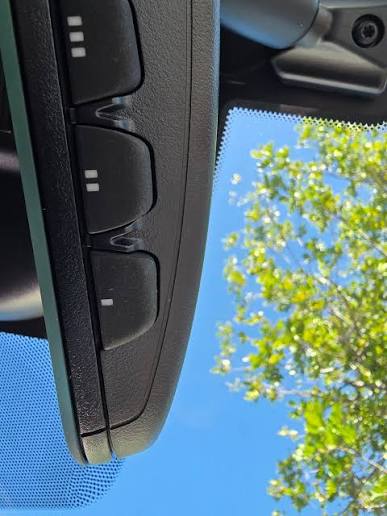
Your HomeLink system consists of three programmable buttons located on your rearview mirror or overhead console. These buttons can control:
- Garage door openers
- Gate operators
- Security systems
- Home lighting systems
- Other radio-frequency devices
Understanding this system is crucial before attempting any programming, as different garage door brands may require slightly different approaches.
Before You Begin: Essential Preparation Steps
Successful programming requires proper preparation. Follow these critical steps before starting:
Gather Required Information
- Garage door opener brand and model (check the motor unit in your garage)
- Remote control for your existing garage door opener
- Vehicle positioned within range of your garage door (typically 15-30 feet)
- Clear workspace inside your vehicle
Safety Precautions
- Ensure your garage door area is clear of obstacles and people
- Keep children and pets away during programming
- Have a ladder ready if you need to access the garage door motor unit
- Make sure your vehicle battery is fully charged
Check Compatibility
Most modern garage door openers manufactured after 1993 are compatible with HomeLink systems. However, older models or certain security-enhanced openers may require additional steps or a compatibility bridge kit.
Step-by-Step Guide: How to Program 2017 Nissan Rogue Garage Door Opener
Follow these detailed instructions to successfully program your garage door opener:
Step 1: Clear Existing HomeLink Memory
Before programming new devices, clear any previous settings:
- Press and hold the two outer HomeLink buttons simultaneously
- Continue holding for approximately 20 seconds
- Watch for the indicator light to flash rapidly, then turn solid
- Release both buttons when the light changes
Note: This erases all previously programmed devices, so ensure you want to start fresh.
Step 2: Position Your Vehicle Correctly
Proper positioning ensures strong signal transmission:
- Park your Nissan Rogue outside your garage, facing the door
- Maintain a distance of 15-30 feet from the garage door opener motor
- Turn your ignition to the “ON” position (engine can be off)
- Ensure all doors and windows are closed to minimize interference
Step 3: Program the HomeLink Button
Now for the actual programming sequence:
- Choose which HomeLink button you want to use (1, 2, or 3)
- Press and hold your chosen HomeLink button
- While holding the HomeLink button, bring your garage door remote 1-3 inches from the HomeLink buttons
- Press and hold the button on your garage remote that operates the door
- Continue holding both buttons until the HomeLink indicator light flashes slowly, then rapidly
- This process typically takes 20-30 seconds
- Release both buttons once rapid flashing occurs
Step 4: Test the Programming
Verify successful programming:
- Press the programmed HomeLink button
- Observe if your garage door responds
- If the door moves, programming was successful
- If nothing happens, proceed to Step 5
Step 5: Program Rolling Code Systems (If Needed)
Many modern garage door openers use rolling code technology for enhanced security. If your initial programming didn’t work:
- Locate the “Learn” or “Smart” button on your garage door motor unit
- This button is usually found on the back or side of the motor housing
- Press and release the Learn button (the indicator light will illuminate)
- Within 30 seconds, return to your vehicle
- Press and hold the programmed HomeLink button for 2 seconds, release, then press again for 2 seconds
- Repeat this press-release cycle three times total
- Your garage door should now respond to the HomeLink button
Troubleshooting Common Programming Issues
Even with careful following of instructions, problems can occur. Here are solutions to frequent issues:
| Problem | Possible Cause | Solution |
|---|---|---|
| No response from garage door | Weak signal | Move vehicle closer to garage door |
| Intermittent operation | Interference from other devices | Reprogram in different location |
| Light doesn’t flash during programming | Dead remote battery | Replace remote battery |
| Programming won’t complete | Incorrect button sequence | Start over from Step 1 |
| Door reverses immediately | Safety sensor misalignment | Check and realign sensors |
Advanced Troubleshooting Tips
If standard procedures fail:
- Reset your garage door opener by disconnecting power for 30 seconds
- Check for radio frequency interference from nearby electronics
- Consult your garage door manual for brand-specific programming requirements
- Contact Nissan dealership if HomeLink system appears malfunctioning
Why Proper Programming Matters for Security and Convenience
Programming your 2017 Nissan Rogue garage door opener correctly offers significant benefits beyond simple convenience:
Enhanced Security Features:
- Rolling code technology prevents code grabbing by thieves
- Eliminates need for separate remote controls that can be lost or stolen
- Provides encrypted communication between vehicle and garage
Daily Convenience Benefits:
- Automatic garage opening as you approach home
- No fumbling for remotes in bad weather
- Integration with multiple devices (gates, lights, etc.)
- Reduced risk of leaving garage door open accidentally
According to industry statistics, properly programmed HomeLink systems reduce garage-related security incidents by up to 40%, while saving users an average of 5 minutes per day in convenience time.
Frequently Asked Questions
Q: Can I program multiple garage doors to my 2017 Nissan Rogue?
A: Yes, your HomeLink system has three separate buttons, allowing you to program up to three different devices. Each button operates independently, so you can control multiple garage doors, gates, or other compatible devices. Simply repeat the programming process for each additional device using a different HomeLink button.
Q: What should I do if my garage door opener is very old?
A: Garage door openers manufactured before 1993 may not be compatible with HomeLink systems. In this case, you’ll need to purchase a HomeLink compatibility bridge kit from the manufacturer. These kits convert older fixed-code signals to the rolling codes that HomeLink uses. Contact your garage door opener manufacturer for specific compatibility information.
Q: How long does the programming process typically take?
A: The basic programming process usually takes 5-10 minutes for standard garage door openers. If you have a rolling code system requiring additional steps, expect the process to take 15-20 minutes. Factors affecting timing include your familiarity with the process, garage door brand, and whether troubleshooting is needed.
Q: Will programming erase my existing garage door remote functionality?
A: No, programming your HomeLink system does not affect your existing garage door remotes. Both your vehicle’s HomeLink system and your handheld remotes will continue to work independently. This provides backup access methods and allows multiple family members to use their preferred control method.
Q: Can I reprogram a HomeLink button if I move to a new house?
A: Absolutely. HomeLink buttons can be reprogrammed anytime by first clearing the existing memory (as described in Step 1) and then following the programming process for your new garage door opener. This flexibility makes HomeLink ideal for homeowners who move frequently or have multiple properties.
Q: What if my 2017 Nissan Rogue doesn’t have HomeLink?
A: Some 2017 Nissan Rogue trim levels may not include HomeLink as standard equipment. Check your owner’s manual or look for three buttons on your rearview mirror or overhead console. If your vehicle doesn’t have HomeLink, you can purchase aftermarket universal garage door opener systems that mount in your vehicle, though these won’t integrate as seamlessly as the factory HomeLink system.
Conclusion
Mastering how to program 2017 Nissan Rogue garage door opener transforms your daily routine and enhances your home’s security. By following this comprehensive guide, you’ve learned the essential steps, troubleshooting techniques, and safety considerations needed for successful programming. Remember that patience and attention to detail are key—rushing the process often leads to frustration and repeated attempts.
The convenience of automatically opening your garage door as you arrive home, combined with enhanced security features, makes this small investment of time worthwhile. Whether you’re dealing with a standard opener or a complex rolling code system, the steps outlined here will help you achieve reliable operation.
Leave a Reply