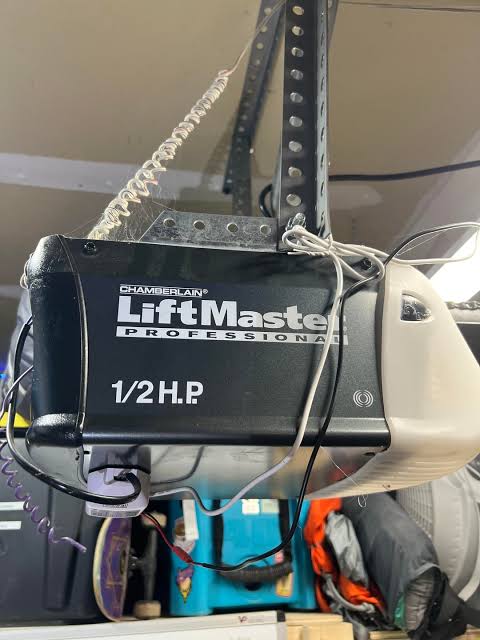
Have you ever stood in the rain, frantically pressing the button on your garage door remote, only to watch your car sit there while the door remains stubbornly closed? It is a frustrating scenario that disrupts your daily routine and leaves you feeling helpless. Finding the right Chamberlain Liftmaster Professional 1 2 Hp Garage Door Opener Remote is not just about buying a new gadget; it is about restoring convenience, security, and peace of mind to your home. Whether your old remote has worn out, been lost, or simply stopped syncing, this guide will walk you through everything you need to know to get back up and running smoothly.
Why Choosing the Right Remote Matters for Your 1/2 HP Opener
Your garage door opener is one of the most used mechanical devices in your home. For homeowners with a Chamberlain Liftmaster Professional 1/2 Hp Garage Door Opener, reliability is key. The 1/2 horsepower motor is a popular choice for standard single-car and lightweight double-car garage doors because it offers a perfect balance of power and quiet operation. However, even the best motor is useless if the communication link—the remote—fails.
Many users make the mistake of assuming all remotes are universal. While Chamberlain and LiftMaster (which are part of the same corporate family) share many technologies, compatibility depends heavily on the frequency and security protocol used by your specific opener model. Using an incompatible remote can lead to intermittent failures, reduced range, or complete inability to program the device.
The Evolution of Security: From DIP Switches to Rolling Codes
To understand which remote you need, it helps to understand the technology inside your opener. Older models used DIP switches—tiny physical switches inside the remote and the motor unit that had to match exactly. These were insecure and easy to hack.
Modern Chamberlain Liftmaster Professional units use Security+ 2.0 rolling code technology. This means every time you press the button, the remote sends a new, unique code. This prevents thieves from “capturing” your signal and opening your garage later. When shopping for a replacement, ensuring your remote supports the same security protocol as your opener is critical for both functionality and safety.
How to Identify Your Compatible Remote Model
Before purchasing a replacement, you must identify the exact specifications of your current setup. Here is a step-by-step approach to ensure you buy the correct Chamberlain Liftmaster Professional 1 2 Hp Garage Door Opener Remote.
Step 1: Locate the Model Number
Look at the motor unit hanging from your garage ceiling. There should be a label or sticker containing the model number and serial number. Common series for 1/2 HP professional models include the WD832, LSW5000, or older Professional Series units. Write this number down.
Step 2: Check the Frequency
Most modern Chamberlain/LiftMaster openers operate on 315 MHz or 390 MHz. Some newer models use dual-frequency bands. You can often find this information on the back of your existing remote or in the user manual. If you no longer have the old remote, the motor unit’s label usually specifies the frequency.
Step 3: Determine the Button Configuration
Do you need a single-button remote for basic access, or a multi-button remote to control multiple doors or activate lights? The LiftMaster 374UT is a popular universal 4-button remote that works with most Security+ 2.0 openers, including 1/2 HP professional models.
| Feature | Basic Remote (e.g., 371LM) | Universal Remote (e.g., 374UT) | Smart Remote (e.g., MyQ) |
|---|---|---|---|
| Buttons | 1-3 | 4 | App-controlled |
| Compatibility | Specific Models | Most Security+ 2.0 | Wi-Fi Enabled Openers |
| Range | Standard | Enhanced | Global (via Internet) |
| Price Range | $15 – $25 | $25 – $40 | $30 – $60 |
Step-by-Step Guide to Programming Your New Remote
Once you have purchased the correct Chamberlain Liftmaster Professional 1 2 Hp Garage Door Opener Remote, programming it is usually straightforward. However, the process can vary slightly depending on the age of your opener. Below is the standard procedure for most Security+ 2.0 models.
Prerequisites
- Your new remote with fresh batteries.
- A sturdy ladder to reach the motor unit.
- Approximately 5–10 minutes of uninterrupted time.
Programming Instructions
- Locate the “Learn” Button: On your garage door opener motor unit, find the “Learn” button. It is typically located on the back panel near the antenna wire. The button color may be yellow, purple, orange, or red, depending on the model year.
- Clear Old Codes (Optional but Recommended): If you are replacing a lost remote, press and hold the “Learn” button for about 6 seconds until the indicator light blinks off. This erases all previously programmed remotes for security purposes. Note: You will need to reprogram all remaining remotes after this step.
- Initiate Programming Mode: Press and release the “Learn” button once. The indicator light will turn on or blink, signaling that the unit is ready to receive a new code. You have approximately 30 seconds to complete the next step.
- Sync the Remote: Within 30 seconds, press and hold the button on your new remote that you wish to use. Hold it until the opener’s lights flash or you hear two clicks. This confirms the code has been accepted.
- Test the Connection: Press the remote button again to ensure the garage door operates correctly. Test it from various distances to confirm the range is adequate.
If the remote does not program, try replacing the batteries with high-quality alkaline cells. Weak batteries are the most common cause of programming failures.
Troubleshooting Common Remote Issues
Even with the correct Chamberlain Liftmaster Professional 1 2 Hp Garage Door Opener Remote, you may encounter issues. Here are solutions to the most frequent problems.
Issue 1: Remote Works Intermittently
- Cause: Interference from LED light bulbs or neighboring wireless devices.
- Solution: Replace standard LED bulbs in the opener with shielded or “garage door compatible” LEDs. LED bulbs can emit radio frequency interference that blocks the remote signal.
Issue 2: Short Range
- Cause: Low battery or obstructed antenna.
- Solution: Ensure the antenna wire hanging from the motor unit is fully extended and not wrapped around metal brackets. Replace the remote battery if it is more than a year old.
Issue 3: Remote Won’t Program
- Cause: Incompatible frequency or security protocol.
- Solution: Double-check that your remote matches the frequency (315 MHz vs. 390 MHz) of your opener. If you have an older opener with DIP switches, you cannot use a modern rolling-code remote without a compatibility kit.
For more detailed technical specifications on garage door opener frequencies and standards, you can refer to general industry information on Wikipedia.
Enhancing Your Garage Experience with Smart Features
While a standard remote is essential, many owners of Chamberlain Liftmaster Professional 1/2 Hp Garage Door Opener units are upgrading to smart solutions. If your opener is compatible, adding a MyQ Smart Garage Hub allows you to control your door via smartphone.
This integration offers several benefits:
- Remote Access: Open or close your garage from anywhere in the world.
- Delivery Monitoring: Receive alerts when the door opens, useful for package deliveries.
- Voice Control: Integrate with Amazon Alexa or Google Assistant for hands-free operation.
Even if you prefer physical remotes, having a smart backup ensures you never get locked out if you lose your keys or remote.
FAQ Section
Q1: Can I use a LiftMaster remote with a Chamberlain opener?
A: Yes, in most cases. Chamberlain and LiftMaster are manufactured by the same parent company and share the same proprietary technology, including Security+ 2.0. As long as the frequency and security protocol match, they are cross-compatible.
Q2: How do I know if my 1/2 HP opener uses Security+ 2.0?
A: Look for a yellow, purple, or orange “Learn” button on the motor unit. If your opener was manufactured after 2011, it likely uses Security+ 2.0. Older models with red or green learn buttons may use the original Security+ or DIP switch systems.
Q3: Why does my new remote only work when I am very close to the garage?
A: This is often due to radio frequency interference. Check for LED light bulbs in the opener unit, as these are common culprits. Additionally, ensure the remote’s battery is fresh and the antenna on the motor unit is hanging freely.
Q4: Can I program multiple remotes to one opener?
A: Yes, most Chamberlain and LiftMaster openers can store up to 8–10 different remote codes. Simply repeat the programming steps for each additional remote.
Q5: What should I do if I lose my remote?
A: For security, it is recommended to clear all codes from the opener and reprogram your remaining remotes. This ensures that anyone who found your lost remote cannot access your garage. Then, purchase a new Chamberlain Liftmaster Professional 1 2 Hp Garage Door Opener Remote and program it as usual.
Conclusion
Investing in the right Chamberlain Liftmaster Professional 1 2 Hp Garage Door Opener Remote is a small step that yields significant daily convenience. By understanding your opener’s specific requirements—whether it’s the frequency, security protocol, or button configuration—you can avoid the frustration of incompatible purchases. Remember, proper programming and regular maintenance, such as battery checks and interference management, will extend the life of your remote and ensure reliable operation.
Leave a Reply