Is your garage door remote suddenly unresponsive? You’re not alone—millions of homeowners face this frustrating issue every year. Learning how to replace battery in garage door opener remote is a simple DIY task that can save you time and money. In this comprehensive guide, we’ll walk you through everything you need to know to get your remote working again.
Why Does Your Garage Door Remote Stop Working?
Before diving into the replacement process, it’s important to understand why your remote might fail. According to the International Door Association, battery depletion accounts for approximately 60% of all garage door remote issues. Other common causes include:
- Dead or weak batteries: The most frequent culprit
- Corroded battery contacts: Moisture and age can cause buildup
- Physical damage: Drops or impacts can disrupt internal connections
- Signal interference: Nearby electronic devices may block the signal
Understanding these factors helps you troubleshoot more effectively and prevents future problems.
What Type of Battery Does Your Garage Door Remote Use?
Most modern garage door remotes use one of these common battery types:
| Battery Type | Common Models | Voltage | Lifespan |
|---|---|---|---|
| CR2032 | Chamberlain, LiftMaster, Genie | 3V | 1-2 years |
| CR2025 | Older Chamberlain models | 3V | 6-12 months |
| CR2016 | Compact remotes | 3V | 6-12 months |
| AA/AAA | Universal remotes | 1.5V each | 1-2 years |
Pro Tip: Check your remote’s battery compartment or owner’s manual for the exact specification. If unavailable, look up your remote model number online or visit the manufacturer’s website.
The CR2032 lithium coin cell battery is the most popular choice, used by major brands like Chamberlain and LiftMaster. These batteries provide reliable power and long-lasting performance.
Step-by-Step Guide: How to Replace Battery in Garage Door Opener Remote
Follow these detailed instructions to successfully replace your remote’s battery:
Step 1: Gather Your Supplies
Before starting, ensure you have:
- New battery (correct type for your remote)
- Small flathead screwdriver or coin (for prying open the case)
- Clean cloth or cotton swab
- Optional: Rubbing alcohol for cleaning contacts
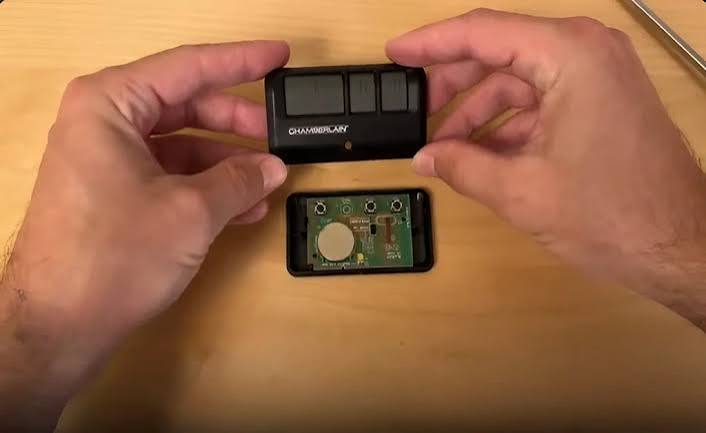
Step 2: Open the Remote Case
Locate the seam along the edge of your remote. Most remotes feature one of these opening mechanisms:
- Slide-off cover: Gently slide the back panel away from the front
- Screw-held case: Remove small Phillips or flathead screws
- Snap-fit design: Insert a coin or screwdriver into the notch and twist gently
Warning: Apply gentle pressure to avoid cracking the plastic housing. If resistance feels excessive, double-check for hidden screws.
Step 3: Remove the Old Battery
Once opened, you’ll see the battery held in place by:
- A metal clip that slides sideways
- A plastic tab that lifts upward
- Simple friction fit (common with coin cells)
Carefully remove the old battery, noting its orientation (positive side facing up in most cases). Take a photo with your phone if you’re unsure about positioning.
Step 4: Clean the Battery Contacts
Use a clean cloth or cotton swab dipped in rubbing alcohol to wipe away any corrosion or debris from the metal contacts. This simple step often improves connectivity and extends battery life.
Allow the contacts to dry completely before proceeding—this takes approximately 30 seconds.
Step 5: Insert the New Battery
Place the new battery with the positive (+) side facing up, matching the orientation of the old battery. Press down firmly until you hear or feel it click into place.
Ensure the battery sits flush against the contacts without wobbling.
Step 6: Reassemble the Remote
Align the two halves of the remote case and press them together firmly. If your remote uses screws, tighten them snugly but don’t overtighten, as this can strip the threads.
Step 7: Test Your Remote
Stand within 10-15 feet of your garage door and press the button. The door should respond immediately. If it doesn’t:
- Double-check battery orientation
- Ensure the case is fully closed
- Try reprogramming the remote (see FAQ section below)
- Test with another battery to rule out defects
Common Mistakes to Avoid When Replacing Remote Batteries
Even experienced DIYers make these errors:
- Installing the battery backward: Always verify polarity markings
- Using expired batteries: Check the expiration date on the packaging
- Touching battery surfaces with bare fingers: Oils can reduce conductivity
- Forcing the case open: This can break plastic clips permanently
- Skipping contact cleaning: Corrosion prevents proper electrical connection
According to Consumer Reports, properly maintained garage door remotes last 5-7 years on average, with battery replacements needed every 12-24 months depending on usage frequency.
How Often Should You Replace Garage Door Remote Batteries?
Battery lifespan varies based on several factors:
Usage Frequency:
- Daily use (multiple times): 12-18 months
- Occasional use (few times weekly): 18-24 months
- Rare use (vacation home): 24+ months
Environmental Conditions:
- Extreme temperatures accelerate battery drain
- High humidity promotes corrosion
- Direct sunlight increases internal temperature
Warning Signs of Low Battery:
- Reduced operating range (must stand closer to door)
- Intermittent response (works sometimes, not others)
- Dim LED indicator light (if equipped)
- Complete failure to operate
Preventive Maintenance Tip: Replace batteries proactively every 12 months, regardless of performance. Keep spare batteries in your car or garage for emergencies.
Troubleshooting: Remote Still Doesn’t Work After Battery Replacement
If your remote remains unresponsive after installing a fresh battery, try these solutions:
- Reprogram the remote: Consult your opener’s manual for reset procedures
- Check the garage door opener unit: Ensure it has power and isn’t locked
- Test other remotes: Determine if the issue is remote-specific or system-wide
- Inspect for physical damage: Look for cracked circuit boards or loose wires
- Reset the opener: Unplug for 30 seconds, then reconnect
If problems persist, contact a professional technician. The average service call costs $75-$150, but may be necessary for complex electronic failures.
Frequently Asked Questions
Q: Can I use a rechargeable battery in my garage door remote?
A: While technically possible, rechargeable batteries aren’t recommended. They typically provide lower voltage (1.2V vs. 1.5V for standard alkaline) and may not deliver consistent power. Coin cell lithium batteries (CR2032) aren’t rechargeable anyway. Stick with manufacturer-recommended battery types for optimal performance.
Q: How do I know which battery size my remote needs?
A: Check these sources in order:
- Inside the battery compartment (often printed on plastic)
- Owner’s manual or quick-start guide
- Manufacturer’s website using your model number
- Online databases like RemoteCo.com or BatteryStuff.com
When in doubt, bring your old battery to an electronics store for identification.
Q: Is it safe to dispose of old garage door remote batteries in regular trash?
A: No. Lithium and alkaline batteries contain materials harmful to the environment. Dispose of them at:
- Local recycling centers
- Battery drop-off locations (many hardware stores offer this)
- Hazardous waste collection events
Some states, including California and New York, legally require battery recycling. Check your local regulations.
Q: Why does my new battery drain quickly?
A: Rapid battery drain indicates underlying issues:
- Stuck button causing continuous signal transmission
- Internal short circuit from moisture damage
- Faulty circuit board components
- Poor-quality battery (stick with reputable brands like Energizer, Duracell, or Panasonic)
If a fresh battery dies within weeks, have your remote inspected professionally.
Q: Can weather affect my garage door remote’s battery life?
A: Absolutely. Extreme cold reduces battery capacity by up to 50%, while excessive heat accelerates chemical degradation. Store spare batteries at room temperature (68-72°F / 20-22°C) and avoid leaving remotes in hot cars during summer months.
Q: Do I need to reprogram my remote after replacing the battery?
A: Usually not. Battery replacement alone doesn’t erase programming. However, if your remote fails to work after installation, reprogramming may resolve connectivity issues. Refer to your opener’s manual for specific instructions, as procedures vary by brand and model.
Conclusion
Learning how to replace battery in garage door opener remote empowers you to handle this common maintenance task confidently. With the right battery, proper technique, and basic troubleshooting knowledge, you can restore your remote’s functionality in under five minutes.
Remember these key takeaways:
- Identify the correct battery type before purchasing
- Handle components gently to avoid damage
- Clean contacts for optimal performance
- Test thoroughly before considering professional help
- Dispose of old batteries responsibly
Regular battery maintenance ensures reliable garage door operation and prevents inconvenient lockouts. Share this guide with friends and family who might benefit from these tips! Have questions or success stories? Leave a comment below or share this article on social media to help others solve their garage door remote issues.
Stay prepared, stay connected, and keep your garage door running smoothly!
Leave a Reply