Introduction
There are few things more frustrating than sitting in your driveway, repeatedly clicking a garage door remote that refuses to respond. If you are searching for how to extend the range of your garage door opener, you are likely dealing with weak signals, interference, or aging equipment that compromises your daily convenience and security. This guide provides actionable, safe, and proven solutions to restore and enhance your opener’s performance so you never have to strain your arm out the window again.
Why Is My Garage Door Opener Range So Short?
Before diving into fixes, it is critical to understand why your range has diminished. Most modern garage door openers operate on radio frequencies between 300 MHz and 390 MHz, or the newer dual-band 315/390 MHz systems. According to industry standards, a healthy system should function reliably from 100 to 150 feet away. If your range has dropped below 20 feet, several factors may be at play:
- Antenna Damage: The hanging wire antenna may be broken, corroded, or improperly positioned.
- Radio Frequency Interference (RFI): LED bulbs, Wi-Fi routers, and nearby power lines can disrupt signals.
- Battery Issues: Weak batteries in the remote reduce transmission power significantly.
- Aging Logic Board: Capacitors and components degrade over time, reducing receiver sensitivity.
- Physical Obstructions: Metal siding, brick walls, and insulated doors block RF waves.
Understanding these variables helps you apply the right solution rather than wasting money on unnecessary replacements. For a deeper technical understanding of radio frequency propagation and interference, you can refer to Wikipedia’s article on Radio Frequency, which explains how environmental factors impact wireless signal integrity.
Step-by-Step Guide: How To Extend The Range Of Your Garage Door Opener
Follow this systematic troubleshooting process to diagnose and resolve range issues safely. Always disconnect power to the opener before performing any physical modifications.
1. Test and Replace Remote Batteries
This is the most overlooked fix. Even if the LED lights up, voltage may be insufficient for long-range transmission.
- Open the remote battery compartment using a small Phillips screwdriver.
- Remove old batteries and check for corrosion; clean contacts with isopropyl alcohol if needed.
- Install fresh CR2032 lithium coin cells (or the specific type listed in your manual). Avoid alkaline batteries as they have lower discharge rates.
- Test the remote at increasing distances: 10 ft, 25 ft, 50 ft, and 100 ft.
Expert Tip: Battery performance drops significantly below 32°F (0°C). If you live in cold climates, keep a spare remote inside the house during winter months.
2. Inspect and Reposition the Antenna
The antenna is typically a 6–8 inch copper wire hanging from the motor unit. Its position directly affects reception.
- Ensure the antenna hangs vertically downward, not coiled or touching metal surfaces.
- Straighten any kinks or bends carefully without breaking the wire.
- Verify the antenna is fully extended and not tucked inside the housing.
- Clean oxidation from the connection point with electrical contact cleaner.
If the antenna is damaged beyond repair, replace it with an OEM-compatible part matching your opener’s frequency band.
3. Eliminate Sources of Interference
RFI is a leading cause of unexplained range loss. Conduct this elimination test:
| Potential Interference Source | Diagnostic Action | Solution |
|---|---|---|
| LED Light Bulbs | Turn off all garage LEDs temporarily | Replace with RFI-shielded “garage door safe” LEDs |
| Wi-Fi Router | Move router >10 ft from opener | Use ferrite cores on cables or relocate |
| Power Strips/Surge Protectors | Unplug non-essential devices | Plug opener directly into wall outlet |
| Nearby Transformers | Identify humming electronics | Shield or relocate interfering device |
| Solar Panel Inverters | Check inverter proximity | Consult solar installer for filtering |
Note: Many homeowners unknowingly install cheap LED bulbs that emit broadband noise across the 300–400 MHz spectrum. Always choose bulbs labeled “FCC Part 15 Compliant” or specifically marketed for garage use.
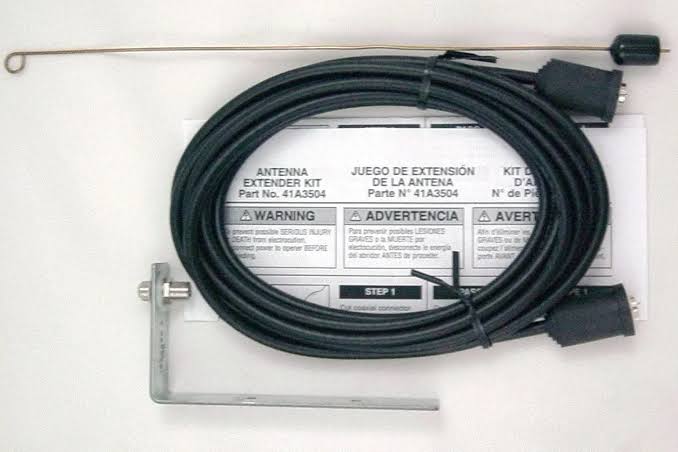
4. Install an Antenna Extension Kit
If repositioning doesn’t help, an external antenna extension can dramatically improve reception by moving the receiving element outside the motor housing’s metal shield.
Installation Steps:
- Purchase a universal antenna extension kit compatible with your opener brand (LiftMaster, Chamberlain, Genie, etc.).
- Disconnect power to the opener at the circuit breaker.
- Locate the antenna connector on the logic board (consult your manual).
- Attach the coaxial cable from the extension kit to the existing antenna terminal.
- Route the external antenna through a vent or drilled hole to the exterior wall of the garage, positioning it vertically at least 3 feet above ground level.
- Seal the penetration point with silicone caulk to prevent moisture intrusion.
- Restore power and test range incrementally.
⚠️ Safety Warning: Never splice or modify the original antenna wire yourself unless you have RF engineering experience. Improper impedance matching can damage the receiver circuit permanently.
5. Upgrade to a Dual-Band or Smart System
If your opener is over 15 years old, component degradation may be irreversible. Modern dual-band openers (315/390 MHz) automatically switch frequencies to avoid interference, effectively doubling reliable range. Smart openers with Wi-Fi connectivity also offer app-based control as a backup when RF fails entirely.
Comparison: Legacy vs. Modern Openers
| Feature | Legacy Single-Band | Modern Dual-Band/Smart |
|---|---|---|
| Typical Range | 50–100 ft | 150–300 ft |
| Interference Resistance | Low | High (auto-frequency hopping) |
| Battery Life (Remote) | 1–2 years | 3–5 years |
| Backup Control Method | None | Smartphone App / Keypad |
| Average Cost | $150–$250 | $250–$450 |
Frequently Asked Questions About Garage Door Opener Range
Can I use a signal booster to extend my garage door opener range?
Commercial RF amplifiers exist but are not recommended for residential garage door openers. They can amplify noise alongside the signal, cause FCC compliance violations, and potentially interfere with emergency services. Focus instead on antenna optimization, interference elimination, and proper maintenance. If problems persist, consult a certified technician rather than installing unregulated boosters.
Does weather affect garage door opener range?
Yes, extreme conditions can temporarily reduce range. Heavy rain, snow accumulation on the antenna, and high humidity absorb RF energy. Temperature extremes also affect battery chemistry and capacitor performance. Ensure your antenna is weatherproofed and consider a protective cover rated for outdoor UV exposure. Regular seasonal inspections prevent weather-related failures.
Will changing my remote’s frequency improve range?
No. Garage door remotes are factory-paired to specific frequencies and rolling code protocols. You cannot manually change frequencies. However, upgrading to a newer remote compatible with your opener model may improve range due to better transmitter design and stronger output power. Always verify compatibility via the manufacturer’s cross-reference tool before purchasing.
How often should I maintain my garage door opener to prevent range issues?
Perform basic maintenance every six months: test batteries, inspect antenna integrity, clean photo-eye sensors, and lubricate moving parts. Annually, conduct a full interference audit and verify safety reversal mechanisms. Proactive maintenance extends equipment life by 40–60% according to the Door & Access Systems Manufacturers Association (DASMA) guidelines.
Is it safe to extend the antenna wire myself?
Only if you use a manufacturer-approved extension kit designed for your specific model. Cutting, splicing, or soldering the original antenna alters its impedance and resonant frequency, which can render the receiver useless or create fire hazards from reflected power. When in doubt, hire a licensed garage door technician who carries proper RF testing equipment.
Can smart home integration solve range problems?
Absolutely. Smart garage door controllers connect via Wi-Fi rather than RF, bypassing traditional range limitations entirely. Even if your RF remote fails at distance, you can open/close the door via smartphone from anywhere with internet access. Many smart systems also provide real-time diagnostics, alerting you to battery weakness or motor issues before they cause complete failure.
Conclusion: Reclaim Reliable Garage Access Today
Extending your garage door opener’s range isn’t about magic gadgets—it’s about systematic diagnosis, proper maintenance, and informed upgrades. By testing batteries, optimizing antenna placement, eliminating interference, and considering modern dual-band technology, you can restore dependable operation and enhance home security. Remember: safety always comes first. When electrical work exceeds your comfort level, professional installation ensures both performance and compliance.
Don’t let a weak signal compromise your peace of mind. Try these steps this weekend, and share your results with friends and family on social media! Tag someone who’s been battling their stubborn garage door—they’ll thank you later. 🏡🔧
Have questions or success stories? Drop them in the comments below or share this guide on Facebook, X (Twitter), or Nextdoor to help your community!
Leave a Reply