If you’re searching for How To Change The Code On Your Garage Door, you likely want to improve security or fix access issues. Maybe you’ve moved into a new home, lost a remote, or simply want to update old access codes. The good news is that changing your garage door code is simple and can usually be done in just a few minutes without professional help.
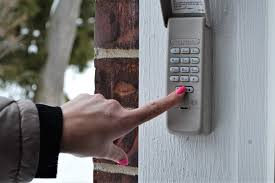
Why You Should Change Your Garage Door Code
Understanding How To Change The Code On Your Garage Door starts with knowing why it matters.
Top Reasons to Update Your Code:
- You moved into a new house
- A remote was lost or stolen
- Former tenants still have access
- You want better home security
Read too: Tc1 Tricode Garage Door Opener Remote W/ Clip Chamberlain: Complete Guide
According to general security practices referenced in Wikipedia, modern garage systems use rolling code technology, which improves safety by changing access signals automatically—but keypad codes still need manual updates.
What Types of Garage Door Codes Exist?
Before learning How To Change The Code On Your Garage Door, you need to understand the two main types:
1. Keypad PIN Code
- Used for outside entry
- Usually 4-digit numbers
- Manually changed by homeowner
2. Remote Control Code
- Synced with the opener unit
- Uses wireless signals
- Changed via “Learn” button
👉 Most homeowners are referring to the keypad PIN when changing codes.
Where Is the Learn Button Located?
The Learn button is essential for programming and code changes.
Location:
- On the motor unit (ceiling-mounted opener)
- Behind a light cover or plastic panel
Common Colors:
- Yellow
- Purple
- Red/Orange
- Green
👉 Each color represents different compatibility systems.
How To Change The Code On Your Garage Door (Step-by-Step)
Method 1: Change Keypad Code (Most Common Method)
Time Required: 2–5 minutes
Steps:
- Press the Learn button on the garage opener
- Release when the LED light turns on
- Within 30 seconds, go to your keypad
- Enter your new 4-digit PIN
- Press and hold the Enter button
- Wait for the garage light to flash
👉 This confirms your new code is successfully saved.
Method 2: Full Reset (Erase All Codes)
Use this if you want to remove all previous users.
Steps:
- Press and hold the Learn button for 6–10 seconds
- Release when the LED turns off
What Happens:
- All remotes are deleted
- Keypads are disconnected
- System is fully reset
Method 3: Reprogram Remote Controls
After resetting, you must reconnect devices.
Steps:
- Press the Learn button
- Press the remote button
- Wait for the light to flash
👉 Repeat for each remote.
Common Problems When Changing Garage Codes
Why Won’t My New Code Work?
Possible Causes:
- Wrong PIN entered
- Battery is weak
- Programming timed out
Quick Fix Checklist:
- Replace keypad battery
- Re-enter code slowly
- Stay within range (3–5 feet)
- Retry programming steps
Troubleshooting Table
| Problem | Symptom | Solution |
|---|---|---|
| Dead battery | No response | Replace battery |
| Wrong PIN | Door won’t open | Reprogram code |
| Timing issue | Code not saved | Repeat quickly |
| Memory full | Old codes still active | Perform reset |
| Signal issue | Intermittent response | Move closer |
Is Changing Garage Door Code Safe?
Yes—and highly recommended
Security experts agree that updating access codes regularly helps prevent unauthorized entry. In fact, garages are often one of the most vulnerable access points in a home due to outdated or shared codes.
Advantages vs Disadvantages
Advantages:
- Improves home security
- Removes old users
- Quick and easy process
Disadvantages:
- May require reprogramming remotes
- Temporary inconvenience
Pro Tips for Better Security
- Change your code every 6–12 months
- Avoid simple PINs like “0000” or “1234”
- Use a unique combination
- Test after every update
When Should You Call a Technician?
You may need professional help if:
- Opener does not respond
- Keypad is completely dead
- Learn button fails to work
FAQ: How To Change The Code On Your Garage Door
Q1: How long does it take to change a garage door code?
Usually 2–5 minutes.
Q2: Do I need tools to change the code?
No. Everything is done manually.
Q3: Will changing the code affect my remote?
No, unless you perform a full system reset.
Q4: How many digits is a garage PIN?
Most systems use 4-digit codes.
Q5: Why is my new code not working?
It may be a battery or timing issue.
Q6: Is it safe to change codes frequently?
Yes. It improves overall security.
Conclusion
Learning How To Change The Code On Your Garage Door is one of the easiest ways to protect your home. With just a few simple steps, you can update your access, remove old users, and improve overall security in minutes.
It’s fast, effective, and something every homeowner should know.
👉 If this guide helped you, share it on social media so others can secure their garage doors too!
Leave a Reply