Introduction
Moving into a new home or worrying about an old remote in the wrong hands? You’re not alone — and the good news is, yes, you absolutely can change the code on your garage door opener, and it’s easier than you might think. Whether you just bought a house, lost a remote, or simply want to boost your home’s security, this guide will walk you through every step in plain, beginner-friendly language. Let’s get your garage locked down in just a few minutes.
Why Should You Change Your Garage Door Opener Code?
Before we dive into the “how,” let’s talk about the “why.” Changing your garage door code isn’t just a tech task — it’s a smart security move.
According to national crime statistics, approximately 9% of residential break-ins occur through the garage
www.thegaragedoorhero.com. That’s a number no homeowner should ignore. Here are the most common reasons to update your code:
- You just moved into a new home — Previous owners, their kids, or neighbors may still know the old PIN.
- You lost a remote or keypad — Anyone who finds it could potentially access your garage.
- Your code is too simple — Using “1234” or your birth year is a security risk.
- A family member moved out — Ex-roommates or teenagers heading to college should no longer have access.
- You suspect unauthorized access — If the door opens randomly, someone may have your code.
“A garage is often the weakest entry point in a home. Changing the code regularly is one of the cheapest, most effective security upgrades you can make.” — Home security experts at Abode
goabode.com
.
How Garage Door Opener Codes Actually Work
Understanding the technology helps you feel confident while reprogramming. Modern garage door openers use what’s called rolling code technology (also known as code hopping). This means every time you press the remote, the system generates a brand-new, one-time-use security code
support.chamberlaingroup.com.
According to the Wikipedia article on garage door openers, older models used fixed DIP switches (256 to 4,096 possible codes), while today’s systems use billions of encrypted combinations on frequencies between 300–400 MHz. Chamberlain’s latest Security+ 3.0 (introduced in 2025) even uses Bluetooth Low Energy on 2.4 GHz for enhanced security
en.wikipedia.org.
Quick comparison of opener generations:
| Era | Technology | Security Level |
|---|---|---|
| 1984–1993 | 8–12 DIP switches | ⚠️ Very Low |
| 1993–1997 | Billion Code (fixed) | 🔒 Low |
| 1997–2011 | Security+ (rolling code) | 🔒🔒 Medium |
| 2011–2025 | Security+ 2.0 (rolling code) | 🔒🔒🔒 High |
| 2025–present | Security+ 3.0 (BLE LR) | 🔒🔒🔒🔒 Very High |
What You’ll Need Before You Start
Gather these items so the process goes smoothly:
✅ A sturdy ladder — You’ll need to reach the motor unit on the ceiling.
✅ A fresh 9V or AA batteries (depending on your keypad model) — Weak batteries cause 70% of programming failures.
✅ Your garage door opener’s manual (or the brand/model number).
✅ 30 seconds of uninterrupted time — Most systems have a 30-second window to complete the process.
✅ A new 4-digit PIN — Pick something memorable but not obvious (avoid 1234, 0000, or your birth year).
Step-by-Step: How to Change the Code on Your Garage Door Opener
The exact steps vary slightly by brand, but the core process is nearly identical. Here’s the universal method, followed by brand-specific notes.
Step 1: Locate the “Learn” or “Program” Button
Climb your ladder and look at the back or side of the motor unit (the box hanging from your garage ceiling). You’ll find a colored button — usually labeled “Learn,” “Program,” or “Set.” The button color tells you the technology generation:
- 🟡 Yellow button → Security+ 2.0 (2011–2025 models)
- 🟣 Purple button → Security+ (2005–2014)
- 🟠 Orange/Red button → Security+ (1997–2005)
- 🟢 Green button → Billion Code (1993–1997)
Step 2: Clear the Old Code (Optional but Recommended)
If you want to erase all previous remotes and keypads (ideal for new homeowners):
- Press and hold the Learn button for 6–10 seconds www.easygaragedoorrepair.com.
- Release when the LED next to the button turns off.
- All previously paired devices are now erased from memory.
⚠️ Warning: This will disconnect ALL remotes and keypads. You’ll need to reprogram every single one.
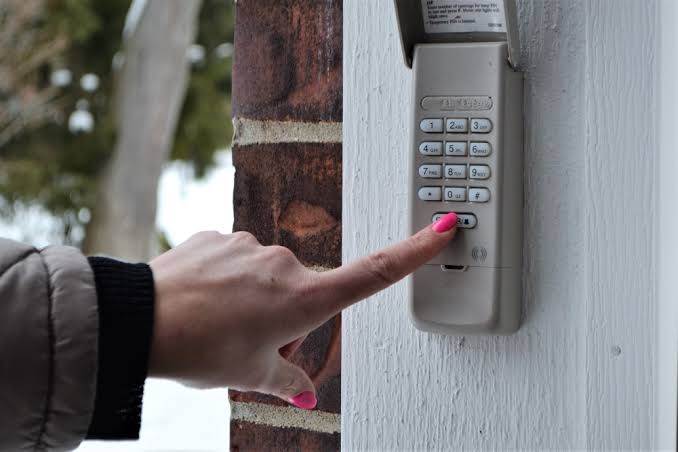
Step 3: Program Your New Keypad Code
- Press the Learn button once (don’t hold it). The LED will blink or turn on www.overheaddoor.com.
- Within 30 seconds, walk to your outdoor keypad.
- Enter your new 4-digit PIN of choice.
- Press and hold the “Enter” or arrow button until the opener’s light blinks or you hear a click support.chamberlaingroup.com.
- Test the new code by entering it again — the door should operate.
Step 4: Re-Program Your In-Car and Handheld Remotes
Since clearing memory wiped everything, re-sync each remote:
- Press the Learn button on the motor unit once.
- Within 30 seconds, press and hold the button on your remote for 1–2 seconds.
- The opener light will flash to confirm pairing.
- Repeat for each remote.
Brand-Specific Instructions
🔵 Chamberlain & LiftMaster
- Press the Learn button twice (the LED will flash), then enter your 4-digit PIN on the keypad and press Enter support.chamberlaingroup.com.
- For Security+ 3.0 (2025+) models, you can also program via the myQ app on your smartphone.
🟢 Genie (Intellicode)
- Press the “Program” button on the motor head until the red LED blinks.
- Enter your PIN on the keypad, then press “Arrow Up + Arrow Down + Program” or simply Enter, depending on model www.tiktok.com.
🔴 Craftsman
- Enter your 4-digit PIN, then press and hold the # button until the opener light blinks twice www.justanswer.com.
- Release, enter your new PIN, and press # again to save.
⚪ Overhead Door
- Press the “Learn Code” button once (red LED blinks).
- Enter your new PIN and press the up/down arrow button www.overheaddoor.com.
Change vs. Reset: What’s the Difference?
Many homeowners confuse these two actions. Here’s a quick breakdown:
| Action | What It Does | When to Use |
|---|---|---|
| Change Code | Keeps all remotes paired; only updates the keypad PIN | Routine security refresh |
| Full Reset | Erases ALL remotes and keypads from memory | Moving into a new home, lost remote, suspected breach |
| Reprogram Remote | Adds a new remote without affecting the keypad | Bought a new car or extra remote |
Tips for Choosing a Strong Garage Door PIN
Not all 4-digit codes are created equal. Follow these best practices:
- ❌ Avoid sequential numbers: 1234, 4321
- ❌ Avoid repeated digits: 1111, 2222
- ❌ Avoid personal info: birth year, address number, last 4 of SSN
- ✅ Do use random combinations: 7391, 4826, 5073
- ✅ Do pick something memorable via a pattern only you know
- ✅ Do change your code at least once every 12–18 months
Troubleshooting Common Issues
❓ The keypad won’t accept my new code
- Replace the keypad batteries — weak power is the #1 cause.
- Make sure you’re within the 30-second programming window.
❓ The door doesn’t respond after reprogramming
- Check that the Learn LED stopped blinking before testing.
- Verify you’re using the correct frequency (315 MHz vs. 390 MHz).
❓ My remote works but the keypad doesn’t
- The keypad may need a factory reset: remove batteries for 30 seconds, then reinstall www.justanswer.com.
❓ The Learn button light won’t turn on
- The logic board may be faulty — consider calling a professional.
Frequently Asked Questions (FAQ)
1. Can I change my garage door code without a ladder?
If your model has a wall-mounted control panel with programming access, yes. Otherwise, you’ll need to reach the motor unit on the ceiling.
2. How often should I change my garage door code?
Experts recommend changing it every 12–18 months, or immediately after moving, losing a remote, or a breakup/roommate moving out.
3. Can someone hack my modern garage door opener?
Modern rolling code systems (Security+ 2.0 and newer) are extremely difficult to hack. Older DIP-switch models (pre-1993) are vulnerable and should be replaced.
4. Will changing the code erase my remotes?
Only if you hold the Learn button for 6+ seconds (full reset). A quick press lets you change just the keypad PIN while keeping remotes active.
5. What if I forget my new garage door code?
You’ll need to perform a full reset (hold Learn button for 10 seconds) and start fresh. Write your new PIN down in a secure place!
6. Do smart garage openers need a code change?
Smart openers like myQ or Genie Aladdin use app-based authentication instead of PINs, but their physical keypads still need periodic code updates.
Leave a Reply