If you’re trying to improve home security or your old access code feels too easy to guess, learning how to change the code on a garage door keypad is essential. Many homeowners don’t realize how simple this process can be once you understand the basic steps.
In this guide, we’ll walk you through everything in a clear, beginner-friendly way so you can safely update your keypad code and keep your garage secure.
Read too: Tc1 Tricode Garage Door Opener Remote W/ Clip Chamberlain: Complete Guide
Why You Should Change Your Garage Door Keypad Code?
Changing your garage keypad code is not just about convenience—it’s about safety. According to home security experts, garage entry points are among the most common weak spots in residential properties.
Here are the most common reasons to update your code:
- You moved into a new house
- Someone knows your old code
- You suspect unauthorized access
- You want to improve overall home security
- The keypad is malfunctioning or outdated
A garage door system (see overview at ) is often connected directly to your home, so keeping it secure is critical.
What You Need Before Changing the Code
Before you start, make sure you have the following:
- Access to the garage door motor unit
- Ladder (if the unit is ceiling-mounted)
- Fresh batteries for keypad (optional but recommended)
- Existing PIN (if required by your model)
- User manual (if available)
Most modern systems use a “learn button” method, but older systems may require dip switch adjustments.
How To Change The Code On A Garage Door Keypad (Step-by-Step)
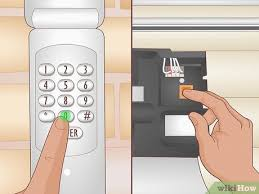
Step 1: Locate the “Learn” Button
Open your garage door motor unit cover. Look for a button labeled:
- Learn
- Program
- Smart/Learn
This button is usually located near the antenna wire or control panel.
Step 2: Clear the Existing Code
Press and hold the Learn button for about 6–10 seconds until the indicator light turns off.
This action erases all previous codes stored in the system.
⚠️ Important: This will disconnect all remotes and keypads temporarily.
Step 3: Enter Programming Mode
Press the Learn button again briefly (1–2 seconds). The indicator light should turn on and stay steady.
You now have approximately 30 seconds to enter a new code.
Step 4: Set Your New Keypad Code
On your garage keypad:
- Enter your desired 4–6 digit PIN
- Press the “Enter” or “OK” button
- Wait for the light to blink or hear a click sound
This confirms that the new code has been successfully saved.
Step 5: Test the New Code
Close the garage door and test your new PIN:
- Enter the code
- Press Enter
- Observe if the door opens smoothly
If it doesn’t work, repeat the process carefully.
Common Garage Keypad Brands and Differences
Different manufacturers may have slightly different steps:
| Brand | Method | Notes |
|---|---|---|
| Chamberlain | Learn button method | Most common in US homes |
| LiftMaster | Similar to Chamberlain | Often compatible systems |
| Genie | Keypad sync code | May require reset button |
| Craftsman | Learn button | Older models use dip switches |
Each system may have slight variations, so always double-check your model instructions.
Troubleshooting: Why Your New Code Isn’t Working
If your keypad doesn’t respond after changing the code, check these issues:
1. Weak Batteries
Replace keypad batteries every 12–18 months.
2. Incorrect Timing
You may have waited too long after pressing the Learn button.
3. Signal Interference
Nearby electronics can sometimes disrupt the signal.
4. Wrong Programming Mode
Ensure the system is in programming mode before entering the PIN.
Security Tips for Better Garage Protection
To maximize safety after changing your code:
- Use a random 4–6 digit PIN (avoid birthdays)
- Change your code every 6–12 months
- Avoid sharing your code with too many people
- Enable rolling code technology if available
- Regularly inspect keypad for wear or damage
Kelebihan vs Kekurangan Keypad Garage
| Kelebihan | Kekurangan |
|---|---|
| Easy access without keys | Can be hacked if weak PIN used |
| Convenient for family use | Requires battery maintenance |
| Works during power outages | Keypad can wear out over time |
How Often Should You Change the Code?
Security experts recommend updating your garage keypad code:
- Every 6–12 months
- Immediately after moving into a new home
- After suspected security breaches
Frequent updates reduce the risk of unauthorized access significantly.
FAQ: How To Change The Code On A Garage Door Keypad
1. Do I need to reset the whole system to change the code?
No. Most modern systems only require reprogramming via the Learn button, not a full reset.
2. Can I use the same code for multiple garage doors?
Yes, but it is not recommended for security reasons. Use unique codes for each door.
3. What if I forget my garage keypad code?
You will need to reset the system using the motor unit Learn button and set a new code.
4. How long does it take to change the code?
Usually less than 10 minutes if you follow the correct steps.
5. Do all garage keypads use the same method?
No. Some use Learn buttons, others use dip switches or smartphone apps.
6. Is it safe to change the code myself?
Yes, it is generally safe as long as you follow manufacturer instructions carefully.
Conclusion
Learning how to change the code on a garage door keypad is a simple but powerful way to improve your home security. With just a few steps, you can update your access code, protect your property, and gain peace of mind.
Make it a habit to refresh your code regularly and always choose a secure combination that’s hard to guess.
If you found this guide helpful, feel free to share it with friends or family who might also need to secure their garage systems.
Leave a Reply