Introduction
There is nothing quite as frustrating as standing in your driveway, rain pouring down, and realizing you cannot remember the keypad code to get into your garage. Even worse, if you have moved into a new home or suspect a security breach, you may need to change the code but lack the original credentials. You are not alone; thousands of homeowners face this dilemma annually. This guide will walk you through how to change garage door code without old code Liftmaster systems, ensuring your home remains secure and accessible.
Why You Might Need a Full System Reset
Before diving into the technical steps, it is crucial to understand why a simple code change might not be enough. If you do not know the old code, you typically cannot just “update” it via the keypad interface because most systems require authentication for security reasons. Therefore, the solution usually involves a hard reset of the logic board or re-syncing the wireless components.
According to recent home security surveys, over 30% of homeowners use default or easily guessable codes for their garage doors, making them vulnerable to brute-force attacks. By performing a proper reset, you are not just regaining access; you are upgrading your home’s security posture.
Step 1: Identify Your LiftMaster Model Type
Not all LiftMaster openers are created equal. The method to reset them varies significantly depending on the age and technology of the unit. Look at the motor unit hanging from your garage ceiling. You will find a label with the model number (e.g., 8500, 87504, or a series like Security+ 2.0).
- Older Models (Pre-2011): Often use DIP switches or simple “Learn” buttons that are yellow, red, or purple.
- Newer Models (Security+ 2.0): Typically feature a yellow “Learn” button and use rolling code technology for enhanced security.
- MyQ Enabled Models: These can often be managed via smartphone apps, but a physical reset is still required if the app is inaccessible.
Pro Tip: If you cannot find the model number, look at the color of the “Learn” button near the antenna wire. This is the single most important identifier for programming instructions.
Step 2: How to Clear All Codes (The Hard Reset)
If you do not have the old code, the most effective method is to wipe the opener’s memory clean. This removes all previously programmed remotes and keypads. Warning: This means you will need to reprogram every remote control and keypad you own after this step.
For Models with a Yellow “Learn” Button
- Locate the motor unit on the ceiling.
- Find the Yellow Learn Button. It is usually located on the back panel near the terminal block where the wires connect.
- Press and hold the Learn button for approximately 6 to 10 seconds.
- Wait until the indicator light next to the button turns off.
- Release the button.
Once the light goes out, the memory is cleared. The opener no longer recognizes any previous codes, effectively solving the problem of not knowing the old one.
For Older Models with DIP Switches
If your unit has a row of tiny switches (DIP switches) inside the remote and the motor unit:
- Open the light cover on the motor unit.
- Locate the DIP switch bank.
- Change the pattern of the switches to a new, random configuration.
- Match this exact pattern on all your handheld remotes.
While less common today, this mechanical method is foolproof if you have physical access to the motor unit.
Step 3: Reprogramming Your Wireless Keypad
Now that the system is wiped, you need to set a new code. This is where you establish your new entry credential.
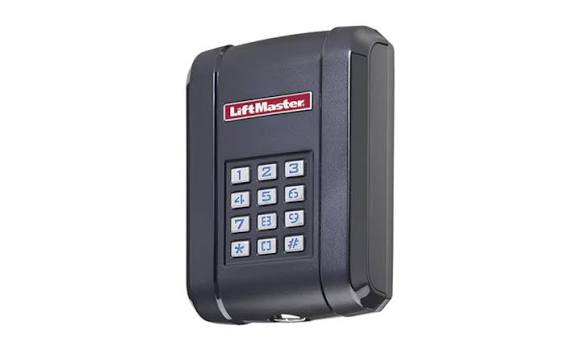
- Enter Programming Mode: On your wireless keypad (e.g., LiftMaster 877LM), press and hold the
*and#keys simultaneously until the LED lights blink. - Enter New PIN: Type in your desired 4-digit PIN. Choose something memorable but not obvious (avoid 1234 or your birth year).
- Confirm PIN: Press the
ENTERbutton. The light should blink again to confirm acceptance. - Sync with Opener: Go to the motor unit and press the Learn Button once (do not hold it). The light will illuminate steadily.
- Finalize Sync: Within 30 seconds, return to the keypad and enter your new PIN followed by
ENTER. The motor unit light should blink or click, indicating success.
| Feature | Old Code Method | Hard Reset Method |
|---|---|---|
| Requires Old Code? | Yes | No |
| Time Required | 2 Minutes | 10-15 Minutes |
| Security Level | Standard | High (Clears unauthorized devices) |
| Complexity | Low | Medium |
Step 4: Re-syncing Handheld Remotes
Do not skip this step. Since you performed a hard reset, your car remotes will no longer work.
- Press the Learn Button on the motor unit once. The indicator light will turn on.
- Within 30 seconds, press and hold the button on your handheld remote that you wish to program.
- Hold it until the motor unit’s light blinks or you hear a click.
- Test the remote immediately.
Repeat this process for every remote control in your household. For more detailed technical specifications on rolling code technology, you can refer to Wikipedia’s entry on Rolling Codes, which explains how modern openers prevent code grabbing theft.
Troubleshooting Common Issues
Even with careful execution, things can go wrong. Here are solutions to frequent problems:
- Keypad Not Responding: Check the battery. A weak battery can cause signal failure even if the code is correct. Replace with a fresh 9V or AA battery as specified by your model.
- Light Blinks But Door Doesn’t Move: Ensure the safety sensors near the floor are aligned. If the green light on the sensor is blinking, the door will not operate regardless of the code.
- “Invalid Code” Error: You may have entered the programming mode incorrectly. Perform the hard reset again and ensure you are pressing the Learn button only once during the syncing phase.
FAQ Section
Q1: Can I change the code without accessing the motor unit?
A: Generally, no. To change a code without knowing the old one, you must physically access the motor unit to perform a hard reset. If you cannot reach the motor unit (e.g., high ceiling, no ladder), you may need to contact a professional technician.
Q2: Will resetting the code affect my MyQ smartphone app?
A: Yes. If you clear the memory, your MyQ hub will lose connection with the opener. You will need to re-setup the MyQ integration in the app after reprogramming the opener.
Q3: How often should I change my garage door code?
A: Security experts recommend changing your garage door code at least once a year, or immediately if you lose a remote or move into a new home. Regular changes prevent code fatigue and unauthorized access.
Q4: What if I don’t have a wireless keypad?
A: You can still reset the system using the motor unit’s Learn button. However, without a keypad, you will rely solely on handheld remotes or the wall console inside the garage. Consider purchasing a wireless keypad for added convenience and guest access.
Q5: Is it safe to use simple codes like 1111 or 0000?
A: Absolutely not. These are the first codes hackers or thieves will try. Use a random combination of numbers that does not relate to personal information. A 4-digit code offers 10,000 combinations; make yours count.
Conclusion
Learning how to change garage door code without old code Liftmaster units is a valuable skill for any homeowner. By performing a hard reset, you not only regain access to your garage but also enhance your home’s security by wiping out potentially compromised old codes. Remember, the key lies in identifying your model, clearing the memory correctly, and diligently reprogramming all your devices.
Don’t let a forgotten code lock you out of your life. Take control of your home security today. If you found this guide helpful, please share it with friends and family on social media to help them stay secure and stress-free!
Leave a Reply