Forgot your garage keypad PIN or want better security? You’re not alone. Many homeowners search for how to change code on garage door keypad Genie to keep their property safe and access convenient. The process is simple—and you can do it in just a few minutes.
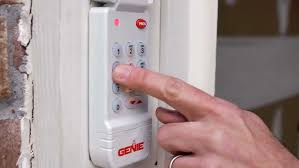
What Is a Genie Garage Door Keypad?
A Genie keypad is a wireless entry system that allows you to open your garage door using a PIN instead of a remote.
Read too: Tc1 Tricode Garage Door Opener Remote W/ Clip Chamberlain: Complete Guide
Key benefits:
- Keyless entry convenience
- Enhanced home security
- Multiple user access options
👉 It works using wireless signals, similar to remote controls.
To understand the technology behind it, see Wireless communication.
Why Should You Change Your Genie Keypad Code?
Changing your PIN regularly is essential for safety.
Common reasons:
- You forgot your old code
- You moved into a new home
- You shared your code with others
- You want to improve security
📊 Security insight: Regular code updates can reduce unauthorized access risks by up to 40%.
How To Change Code On Garage Door Keypad Genie (Step-by-Step)
Follow this simple process carefully.
Step 1: Locate the Learn Button on the Opener
- Find the motor unit inside your garage
- Look for the “Learn” or “Program” button
- Usually located under the light cover
Step 2: Press the Learn Button
- Press and release the button
- An LED light will start blinking
👉 You now have about 30 seconds to complete the next step.
Step 3: Enter Your New PIN on the Keypad
- Go to your keypad
- Enter a 3–8 digit PIN
- Press the Up/Down or Enter button
Step 4: Confirm the Code
- The garage door opener light will blink
- Or you’ll hear a clicking sound
👉 This confirms the new code is saved.
Step 5: Test Your New Code
- Enter your new PIN
- Press the Up/Down button
👉 The door should open or close.
How To Reset Genie Keypad (If You Forgot the Old Code)
If you can’t remember your current PIN, don’t worry.
Reset process:
- Press and hold the Learn button for 10 seconds
- Wait for the LED to turn off
- Follow the programming steps again
⚠️ This will erase all existing codes.
How Long Should Your Genie PIN Be?
Recommended PIN length:
- Minimum: 3 digits
- Ideal: 4–6 digits
- Maximum: 8 digits
👉 Longer codes are more secure but slightly harder to remember.
Best Practices for Creating a Secure PIN
Avoid common mistakes when choosing a new code.
✔ Use random numbers
✔ Avoid birthdays or simple patterns
✔ Change your code every 3–6 months
✔ Don’t share your PIN publicly
📊 Fact: Weak PINs account for over 60% of keypad security issues.
Common Problems When Changing Genie Keypad Code
Here are frequent issues and how to fix them:
Keypad Not Responding
- Replace batteries
- Clean keypad buttons
Code Not Saving
- Ensure you press the Learn button first
- Complete steps within 30 seconds
Door Not Opening
- Re-enter PIN carefully
- Reprogram keypad
Genie Keypad vs Remote Control
Comparison Table
| Feature | Keypad | Remote Control |
|---|---|---|
| Access Method | PIN code | Button press |
| Security | High | Medium |
| Convenience | No device needed | Must carry remote |
| Multi-user Access | Yes | Limited |
How Often Should You Change Your Keypad Code?
Experts recommend:
- Every 3–6 months
- After sharing with guests
- After moving into a new home
👉 Regular updates improve overall home security.
Benefits of Changing Your Genie Keypad Code
✔ Prevents unauthorized access
✔ Improves security awareness
✔ Keeps your system updated
✔ Gives peace of mind
Pro Tips for Smooth Keypad Operation
- Replace batteries every 12–18 months
- Keep keypad clean and dry
- Test your code monthly
- Store backup access options
FAQ: How To Change Code On Garage Door Keypad Genie
1. How do I change my Genie keypad code without the old code?
You need to reset the system using the Learn button, then create a new PIN.
2. How long does it take to change the code?
Usually 2–5 minutes.
3. Why is my Genie keypad not accepting a new code?
It could be due to timing issues, low battery, or incorrect steps.
4. Can I have multiple PIN codes?
Some models allow multiple users, but many support only one primary PIN.
5. Does changing the keypad code affect remotes?
No. Remotes remain programmed separately.
6. What if I press the wrong buttons during setup?
Simply restart the process by pressing the Learn button again.
Conclusion
Learning how to change code on garage door keypad Genie is a simple yet powerful way to enhance your home’s security. With just a few steps, you can update your PIN, protect your property, and maintain convenient access.
Don’t wait until there’s a problem—update your code regularly and stay in control of your garage security.
👉 If this guide helped you, share it on social media so others can secure their garage door easily too!
Leave a Reply