If your garage keypad suddenly stops working or you’ve just installed a new one, you may be wondering How Do You Program A Clicker Garage Door Keypad correctly. This is a common issue for homeowners using wireless entry systems.
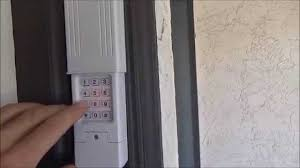
The good news is that programming a Clicker keypad is usually quick and straightforward once you understand the right sequence and compatibility requirements.
Read too: How Do You Change Code On Garage Door Keypad Fast?
What Is a Clicker Garage Door Keypad?
A Clicker garage door keypad is a wireless access device that allows you to open your garage door using a PIN code instead of a remote.
It is widely used because:
- It improves home security
- It eliminates the need for physical keys
- It allows multiple users to access the garage easily
Clicker keypads are compatible with major brands like Chamberlain, LiftMaster, and Craftsman systems.
Before You Start Programming
Before learning How Do You Program A Clicker Garage Door Keypad, make sure you have:
- Fresh batteries installed (usually CR2032 or 9V depending on model)
- Access to your garage motor unit
- Ladder (if opener is mounted high)
- Existing PIN or factory reset readiness
According to the U.S. Department of Energy, properly maintained garage systems can improve home energy efficiency by reducing air leakage from repeated manual operation. United States Department of Energy
How Do You Program A Clicker Garage Door Keypad (Step-by-Step)
Follow this simple and accurate method:
Step 1: Locate the “Learn” Button
Go to your garage door motor unit (ceiling-mounted). Look for a small button labeled:
- Learn
- Program
- Smart
This button is usually near the antenna wire.
Step 2: Activate Programming Mode
Press the Learn button once (do NOT hold it too long).
- A small LED light will turn on or blink
- You typically have 30 seconds to complete the next step
Step 3: Enter Your PIN on the Keypad
On your Clicker keypad:
- Enter your 4-digit PIN
- Press the “Enter” or “Send” button
You may hear a click or see the garage light flash, indicating successful sync.
Step 4: Test the System
Wait 10–15 seconds, then:
- Enter your PIN again
- Press Enter
- Observe garage door response
If it works, programming is complete.
Common Programming Methods by Model
Different Clicker models may have slight variations.
| Method | Description |
|---|---|
| Standard Learn Button | Most common method |
| Dip Switch Mode | Older garage systems |
| Smart Sync Mode | Newer rolling-code systems |
Rolling-code technology, widely used in modern systems, changes the access code every time you use the remote for added security. Learn more about it here: Rolling code
Troubleshooting If It Doesn’t Work
If programming fails, check these issues:
1. Wrong PIN Entry
Double-check your 4-digit code.
2. Battery Issues
Weak batteries are the most common failure cause.
3. Signal Interference
Metal doors or nearby electronics may block signals.
4. Incompatible System
Not all Clicker keypads support every opener brand.
Programming vs Reprogramming
| Action | Purpose |
|---|---|
| Programming | Setting up a new keypad |
| Reprogramming | Resetting or changing existing code |
If your keypad was previously paired with another garage door, you must reset it before reprogramming.
Safety Tips Before Programming
Garage systems involve moving mechanical parts. According to safety recommendations from Consumer Product Safety Commission:
- Never place fingers near moving door parts
- Keep children away during setup
- Disconnect power if troubleshooting wiring issues
How Long Does Programming Take?
In most cases:
- Initial setup: 2–5 minutes
- Troubleshooting: 10–15 minutes
- Full reset + setup: up to 20 minutes
Most users successfully complete programming on the first attempt if instructions are followed carefully.
Benefits of Using a Clicker Keypad
- No need to carry remote controls
- Secure PIN-based access
- Easy sharing with family members
- Weather-resistant design
- Works even if remote battery dies
FAQ: How Do You Program A Clicker Garage Door Keypad
1. How do you program a Clicker garage door keypad for the first time?
Press the Learn button on the motor unit, enter your PIN on the keypad, and press Enter to sync.
2. Why is my Clicker keypad not working after programming?
It may be due to weak batteries, incorrect PIN, or signal interference.
3. Can I program multiple garage doors to one keypad?
Yes, most Clicker models support multiple door programming with different PINs.
4. Do I need to reset my keypad before reprogramming?
Yes, if it was previously synced to another garage system.
5. How far does the Clicker keypad signal reach?
Typically up to 20–30 feet depending on environment and interference.
Conclusion
Learning How Do You Program A Clicker Garage Door Keypad is a simple but valuable skill that improves home convenience and security. With just a few steps—locating the Learn button, entering your PIN, and testing—you can complete the setup in minutes.
If the keypad doesn’t work immediately, don’t worry. Most issues are related to batteries or signal timing and can be fixed quickly.
For better home access control and safety, a properly programmed keypad is one of the easiest upgrades you can make. Share this guide if it helped you set up your system successfully.
Leave a Reply