Losing your remote or needing an extra one for a new car is incredibly frustrating. If you are currently scratching your head wondering how do you program a Clicker garage door opener, take a deep breath—you are in the right place. We know how stressful it is to be stuck in the driveway, which is why we have crafted this friendly, foolproof guide to get your door working perfectly in just a few minutes.
How Do You Program A Clicker Garage Door Opener: Preparation and Tools
Before we dive into the buttons and blinking lights, let us gather what you need. Think of me as your helpful neighbor; I always tell people that programming a universal remote is much like pairing a new Bluetooth device. It just requires a little patience and the right tools.
To get started, ensure you have the following items ready:
- Your Clicker universal remote or exterior keypad.
- A sturdy step ladder (safety first if the motor is high up!).
- A fresh set of batteries (always start with fresh power to avoid weak signals).
- A flashlight (garages can be dimly lit, especially near the ceiling).
According to the International Door Association, over 70% of homeowners use their garage as their primary entrance to the house. Because of this high daily traffic, having a reliable, properly programmed remote is absolutely essential for your daily routine.
Understanding Your Garage Door Motor
To successfully program your remote, you need to understand the brain of your garage system: the motor unit. Modern systems use what is called “rolling code technology,” which changes the access code every time you use the remote to prevent hacking.
You will need to locate the “Learn” button on your main motor unit hanging from the ceiling. This button is usually located on the back or side of the unit, often near the hanging antenna wire.
The color of the Learn button tells you a lot about your system:
- Purple or Yellow: Uses Security+ 2.0 technology (most common in newer models).
- Red or Orange: Uses Security+ technology (common in models from the 2000s).
- Green: Uses older, standard technology (common in models from the 1990s).
Knowing this helps you understand that regardless of the color, the fundamental process of syncing your Clicker remote remains largely the same.
Step-by-Step Tutorial: Programming the Clicker Remote
Let us break down the exact process. Follow these concrete steps carefully, and you will have your garage door responding to your new Clicker remote in no time.
Step 1: Clear the Old Memory (Optional but Recommended)
If you are replacing an old, lost remote, it is a good idea to wipe the motor’s memory. Press and hold the Learn button on the motor for about 6 to 10 seconds. The indicator light next to the button will turn off, confirming the memory is clear. Note: This will erase all previously programmed remotes and keypads, so you will need to re-sync them all.
Step 2: Initiate the Programming Mode
Press the Learn button once and release it immediately. Do not hold it down. The indicator light next to the button will illuminate or start blinking. This means the motor is now “listening” and gives you a 30-second window to complete the next step.
Step 3: Sync the Clicker Remote
Walk over to your Clicker remote. Press and hold the main button you want to use to open the door. Hold it down firmly for about 3 to 5 seconds, then release.
- If your Clicker remote has multiple buttons, repeat this step for each one you wish to program while the motor light is still blinking.
Step 4: Test the Connection
Press the programmed button on your Clicker remote one time. The garage door light should flash, or you should hear a distinct mechanical click from the motor unit. This confirms that the garage door opener has successfully received and stored the new radio frequency signal.
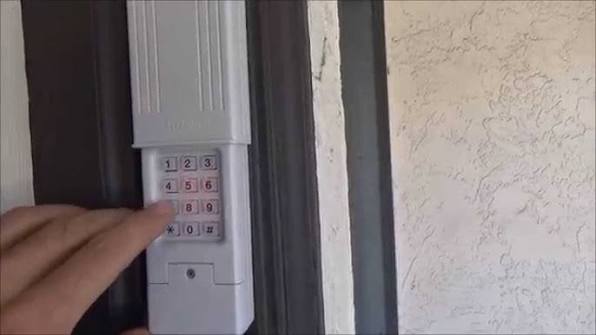
How to Program a Clicker Universal Exterior Keypad
What if you are installing an exterior keypad so you can enter your garage without a remote? The process is slightly different but just as easy.
- Enter your desired PIN: Type in a new 4-digit Personal Identification Number into the keypad.
- Press the Program button: Press and hold the “Prog” or “Program” button on the keypad itself.
- Activate the motor: While still holding the “Prog” button on the keypad, walk over and press the “Learn” button on the main motor unit.
- Release and sync: Release both buttons. Enter your 4-digit PIN again and press the “Enter” or “Arrow” button. The motor light will flash to confirm the sync is complete.
Clicker Universal Remotes: Pros and Cons
To give you a complete picture of your hardware, here is a quick comparison of using a Clicker universal remote versus buying an Original Equipment Manufacturer (OEM) remote directly from your garage door brand.
| Feature | Clicker Universal Remote | OEM Brand Remote |
|---|---|---|
| Compatibility | Works with almost all major brands | Only works with specific brand |
| Cost Efficiency | Highly affordable ($20 – $30 range) | More expensive ($40 – $60 range) |
| Setup Time | 5 to 10 minutes | 2 to 5 minutes |
| Advanced Features | Basic open/close functions | May include battery backup, built-in lighting |
As you can see, the Clicker universal remote is a massive money-saver. A recent consumer study showed that homeowners spend an average of $150 on professional programming services, whereas a universal remote costs under $30 and takes minutes to set up.
Troubleshooting Common Programming Issues
Even with the best instructions, technology can sometimes be stubborn. Here are a few common hiccups and how to fix them quickly.
- The Remote Blinks but the Door Doesn’t Move: This usually means the remote is transmitting, but the motor isn’t receiving it. Check if the motor’s antenna wire is hanging down freely and not tangled. Also, ensure you are within 10 feet of the motor during programming.
- The Learn Button Light Won’t Turn On: You might be pressing the wrong button. Ensure you are pressing the actual “Learn” button, not the Wi-Fi, accessory, or lock button.
- Interference Issues: Surprisingly, certain LED or CFL light bulbs in the garage can block radio frequencies. If your remote fails, try temporarily unscrewing the garage light bulb to see if the remote starts working. If it does, you need to buy “garage door safe” LED bulbs.
- The Remote is Completely Dead: Check the battery orientation. Make sure the positive (+) and negative (-) ends are aligned correctly. If it still fails, clean the battery contacts with a dry cotton swab.
Safety Precautions Before You Begin
While programming a remote is generally safe, you are dealing with heavy machinery and electricity. Always ensure the garage door is fully closed before you start working on the motor unit.
Never attempt to press the Learn button while standing on an unstable surface. If your motor is exceptionally high, use a fiberglass ladder rather than an aluminum one to prevent any electrical conductivity risks. Always keep children and pets out of the garage while the door is in motion during testing.
Frequently Asked Questions (FAQ)
How do I reset my Clicker garage door keypad?
To reset an exterior keypad, slide the cover up to reveal the keys. Enter your current 4-digit PIN, then press and hold the “#” button until the motor blinks. You can then enter a brand new 4-digit PIN and press “#” to save it.
Why is my Clicker remote blinking continuously?
A continuously blinking red light usually indicates that the batteries are critically low or installed incorrectly. Open the battery compartment, ensure the alignment is correct, and replace them with a fresh CR2032 or AAA battery (depending on your model) if needed.
Can I program a Clicker remote to any brand of garage door?
Yes! Clicker remotes are designed to be truly universal. They are compatible with major brands like Chamberlain, LiftMaster, Genie, Craftsman, and Overhead Door. However, they may not work on very old models manufactured before 1993 that lack modern safety reversal sensors.
How do I change the code on my Clicker keypad?
Simply enter your old PIN, press the “Prog” button, enter your new desired 4-digit PIN, and press “Prog” again. The system will save the new code immediately, and the old code will no longer work.
What if my garage door opener doesn’t have a Learn button?
If your motor is much older and lacks a Learn button, it likely uses DIP switches. You will need to open the back of your Clicker remote, match the tiny physical micro-switches inside to the exact same up/down pattern on the motor unit, and it will work instantly without any button pressing.
Conclusion
Mastering your garage access doesn’t require a degree in electrical engineering. By following these clear, step-by-step instructions on how do you program a Clicker garage door opener, you save valuable time, avoid expensive professional service calls, and secure your home efficiently.
We hope this guide made the process feel like a breeze and got your car back inside the garage where it belongs!
Leave a Reply