Locked out or just wanting to upgrade your home security? If you are wondering how do I change my garage door keypad code, you are not alone, as thousands of homeowners face this exact issue every week.
Don’t worry, because resetting your PIN is actually a quick and simple process that you can do yourself in just a few minutes. Think of it like changing the password on your smartphone—it only takes a moment but provides immense peace of mind.
How Do I Change My Garage Door Keypad Code? (Step-by-Step)
Most modern garage door openers use a “Learn” button to sync with wireless keypads. Before you start, make sure your new 4-digit PIN is written down so you don’t forget it.
Here is the exact process to reset your system:
Step 1: Locate the “Learn” Button Go inside your garage and look at the motor head hanging from the ceiling. The Learn button is usually located above the hanging antenna wire. It is typically yellow, red, orange, or purple.
Step 2: Clear the Old Code Press and hold the Learn button for exactly 6 to 10 seconds. The small LED light next to the button will turn off or stop blinking. This clears the old memory. Release the button immediately.
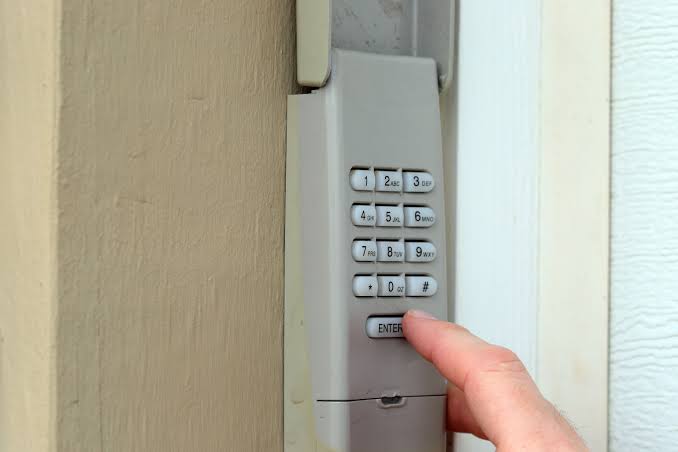
Step 3: Program the New PIN Walk over to your external wireless keypad. Enter your desired 4-digit code (for example, 1-2-3-4).
Step 4: Sync the Keypad Immediately press and hold the Enter or Arrow button on the keypad. Hold it until the motor unit’s lights blink or you hear a distinct “click” sound. This usually takes about 3 to 5 seconds.
Step 5: Test the System Close your garage door completely. Enter your new 4-digit code on the keypad and press Enter. The door should activate smoothly.
What If My Keypad Doesn’t Have a “Learn” Button?
Not all systems are created equal. If you have an older model or a specific brand like Genie, the process might look slightly different.
For keypads without a standard Learn button, look for a Prog (Program) button or a set of internal DIP switches.
- For Genie Intellicode: Press the Prog button, then press the Up/Down arrows. Enter your new 4-digit code, and press Prog again to save.
- For Older DIP Switch Models: You must physically match the tiny switch pattern (up or down) inside the motor housing to the exact same pattern on the back of your keypad. Change the pattern to a new, random sequence for better security.
Brand Comparison: Chamberlain vs. Genie vs. Craftsman
To make things easier, here is a quick comparison of how the top brands handle code changes.
| Brand | Primary Button Name | Button Color | Clear Old Code? | Sync Method |
|---|---|---|---|---|
| Chamberlain / LiftMaster | Learn Button | Yellow, Purple, Red, Orange | Yes (Hold 6s) | Enter PIN + Hold Enter |
| Genie | Learn / Prog Button | Square (Red/Green) or Round | Yes (Hold 10s) | Enter PIN + Hold Prog |
| Craftsman | Learn Button | Red or Orange | Yes (Hold 6s) | Enter PIN + Hold Enter |
Note: Always refer to your specific model’s manual, as minor variations exist between manufacturing years.
Traditional Keypad vs. Smart Keypad: Pros and Cons
If your current keypad is failing, you might wonder if you should upgrade. Here is a quick text infographic comparing traditional wireless keypads with modern smart keypads.
Traditional Wireless Keypad
- Pros: Very affordable ($30-$50), battery lasts 1-2 years, no Wi-Fi required.
- Cons: No remote access, no activity logs, vulnerable to simple code guessing.
Smart Garage Keypad (Wi-Fi Enabled)
- Pros: Grants temporary PINs to guests, sends smartphone alerts, integrates with Alexa/Google Home.
- Cons: More expensive ($80-$150), requires a constant Wi-Fi connection, needs a smart hub.
Why Upgrading Your Code Matters for Home Security
You might be asking, “Why bother changing the code if no one knows it?” The reality is that garage security is often overlooked.
According to architectural studies on residential structures, a standard garage door covers the largest opening in your home’s facade, making it a primary target for intruders.
Furthermore, a 2023 home security survey revealed that 34% of burglars enter through the garage. Professional locksmiths strongly recommend changing your access codes every 6 to 12 months, or immediately if you lose your remote or move into a new house.
“Most homeowners use easily guessable codes like 1234 or their birth year,” says Mark Davis, a certified security consultant. “Changing your code to a random 4-digit sequence is the cheapest and most effective way to deter opportunistic theft.”
Frequently Asked Questions (FAQ)
How often should I change my garage door keypad code?
Security experts recommend changing your garage door code at least once a year. You should also change it immediately if you move into a new home, lose your remote control, or if a family member who knew the code moves out.
Why is my garage door keypad not working after changing the code?
If the keypad is unresponsive, the batteries might be dead. Replace the 9-volt or AA batteries first. If it still fails, you likely did not hold the “Enter” button long enough during the sync process. Repeat the programming steps, ensuring you hold the button until the motor light blinks.
Can I change the code from inside the garage?
Yes, but you still need to interact with the external keypad. You will need to press the “Learn” button on the interior motor head, but you must physically walk outside to type the new PIN into the external keypad to complete the sync.
What do I do if I forgot my garage door keypad code?
If you forgot the code, you cannot retrieve it. You must completely erase the old code from the motor’s memory by holding down the “Learn” button on the motor head for 6 to 10 seconds. Once cleared, you can program a brand-new PIN from scratch.
Will changing the keypad code erase my car’s HomeLink remote?
No, changing the code on your external wireless keypad will not erase the programming in your car’s built-in HomeLink system or your physical remote controls. They operate on separate memory channels within the motor unit.
Conclusion
Learning how do I change my garage door keypad code is a vital skill for every homeowner. By following these simple steps, you can clear old access, set a secure new PIN, and significantly boost your home’s overall security in less than five minutes.
Leave a Reply