Introduction
There is nothing quite as frustrating as standing in your driveway, pressing the remote button, and watching your garage door rise smoothly—only for it to stubbornly refuse to come back down. You press the button again, and again, but the motor hums while the door stays put or reverses immediately. If you are experiencing this exact scenario where your garage door goes up with remote but not down, you are not alone. This is one of the most common service calls for home technicians, yet it is often a simple fix that you can handle yourself without calling a professional.
In this guide, we will walk you through the logical steps to diagnose and resolve this issue safely. We will focus on the most likely culprits: safety sensors, travel limits, and remote signal interference. By the end of this article, you will have a clear action plan to get your garage door functioning correctly again, ensuring both convenience and security for your home.
Why Does My Garage Door Open But Not Close?
Before diving into tools and screws, it is essential to understand why this happens. Modern garage door openers are designed with stringent safety protocols mandated by federal regulations in the United States. The primary reason a door will go up but not down is the safety reversal system.
If the opener detects any obstruction, misalignment, or signal error during the closing cycle, it will automatically abort the mission to prevent injury or damage. Unlike the opening cycle, which requires less resistance, the closing cycle is highly sensitive. Understanding this mechanism helps you troubleshoot with precision rather than guesswork.
Check the Safety Sensors First
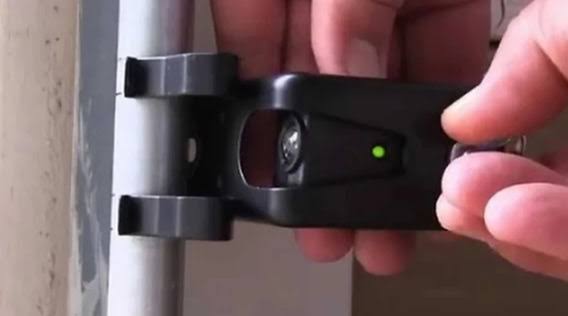
The number one cause for a garage door that opens but won’t close is misaligned or blocked safety sensors. These are the small eyes located near the bottom of the garage door tracks, usually about six inches off the ground.
How to Identify Sensor Issues
Look at the LED lights on your sensors. Typically, one sensor has a green light (power), and the other has an amber or red light (signal).
- Solid Green/Amber: The sensors are aligned and working.
- Blinking Amber/Red: The sensors are misaligned or obstructed.
- No Light: There may be a wiring issue or power failure.
If the light is blinking, the door’s brain thinks there is an object in the way, even if the path is clear. This triggers the “reverse on contact” safety feature, preventing the door from closing.
Step-by-Step Sensor Alignment
- Clean the Lenses: Use a soft, dry cloth to wipe away any dust, spiderwebs, or dirt from the sensor lenses. Even a thin layer of grime can block the infrared beam.
- Check for Obstructions: Ensure no boxes, bikes, or trash cans are blocking the line of sight between the two sensors.
- Align the Brackets: Loosen the wing nut on the sensor bracket slightly. Gently adjust the sensor until the LED light turns solid (not blinking). Tighten the nut carefully without moving the sensor.
- Test the Door: Press your remote. If the door closes, you have solved the problem.
Pro Tip: If you live in an area with intense sunlight, direct sun hitting the sensor lens can sometimes blind it. Try shading the sensor with your hand while testing. If it works, consider installing a small shade hood.
Inspect the Travel Limit Settings
If your sensors are aligned and the lights are solid, the next likely culprit is the travel limit settings. These settings tell the motor how far to move the door up and down. Over time, vibrations can cause these settings to drift.
Understanding Up vs. Down Limits
Most modern openers have two adjustment screws or digital settings: one for “Up” and one for “Down.” If the “Down” limit is set too short, the door might think it has hit the floor before it actually has, causing it to reverse. Conversely, if the force sensitivity is too low, the door may detect minor resistance (like weather stripping) and stop.
How to Adjust Travel Limits
Note: Consult your specific opener’s manual, as mechanisms vary by brand (LiftMaster, Chamberlain, Genie, etc.).
- Locate the adjustment panel on the motor unit hanging from the ceiling.
- Find the “Down Limit” screw or button. It is often marked with a downward arrow.
- Turn the screw slightly (usually clockwise) to increase the distance the door travels downward.
- Test the door. If it still reverses, adjust the force setting slightly higher. Be cautious not to set it too high, as this compromises safety.
Examine the Remote Control Battery and Signal
Sometimes the issue isn’t the door; it’s the messenger. If your garage door goes up with remote but not down, it could be a weak battery issue. While this seems counterintuitive—why would it work one way but not the other?—it relates to signal consistency.
A weak battery may send a fragmented signal. The opener might receive the “open” command clearly but fail to process the “close” command due to signal drop-out, especially if you are standing at the edge of the range.
Quick Remote Checks
- Replace the Battery: Use a fresh CR2032 or AA battery (check your model). Do not assume the old battery is good just because it opened the door once.
- Check Range: Stand closer to the door when testing. If it works up close but not from the car, the battery is likely weak, or there is interference.
- Reprogram the Remote: Occasionally, the code sync can become corrupted. Refer to your manual to erase and re-pair the remote with the opener.
Look for Physical Obstructions and Track Issues
Even if the sensors are clear, physical resistance can trigger the safety reversal. The door must move smoothly along the tracks. If there is friction, the motor interprets this as an obstruction.
Common Physical Blockers
- Debris in Tracks: Small stones, leaves, or hardened grease can jam the rollers.
- Bent Tracks: If the metal tracks are dented or bent, the rollers will catch.
- Worn Rollers: Plastic rollers can crack, causing uneven movement.
Maintenance Checklist
| Component | What to Check | Action Required |
|---|---|---|
| Tracks | Dents, bends, or loose bolts | Tighten bolts; call pro for bent tracks |
| Rollers | Cracks, chips, or flat spots | Replace worn rollers |
| Hinges | Loose screws or rust | Tighten screws; lubricate hinges |
| Springs | Gaps in extension springs | Do not touch. Call a professional. |
Warning: Never attempt to repair or adjust torsion springs (the large spring above the door) yourself. They are under extreme tension and can cause severe injury. Always hire a certified technician for spring-related issues. For more information on garage door safety standards, you can refer to Wikipedia’s entry on Garage Door Openers.
When to Call a Professional
While many issues can be resolved with DIY troubleshooting, some scenarios require expert intervention. You should call a professional if:
- The Door Falls Rapidly: If the door drops quickly when disconnected from the opener, the springs are broken.
- Cables are Frayed: Broken cables can snap and cause significant damage.
- Motor Makes Grinding Noises: This indicates internal gear failure.
- Electrical Issues: If the opener unit smells like burning plastic or sparks.
Investing in professional maintenance every 1–2 years can extend the life of your garage door system by up to 50%, according to industry studies.
FAQ Section
Q: Why does my garage door close when I hold the wall button but not the remote?
A: This usually indicates an issue with the remote itself (battery or programming) or interference affecting the wireless signal. The wall button is hardwired, so it bypasses wireless issues. Try reprogramming your remote or replacing the battery.
Q: Can dirty sensors really stop the door from closing?
A: Yes. The infrared beam between the sensors is very sensitive. Even a small amount of dust, cobwebs, or mud can break the beam, causing the opener to think there is an obstruction. Clean them regularly with a soft cloth.
Q: My door goes down halfway and then comes back up. What is wrong?
A: This is typically a travel limit or force setting issue. The door encounters resistance (like tight weather stripping) and the motor thinks it hit an obstacle. Adjust the down force setting slightly higher or check for physical obstructions in the track.
Q: Is it safe to bypass the sensors to close the door?
A: No. Bypassing sensors removes a critical safety feature designed to prevent entrapment, especially for children and pets. It is illegal in many jurisdictions to operate a garage door without functional safety sensors. Always fix the underlying issue instead.
Q: How often should I lubricate my garage door?
A: You should lubricate the moving parts (rollers, hinges, and springs) at least twice a year. Use a silicone-based lubricant or lithium grease. Avoid WD-40 as it attracts dust and can gum up the mechanism over time.
Conclusion
Dealing with a situation where your garage door goes up with remote but not down can be stressful, but it is rarely a catastrophic failure. In most cases, the issue stems from simple misalignments, dirty sensors, or minor setting adjustments. By following the steps outlined above—checking your sensors, adjusting travel limits, and inspecting for physical obstructions—you can likely restore functionality without expensive repairs.
Remember, safety is paramount. Never ignore warning signs like frayed cables or broken springs. Regular maintenance not only keeps your door working smoothly but also ensures the safety of your family and vehicles.
If you found this guide helpful, please share it with your neighbors or on social media. You never know who else might be stuck in their driveway right now!
Leave a Reply