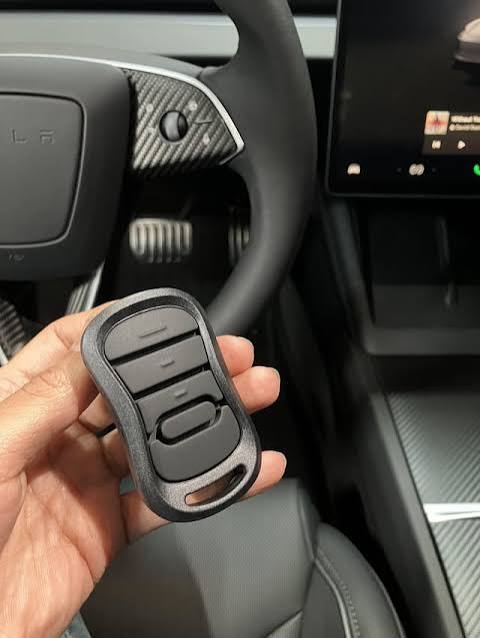
Many Tesla owners love their sleek, tech-forward vehicles but often face a common frustration: How do I open my garage without fumbling for a remote? If you’re wondering does the Tesla Model 3 have a garage door opener, you’re not alone. The answer isn’t as straightforward as “yes” or “no,” but with the right setup, your Model 3 can seamlessly integrate with your garage system. Let’s break down everything you need to know.
Understanding Tesla’s Garage Door Integration
The Tesla Model 3 does not come with a built-in garage door opener in the traditional sense. Instead, it relies on HomeLink, a universal wireless control system that allows your vehicle to communicate with compatible garage door openers, gates, and other home automation devices.
What Is HomeLink?
HomeLink is a third-party technology integrated into many modern vehicles, including Teslas. It acts as a bridge between your car and your garage door opener by mimicking the signal of your original remote. According to Wikipedia, HomeLink supports a wide range of frequencies and protocols, making it compatible with most major garage door brands.
In the Tesla Model 3, HomeLink is available as part of the Premium Connectivity package or as a standalone feature depending on your model year and region. Newer models (2021 and later) often include it standard, while older versions may require an upgrade.
Does Every Tesla Model 3 Support HomeLink?
Not all Model 3s are created equal when it comes to HomeLink compatibility. Here’s a quick breakdown:
| Model Year | HomeLink Availability | Notes |
|---|---|---|
| 2018–2020 | Optional (requires purchase) | Must be enabled via software update |
| 2021+ | Standard on most trims | Included in Premium Interior packages |
| Refreshed 2024+ | Standard across all trims | Enhanced integration with Tesla app |
If you own an earlier model, check your Tesla account or contact support to confirm whether HomeLink is enabled. You can also verify this directly from your vehicle’s touchscreen under Controls > Settings > Garage Door.
How to Set Up HomeLink on Your Tesla Model 3
Setting up HomeLink is straightforward but requires attention to detail. Follow these steps to ensure a smooth pairing process:
Step 1: Check Compatibility
Before starting, confirm that your garage door opener is compatible with HomeLink. Most major brands like Chamberlain, LiftMaster, Genie, and Craftsman work seamlessly. If your opener uses rolling code technology (common in post-1996 models), you’ll need to follow additional synchronization steps.
Step 2: Position Your Vehicle
Park your Model 3 within 10–15 feet of the garage door opener motor unit. Ensure there are no large metal objects or walls blocking the signal path.
Step 3: Access HomeLink Settings
On your Tesla touchscreen:
- Tap Controls
- Select Settings
- Choose Garage Door
- Click Add New Device
Step 4: Program the Remote
Follow the on-screen instructions to program your garage door remote. This typically involves:
- Pressing the learn button on your garage door motor
- Holding your existing remote near the Tesla’s rearview mirror area
- Confirming the signal match
Step 5: Test the Connection
Once programmed, test the connection by tapping the newly added device in your HomeLink menu. Your garage door should respond immediately. If it doesn’t, repeat the pairing process or consult your opener’s manual for troubleshooting tips.
Common Issues and Troubleshooting Tips
Even with proper setup, some users encounter issues. Here are the most frequent problems and solutions:
- Signal Interference: Metal structures, Wi-Fi routers, or other electronic devices can disrupt the HomeLink signal. Try repositioning your vehicle or removing potential sources of interference.
- Rolling Code Sync Failure: If your garage uses rolling codes, ensure you complete the full synchronization process. Some openers require multiple attempts to establish a secure connection.
- Software Glitches: Occasionally, Tesla’s software updates may reset HomeLink settings. Re-pairing your device usually resolves this issue.
For persistent problems, consult Tesla’s official support resources or reach out to your garage door manufacturer for compatibility guidance.
Alternatives to HomeLink
If HomeLink isn’t viable for your setup, consider these alternatives:
- Smart Garage Controllers: Devices like MyQ or Tailwind allow you to control your garage door via smartphone apps. While not integrated into your Tesla, they offer remote access and scheduling features.
- Universal Remotes: Affordable universal remotes can be programmed to work with most garage door systems. Keep one in your car for convenience.
- Tesla App Integration: Some users leverage third-party APIs to connect their Tesla app with smart home systems, enabling voice commands or automated triggers.
FAQ Section
Q1: Can I use HomeLink with any garage door opener?
A: HomeLink works with most major brands, but compatibility varies. Check your opener’s manual or visit the HomeLink website for a list of supported devices.
Q2: Do I need Premium Connectivity to use HomeLink?
A: Not necessarily. While Premium Connectivity enhances features, HomeLink can function independently once configured. However, some newer models bundle it with premium packages.
Q3: Why won’t my Tesla recognize my garage door remote?
A: Ensure your remote is within range, batteries are fresh, and you’ve followed the pairing steps correctly. Rolling code openers may require extra synchronization steps.
Q4: Can I control multiple garage doors with HomeLink?
A: Yes! HomeLink supports up to three devices, allowing you to manage multiple garage doors, gates, or even lighting systems.
Q5: Is HomeLink secure?
A: Yes, HomeLink uses encrypted signals to prevent unauthorized access. Rolling code technology adds an extra layer of security by changing the signal with each use.
Q6: What if my garage door opener is very old?
A: Older openers (pre-1996) may lack rolling code support, making them easier to pair but less secure. Consider upgrading to a modern opener for better compatibility and safety.
Conclusion
So, does the Tesla Model 3 have a garage door opener? Technically, no—but with HomeLink, it effectively serves the same purpose. By integrating your garage door system with your Tesla, you gain convenience, security, and a seamless driving experience. Whether you’re pulling into your driveway after a long day or managing multiple entry points, HomeLink simplifies your routine.
If you found this guide helpful, share it with fellow Tesla enthusiasts on social media! Let’s help more drivers unlock the full potential of their Model 3. 🚗💨
Leave a Reply