Is your garage the weak link in your home security system? Many homeowners struggle with outdated openers that fail during power outages or lack modern monitoring capabilities. The Chamberlain Smart Garage Door Opener With Battery Backup Video Keypad offers a comprehensive solution, combining reliable access control with intelligent backup power to keep your home secure and accessible at all times.
In this guide, we will explore how this advanced system transforms your garage into a smart, secure entry point for your home. Whether you are upgrading from an old chain-drive model or building a new smart home ecosystem, understanding the integration of video verification and battery resilience is crucial for making an informed decision.
What Is the Chamberlain Smart Garage System with Video Keypad?
The concept of a “smart garage” has evolved beyond simple remote controls. Today, it involves a networked device that communicates with your smartphone, provides visual confirmation of activity, and remains operational even when the grid goes down.
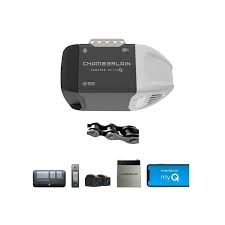
The Chamberlain Smart Garage Door Opener With Battery Backup Video Keypad is not just a single motor unit; it is an integrated ecosystem. It typically involves a myQ-enabled garage door opener equipped with a battery backup module and paired with a smart video keypad (such as the myQ Video Keypad). This combination allows you to:
- Monitor who enters your garage via live video.
- Grant temporary access to delivery drivers or guests without giving them your main code.
- Ensure your door opens even during a blackout thanks to the battery backup.
According to industry standards, smart home devices must meet rigorous security protocols. Chamberlain’s myQ platform uses encrypted communication to ensure that your video feeds and access codes remain private. For more context on how smart home ecosystems integrate, you can refer to general definitions of Home Automation on Wikipedia.
Why Do You Need Battery Backup in a Smart Garage Opener?
Power outages are more frequent than many homeowners realize. According to data from the U.S. Energy Information Administration, the average American household experiences several hours of power interruption annually due to weather events and grid maintenance.
Without a battery backup, your smart garage door becomes a dumb, heavy slab of metal during a blackout. You cannot open it electronically, and if you have an electric car charging inside, you may be stuck.
Key Benefits of Battery Backup:
- Continuity of Access: Enter and exit your home regardless of grid status.
- Security Maintenance: Keep your garage locked and monitored even when the lights are out.
- Peace of Mind: No need to manually disengage the emergency release cord every time the power flickers.
The battery backup unit usually connects directly to the opener’s logic board. It keeps the system in standby mode, ready to activate the motor for a limited number of cycles (typically 20–50 openings depending on the model) until power is restored.
How Does the Video Keypad Enhance Security?
Traditional keypads only offer numeric entry. They do not tell you who entered, only that someone did. The video keypad changes this dynamic by adding visual verification to physical access.
Features of the Video Keypad:
- Live View: See who is at your garage in real-time via the myQ app.
- Two-Way Audio: Speak to visitors or delivery personnel directly from your phone.
- Motion Detection: Receive alerts when someone approaches the keypad, even before they press a button.
- Temporary Codes: Generate one-time use codes for dog walkers, cleaners, or package deliveries.
This level of control is essential for modern home security. It eliminates the risk of sharing your permanent PIN with service providers. If a code is compromised, you can delete it instantly from your app without reprogramming the entire system.
Installation Guide: Step-by-Step Setup
Installing the Chamberlain Smart Garage Door Opener With Battery Backup Video Keypad requires careful attention to detail. While professional installation is recommended for complex setups, many DIY enthusiasts can handle the upgrade if they follow these steps.
Prerequisites:
- A compatible Chamberlain myQ garage door opener.
- The Battery Backup Unit (BBU).
- The myQ Video Keypad.
- A stable Wi-Fi connection (2.4 GHz band).
- Basic tools: Screwdriver, ladder, drill.
Step 1: Install the Battery Backup Unit
- Unplug your garage door opener from the power outlet.
- Locate the backup power port on the motor head (usually labeled “Battery Backup”).
- Connect the BBU harness to the port.
- Mount the BBU box on the wall near the opener using the provided screws.
- Plug the opener back in. The system will run a self-test, indicated by LED lights on the motor head.
Step 2: Mount the Video Keypad
- Choose a location outside your garage, ideally at eye level (about 5 feet high).
- Ensure the spot has strong Wi-Fi signal strength. Use your phone to test connectivity at the mounting site.
- Mark the screw holes on the wall or siding.
- Drill pilot holes and insert anchors if necessary.
- Secure the keypad base to the wall.
- Attach the keypad unit and insert the batteries (usually AA or lithium, depending on the model).
Step 3: Sync with the myQ App
- Download the myQ app on your iOS or Android device.
- Create an account or log in.
- Follow the in-app instructions to add the Video Keypad.
- Scan the QR code located on the back of the keypad.
- Name your device (e.g., “Front Garage Keypad”).
- Test the connection by pressing a button on the keypad and checking the app for notification.
Pro Tip: During setup, ensure your Wi-Fi router is not too far from the garage. If the signal is weak, consider installing a Wi-Fi extender to prevent connectivity drops.
Comparison: Standard Opener vs. Smart Opener with Video Keypad
To help you decide if this upgrade is worth the investment, let’s look at a direct comparison.
| Feature | Standard Garage Opener | Chamberlain Smart + Video Keypad |
|---|---|---|
| Access Method | Remote Control Only | App, Remote, Keypad, Voice |
| Power Outage | Manual Release Required | Automatic Battery Backup |
| Visitor Monitoring | None | Live Video & Two-Way Audio |
| Guest Access | Share Physical Remote | Temporary Digital Codes |
| Security Alerts | None | Motion & Entry Notifications |
| Installation Complexity | Low | Medium |
As shown above, the smart system offers superior flexibility and security. While the initial cost is higher, the long-term benefits of convenience and safety often justify the expense.
Common Issues and Troubleshooting
Even the best technology can encounter glitches. Here are common issues users face with the Chamberlain Smart Garage Door Opener With Battery Backup Video Keypad and how to fix them.
- Keypad Offline: Check your Wi-Fi signal. Restart your router and the keypad by removing and reinserting the batteries.
- Battery Backup Not Charging: Ensure the BBU is firmly connected to the motor head. Check the LED indicator; a solid green light means it is charged.
- Video Lag: Reduce the video quality settings in the app if your internet upload speed is low. Close other bandwidth-heavy applications on your network.
- Door Reverses Unexpectedly: Check the safety sensors at the bottom of the door tracks. Clean any dirt or spiderwebs blocking the beam.
If problems persist, consult the official Chamberlain support page or contact a certified technician. Never attempt to repair high-voltage components of the motor yourself.
Frequently Asked Questions (FAQ)
1. How long does the battery backup last?
The duration depends on usage and the specific model. Typically, a fully charged battery backup can operate the door for 20 to 50 cycles during a power outage. It is designed for short-term emergencies, not extended blackouts.
2. Can I use the video keypad without a subscription?
Basic features like live view and two-way audio are usually included free. However, some advanced features like cloud video storage or extended history may require a myQ Plus subscription. Check the current terms on the Chamberlain website.
3. Is the video feed encrypted?
Yes, Chamberlain uses bank-level encryption for all data transmitted between the keypad, the cloud, and your app. This ensures that your video feeds remain private and secure from hackers.
4. Does it work with Alexa and Google Assistant?
Absolutely. The myQ ecosystem integrates seamlessly with Amazon Alexa and Google Assistant. You can ask your smart speaker to close the garage door or check its status. Note that opening the door via voice command often requires a PIN for security reasons.
5. What happens if the Wi-Fi goes down?
The keypad will still function using stored codes for local access. However, you will not receive remote notifications or live video feeds until the internet connection is restored. The battery backup will continue to work independently of Wi-Fi.
Conclusion
Upgrading to the Chamberlain Smart Garage Door Opener With Battery Backup Video Keypad is a significant step toward a safer, more convenient home. It addresses the two biggest pain points of traditional garages: vulnerability during power outages and lack of visitor visibility.
By combining robust battery backup with intelligent video monitoring, you gain complete control over your garage access. You no longer have to worry about lost remotes, forgotten codes, or being locked out during a storm.
If you value security and convenience, this system is a worthy investment. Share this guide with friends or family who are considering a smart home upgrade, and start enjoying the peace of mind that comes with a truly smart garage.
Leave a Reply