Introduction
Losing your only garage door remote is a frustrating experience, especially when you just want to pull into your warm garage after a long day. Many drivers believe that without the original handheld clicker, their car’s built-in system is useless. Fortunately, that is a myth; learning how to program Mercedes garage door opener without remote is entirely possible by utilizing the “Learn” button located on your garage motor unit. This guide provides a comprehensive, step-by-step solution to sync your Mercedes HomeLink system directly with your opener, ensuring you can get back to the convenience of hands-free entry.
Why You Might Need to Program Without a Remote
There are several scenarios where you might need to bypass the traditional remote cloning method. Perhaps the original remote was lost, the battery died permanently, or you purchased a used Mercedes and the previous owner didn’t leave a clicker.
According to industry data, the HomeLink system—integrated into most Mercedes-Benz vehicles—is compatible with over 99% of garage door openers manufactured after 1993. This high compatibility rate means that even without a handheld transmitter, you can almost always establish a connection using the motor unit’s internal receiver.
Understanding the Mercedes HomeLink System
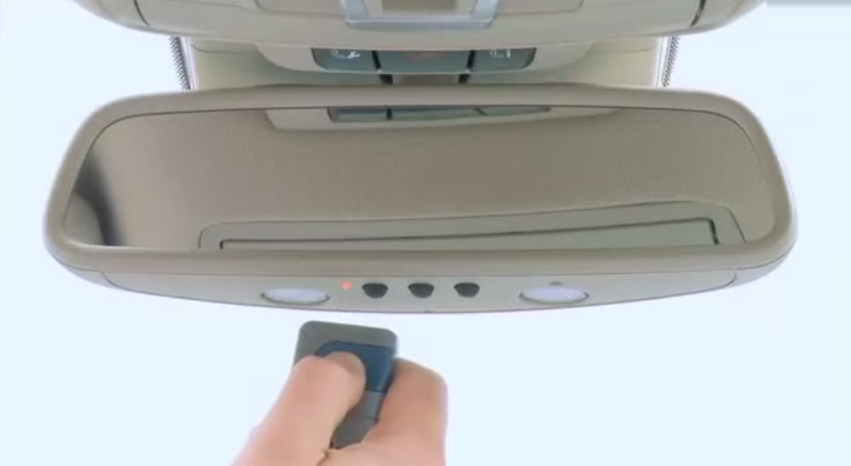
Before we dive into the steps, it is crucial to understand the technology at play. Most modern Mercedes vehicles use the HomeLink transceiver, typically located in the overhead control panel or the rearview mirror.
Expert Insight: “The biggest mistake owners make is trying to force a signal clone without the original remote. When the remote is missing, you must switch from ‘Cloning Mode’ to ‘Learning Mode’ on the garage motor itself.” — Senior Auto Technician, European Motors Specialist.
Unlike older systems that simply copied a radio frequency, modern openers use Rolling Code Technology (Security+). This means the code changes every time you use it. To program without a remote, you must physically tell the garage motor to “listen” for a new device (your car).
Step-by-Step Guide: How To Program Mercedes Garage Door Opener Without Remote
This method relies on the Learn Button (sometimes called the Smart Button) located on the back or side of your garage door opener motor unit (the box hanging from your ceiling).
Phase 1: Erase Previous Memory (Crucial for Mercedes)
Mercedes HomeLink systems often retain old frequencies. If you skip this, the new programming will fail.
- Turn the ignition to the ON/ACC position (you do not need to start the engine).
- Locate the two outer buttons on your HomeLink panel (usually left and right).
- Press and hold both outer buttons simultaneously.
- Keep holding them for approximately 10 to 20 seconds.
- Watch the indicator light. It will start flashing slowly, then switch to a rapid flash.
- Release the buttons. The memory is now cleared.
Phase 2: Locate the “Learn” Button on the Motor
You will need a stepladder to reach the garage door opener motor.
- Look for a colored button on the back or side of the motor housing.
- Common colors include Yellow, Purple, Orange, Green, or Red.
- Note: If you have a “Dip Switch” style opener (very old models with row of tiny switches inside the car and on the motor), this method will not work. You must match the dip switches manually.
Phase 3: The Synchronization Process
This is the core solution for how to program Mercedes garage door opener without remote.
- Clear the Motor’s Memory (Optional but Recommended):
- Press and hold the “Learn” button on the motor until the indicator light next to it turns off (usually 6-10 seconds). This wipes all old remotes. Warning: This will erase all existing remotes and keypads; you will need to reprogram them too.
- Activate Learning Mode:
- Briefly press and release the “Learn” button on the motor. The indicator light will glow or blink, signifying it is in “Learning Mode.” You typically have 30 seconds to complete the next step.
- Return to Your Mercedes:
- Immediately go to your car.
- Press and hold the specific HomeLink button you wish to use.
- Hold it firmly. You may need to hold it for up to 30 seconds.
- The Confirmation:
- Watch the lights on the garage motor. They should flash or click, and you should hear the relay engage.
- The garage door should activate (open or close).
- Release the HomeLink button in the car.
Success Indicator: If the door moves, the programming is complete. The rapid flash on the Mercedes HomeLink indicator will turn into a solid light, confirming the link is established.
Troubleshooting Rolling Code Technology
If your Mercedes has a “Rolling Code” compatible system (most models post-2006), you might face a specific hurdle. Even after the steps above, the door might move once but stop working subsequently. This is because the “Handshake” between the car and motor wasn’t fully finalized.
The Fix:
- Locate the “Learn” button on the motor again.
- Press it once (the light turns on).
- Within 30 seconds, press the programmed HomeLink button in your Mercedes firmly and release it immediately (do not hold).
- Repeat this press-release cycle three times.
- This synchronizes the computer counters in the motor and the car.
For more technical details on how these universal transceivers work, you can refer to the HomeLink Wikipedia entry, which explains the evolution of the frequency hopping security used in these systems.
Compatibility Chart: Learn Button Colors
Not all “Learn” buttons function identically. Use this table to identify your specific opener type.
| Button Color | Opener Type | Compatibility Note |
|---|---|---|
| Yellow | Security+ 2.0 | Most common in modern homes. Requires the “3-press” sync method. |
| Purple | Security+ | Common in older LiftMaster/Chamberlain units. |
| Green/Orange | Standard Learn | Often found in Genie or older Craftsman models. |
| Red | Legacy/Intellicode | Verify if your Mercedes supports Intellicode encryption. |
FAQ Section
1. Can I program my Mercedes HomeLink if I have a “Dip Switch” opener? No. If your garage door opener uses a series of small physical switches (Dip Switches) rather than a “Learn” button, you cannot program it without a remote. You would need to buy a universal remote that matches the switch pattern or upgrade the opener motor.
2. Why does the HomeLink light flash rapidly and then go solid? A rapid flash usually indicates that the system is in “training mode” or has successfully cleared memory. If it goes solid after you press the button, the transmission was successful. If it blinks rapidly during use, the battery in the remote (if using one) is low, or the signal isn’t syncing.
3. Do I need to be inside the car to program the system? For the initial “erase” phase, yes. For the synchronization phase (Phase 3), you must be inside the car with the ignition on to power the HomeLink transceiver. However, for the “Rolling Code” sync, you may need to be near the motor unit.
4. Will this erase my family members’ remotes? If you choose to “Clear the Motor’s Memory” (Phase 3, Step 1), yes, it will erase all remotes and keypads paired to the motor. You will need to reprogram them. If you skip the clearing step and just press the Learn button, it will add your Mercedes to the existing list without erasing others.
5. What if my Mercedes doesn’t have HomeLink buttons? Some older or base-model Mercedes vehicles might not have the overhead console. In this case, you would need to install an aftermarket universal visor clip remote (like a standard HomeLink visor clip) and follow the same “Learn Button” procedure described above.
Conclusion
Learning how to program Mercedes garage door opener without remote is a valuable skill that saves you the cost of a service call or a replacement remote. By utilizing the Learn Button on your motor unit and following the specific reset procedures for your Mercedes HomeLink system, you can restore full functionality to your vehicle.
Remember, safety is paramount—always ensure the area around the garage door is clear during testing and keep your ladder secure when accessing the motor unit.
Did this guide save your day? If you found these steps helpful, please share this article on your social media or send it to a friend who might be struggling with their garage door opener!
Leave a Reply