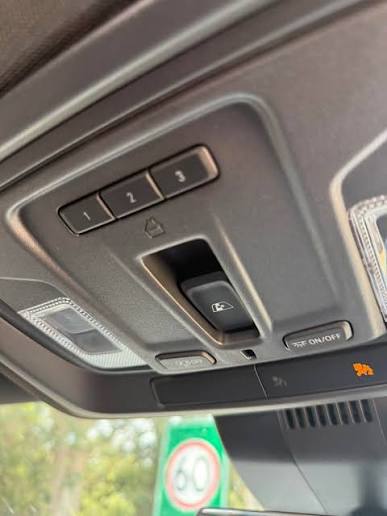
Have you ever pulled into your driveway on a rainy day, fumbling for that tiny, elusive garage remote while trying to keep your coffee from spilling? It is a frustrating scenario that millions of drivers face daily. If you are asking yourself, “Can I program my garage door opener to my car?” the answer is almost certainly yes. Modern vehicles are equipped with built-in technology designed specifically to eliminate this hassle, turning your car into a universal remote for your home.
In this comprehensive guide, we will walk you through everything you need to know about syncing your garage door with your vehicle. From checking compatibility to mastering the “Learn Button” dance, we will ensure you can open your garage with the simple press of a button on your rearview mirror or sun visor.
Understanding In-Car Garage Door Systems
Before diving into the programming steps, it is essential to understand what technology makes this possible. Most modern cars come equipped with a system known as HomeLink, Car2U, or Genie Intellicode. These systems act as universal transmitters, capable of mimicking the radio frequency signals sent by your standard handheld garage remote.
According to data from the Consumer Technology Association, over 80% of new vehicles sold in the United States now include some form of integrated garage door control. This widespread adoption highlights how crucial convenience and security have become for American homeowners.
However, not all systems are created equal. Some use fixed codes, while others utilize rolling codes for enhanced security. Understanding which type your garage door uses is the first step toward successful programming. For a deeper technical understanding of radio frequency standards in home automation, you can refer to resources on Wikipedia regarding garage door opener technologies.
Is Your Car Compatible with Your Garage Opener?
The most common question users ask is whether their specific car model can talk to their specific garage brand. The short answer is: most likely, yes.
Major In-Car Systems
- HomeLink: Found in Ford, Toyota, Honda, Hyundai, and many others. It is the most universal system available.
- Car2U: Primarily found in Chrysler, Dodge, Jeep, and Ram vehicles. It is known for its ease of use but sometimes requires a specific learning mode.
- Genie Intellicode/Other Proprietary Systems: Some luxury brands like BMW and Mercedes may use their own integrated systems or partner with specific brands like LiftMaster.
Compatibility Checklist
To ensure success, check the following before starting:
- Vehicle Age: Cars manufactured after 1995 generally have compatible systems.
- Garage Opener Age: Openers made after 1993 are required by law to have safety sensors and rolling code technology, which makes them easier to program.
- Remote Availability: You must have at least one working handheld remote for your garage door. You cannot program the car without an existing signal to copy.
If you have an older garage opener (pre-1993) or a non-standard commercial door, you might need a compatibility bridge or a universal receiver kit. These devices plug into your garage motor and translate the signal for your car.
Step-by-Step Guide: How to Program Your Garage Door Opener to Your Car
Programming processes vary slightly by manufacturer, but the general logic remains the same. Below is the universal method that works for 90% of HomeLink and Car2U systems.
Step 1: Clear Previous Codes
If your car has been programmed before, you need to wipe the memory.
- Turn your ignition to the “On” position (do not start the engine).
- Press and hold the two outer buttons on your car’s garage control panel.
- Hold them for about 20 seconds until the indicator light flashes rapidly.
- Release the buttons. The memory is now cleared.
Step 2: Initiate Learning Mode in Your Car
- Position your car outside the garage, within clear sight of the garage door motor.
- Press and hold the desired button on your car’s control panel.
- Keep holding it until the light changes from slow blinking to rapid blinking. This indicates the car is ready to receive a signal.
Step 3: Sync with Your Handheld Remote
- Take your original handheld garage remote.
- Hold it 1–3 inches away from the car’s garage button.
- Press and hold the button on the handheld remote while continuing to hold the car button.
- Watch the car’s indicator light. When it flashes rapidly, release both buttons.
Step 4: Test the Connection
Press the programmed button in your car. The garage door should activate. If it does not, repeat Step 3, ensuring the remote is close enough to the car’s receiver.
Troubleshooting Common Programming Issues
Even with careful execution, things can go wrong. Here are the most frequent hurdles and how to overcome them.
| Issue | Possible Cause | Solution |
|---|---|---|
| Light doesn’t flash | Dead battery in car or remote | Check vehicle battery; replace remote battery. |
| Door moves partially | Signal interference | Move car closer; remove other electronics from the dashboard. |
| Rolling Code Failure | Security mismatch | Locate the “Learn” button on the garage motor unit (see below). |
| System unresponsive | Memory full | Clear all codes again using Step 1 above. |
The “Learn Button” Method for Rolling Codes
If the standard method fails, your garage opener likely uses rolling code technology. This security feature changes the code every time you use the remote to prevent hacking. To sync this:
- Locate the “Learn” or “Smart” button on your garage door motor unit (usually hanging from the ceiling). It is often colored yellow, purple, or red.
- Press and release the Learn button. The indicator light on the motor will turn on or blink.
- Within 30 seconds, go back to your car and press the programmed garage button three times.
- The garage door should move, confirming the sync.
Note: Always ensure no one is under the garage door when testing these functions.
Benefits of Integrating Your Garage with Your Car
Why go through the trouble of programming? The advantages extend beyond mere convenience.
- Enhanced Security: You no longer need to leave a handheld remote visible on your seat, which can be a target for theft.
- Weather Protection: Keep windows rolled up and doors locked while opening the garage, protecting you from rain, snow, or extreme heat.
- Streamlined Routine: For families with multiple cars, everyone can have their own programmed button, reducing the chaos of lost remotes.
- Resale Value: Homes and cars with integrated smart features often appeal more to tech-savvy buyers.
FAQ Section
1. Can I program my garage door opener to my car if I lost my handheld remote?
No, you generally cannot program the car without an existing working remote. The car needs to “learn” the signal from the handheld device. If you have lost your remote, you must first buy a replacement universal remote, program it to your garage, and then use that new remote to program your car.
2. Why does my garage door only work when I am very close to the house?
This is usually a sign of weak batteries in either your car key fob (if it uses one for initial sync) or the handheld remote. It can also indicate interference from LED light bulbs in your garage. Try replacing the batteries or switching to incandescent bulbs in the garage opener unit to improve signal range.
3. Is it safe to use rolling code technology?
Yes, rolling code technology is significantly safer than fixed codes. Fixed codes send the same signal every time, which can be intercepted and copied by thieves. Rolling codes change with every use, making it nearly impossible for someone to “capture” your signal and reuse it later.
4. Can I program multiple garage doors to one car?
Absolutely. Most in-car systems have three distinct buttons. You can program one for your home garage, one for a vacation home, and one for a gate or second garage. Just repeat the programming steps for each button individually.
5. What should I do if my car’s manual says it is incompatible?
If your car manual states incompatibility, it may refer to older proprietary systems. In this case, purchase a universal compatibility bridge (such as those made by LiftMaster or Genie). These small devices install in your garage and translate the signal so your car can understand it, effectively bypassing the compatibility issue.
Conclusion
So, can I program my garage door opener to my car? Yes, and it is one of the most rewarding DIY upgrades you can make for your daily routine. By following the steps outlined above, you can transform your vehicle into a seamless extension of your home security system.
Remember, patience is key. Whether you are dealing with a simple fixed-code system or a complex rolling-code setup, the process is straightforward once you understand the logic. Take your time, ensure your batteries are fresh, and enjoy the luxury of never fumbling for a remote again.
Did you find this guide helpful? Share it with your friends and family on social media to help them ditch the clutter of extra remotes too!
Leave a Reply