Introduction
Lost your handheld transmitter and wondering, “Can I program my car garage door opener without remote?” You are not alone, and the good news is that it is entirely possible. This guide will walk you through simple, proven methods to sync your vehicle with your garage door, saving you both time and money.
Understanding the Basics: Can I Program My Car Garage Door Opener Without Remote?
The short answer is yes. You can absolutely program your car’s built-in system (like HomeLink or Car2U) to your garage door even if the original handheld remote is lost or broken.
Modern garage door openers are designed with a “Learn” button located directly on the motor unit. This button allows the motor to accept new signals from any compatible transmitter, including your car’s visor system, a wireless keypad, or a new universal remote. You do not need the old remote to initiate this process, as long as you have safe physical access to the garage motor unit.
Step-by-Step Guide: Programming Your Car to the Garage Door
Follow these concrete steps to sync your vehicle. This method works for most major brands, including LiftMaster, Chamberlain, Genie, and Craftsman.
Step 1: Clear Your Car’s Memory
Before starting, ensure your car’s system is ready. Press and hold the two outer buttons on your car’s visor system simultaneously. Hold them for 20 seconds until the indicator light flashes rapidly. This clears any old, conflicting codes.
Step 2: Locate the “Learn” Button on the Motor
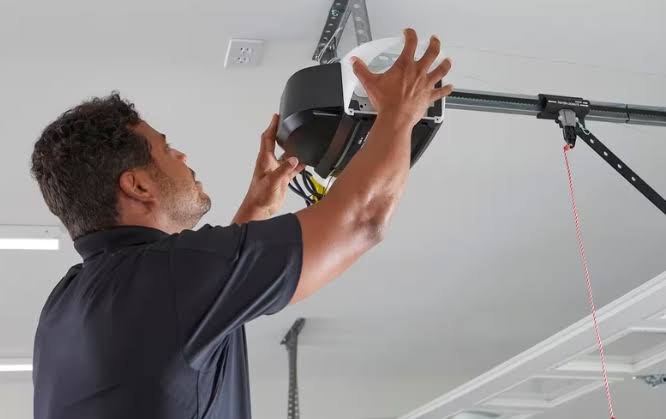
Use a sturdy stepladder to safely reach your garage door opener motor. Look for the “Learn” or “Smart” button. It is typically located on the back or side of the motor unit and is often colored yellow, purple, red, or green.
Step 3: Initiate the Car’s Programming Mode
Sit in your car with the garage door closed. Press and hold the desired button on your car’s visor system. Do not release it yet.
Step 4: Press the Motor’s Learn Button
While still holding the car button, have a helper press and release the “Learn” button on the garage motor. If you are alone, you can quickly press the car button, step out, press the motor’s Learn button, and immediately return to hold the car button again.
Step 5: Wait for the Confirmation Signal
Continue holding the car button for 2 to 3 seconds after pressing the motor’s Learn button. Watch the car’s indicator light. When it flashes rapidly or turns solid, release the button.
Step 6: Test the Connection
Press the programmed button in your car three times. The garage door should activate. If it does not, repeat the process, ensuring you complete the steps within the 30-second window required by most rolling-code systems.
What If You Cannot Access the Motor Unit? Alternative Methods
If the motor unit is out of reach or you want a more convenient long-term solution, consider these alternatives:
| Method | Cost Estimate | Difficulty | Best For |
|---|---|---|---|
| Wireless Keypad | $30 – $50 | Easy | Homes with multiple drivers or guests. |
| Smart Garage Hub (e.g., MyQ) | $30 – $100 | Moderate | Tech-savvy users wanting smartphone control. |
| Wall-Mounted Console | $40 – $60 | Easy | Direct, wired control from inside the garage. |
| Universal Handheld Remote | $20 – $40 | Easy | Replacing a lost remote directly. |
Note: To program a wireless keypad or smart hub without a remote, you will still use the same “Learn” button on the motor unit described in the steps above.
Expert Insights and Safety Statistics
According to industry data, over 70% of modern garage door openers manufactured after 2011 use rolling code technology (such as Security+ 2.0). This technology changes the access code every time the door is used, preventing code grabbers from stealing your signal.
Because of this advanced security, the programming window is strictly limited. As noted in the comprehensive overview of Garage door openers on Wikipedia, rolling code systems require the transmitter and receiver to be synchronized within a specific timeframe, usually 30 seconds, to validate the new cryptographic key.
Expert Tip: “Always prioritize safety. Disconnect the garage door opener from power before performing any mechanical maintenance, and never attempt to reprogram the unit while standing on an unstable surface.” – Certified Garage Door Technician, International Door Association (IDA).
Pros and Cons of Remote-less Programming
To help you decide if this DIY approach is right for you, here is a quick breakdown:
✅ Pros:
- Cost-Effective: Saves $30–$50 by avoiding the purchase of a new handheld remote.
- Convenient: Utilizes the car you already drive, keeping your visor clutter-free.
- Secure: Rolling code synchronization ensures your home remains protected.
❌ Cons:
- Physical Access Required: You must safely reach the ceiling-mounted motor unit.
- Time-Sensitive: The 30-second pairing window can be stressful for beginners.
- Compatibility Limits: Very old openers (pre-1993) may not support modern car-based systems without an external repeater.
Frequently Asked Questions (FAQ)
1. Can I program my garage door opener to my car if I lost the remote?
Yes. As long as you can safely reach the “Learn” button on the garage door motor unit, you can sync your car’s built-in system (like HomeLink) directly to the motor without needing the original handheld remote.
2. How do I find the learn button on my garage door motor?
The Learn button is typically located on the back or side of the motor housing, near the hanging antenna wire. It is usually a square or rectangular button colored yellow, purple, red, or green, sometimes accompanied by a small LED light.
3. Can I use my smartphone to open my garage door without a remote?
Yes. By installing a smart garage door controller (like Chamberlain MyQ or Tailwind), you can connect your opener to your home Wi-Fi. This allows you to open and close the door using a dedicated smartphone app from anywhere in the world.
4. What should I do if my car’s HomeLink system keeps clearing?
If the memory keeps wiping, your car’s battery may be weak, or there could be an electrical glitch. Try reprogramming it while the car is running. If the issue persists, consult your vehicle’s dealership, as the HomeLink module may need replacement.
5. Is it safe to program a garage door opener without the original remote?
Yes, it is completely safe and is a standard procedure supported by manufacturers. The “Learn” button physically resets the receiver’s memory, ensuring that only the devices you actively program can operate the door.
Conclusion
Losing your handheld transmitter does not mean you are locked out of convenience. By answering the question, “Can I program my car garage door opener without remote?” we have shown that a simple, step-by-step approach using your motor’s “Learn” button is highly effective, secure, and budget-friendly.
By leveraging your car’s built-in system or exploring smart alternatives, you can regain seamless access to your garage in minutes.
Found this guide helpful? Share it with your friends and family on Facebook, Twitter, or Pinterest so they can save time and money on their next garage door project!
Leave a Reply