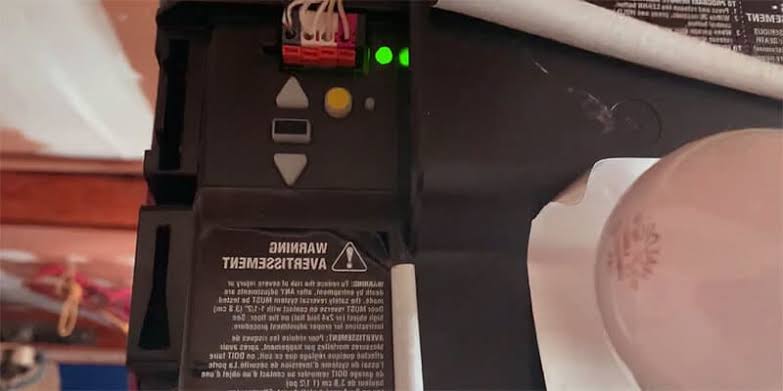
You pull into your driveway after a long day, press the remote, and instead of the door opening, you just see a frustratingly flashing bulb. It is incredibly annoying when your automated door refuses to cooperate just when you want to get inside and relax. If you are asking yourself, “Why is the light on my garage door opener blinking?“, you are not alone, and fixing it is often much easier than you think.
Why Is The Light On My Garage Door Opener Blinking?
Let’s dive right into the core of the issue. When the light on your garage door opener blinks, it is rarely a sign of a catastrophic failure. Instead, it is the motor’s built-in diagnostic system trying to communicate a specific problem.
Most commonly, this blinking indicates a misalignment of the safety sensors, a loose wire, or that the system’s “lock” feature has been accidentally activated. According to the International Door Association (IDA), nearly 80% of residential garage door service calls are related to minor sensor or remote issues that homeowners can fix themselves in under 15 minutes.
Since 1993, federal law has mandated that all automated garage doors feature photoelectric safety sensors. As explained in the comprehensive overview of a garage door opener on Wikipedia, these safety mechanisms will instantly halt the door’s movement and trigger a blinking light if the invisible infrared beam between the sensors is interrupted.
What Does a Blinking Light Mean on Different Brands?
Different manufacturers use specific “blink codes” to tell you exactly what is wrong. Here is a quick breakdown of the most common brands found in US homes:
- Chamberlain / LiftMaster: The main overhead light bulb will blink 10 times over the course of 5 seconds when the door reverses due to a sensor issue.
- Genie: A blinking red light on the motor head usually indicates a problem with the Safe-T-Beam sensors, or that the beam is blocked by dirt.
- Craftsman: Similar to Chamberlain, a flashing light often points to misaligned safety eyes, a disconnected wire, or an RPM (revolutions per minute) sensor fault.
Note: Always count the exact number of blinks. A 5-blink code usually means a different issue than a 10-blink code!
Step-by-Step Guide to Fix a Blinking Garage Door Light
Let’s get your door working smoothly again. Follow these concrete steps to troubleshoot and fix the issue safely.
Step 1: Check and Realign the Safety Sensors
Look at the small plastic units located near the floor on either side of the garage door tracks.
- Locate the sensors about 6 inches (15 cm) above the ground.
- Check the small LED indicators on the back of each sensor. One should be steadily glowing green (sending), and the other should be steadily glowing red or amber (receiving).
- If the receiving eye is blinking or completely dark, gently adjust the metal bracket. Move it in tiny increments of about 1/8 inch (3 mm) up, down, or sideways until the light stays solid.
- Wipe the sensor lenses with a clean, dry microfiber cloth to remove any dust, pollen, or spider webs.
Step 2: Inspect the Thin Sensor Wires
Vibrations from the door opening and closing can loosen wires over time.
- Trace the thin, 2-strand wire connecting the sensors to the motor head on the ceiling.
- Look for any metal staples that might be pinching and fraying the wire insulation.
- Ensure the bare wire ends are firmly pushed into the back of the sensor units and the motor head. A loose connection here will cause an intermittent blink.
Step 3: Test the Voltage with a Multimeter (Advanced Check)
If the lights are on but the door still won’t close, the sensors might not be getting enough power.
- Set your digital multimeter to measure DC Voltage.
- Touch the red probe to the white wire terminal and the black probe to the grey/white wire terminal at the motor head.
- You should see a reading between 5 to 6 volts. If it reads 0, your logic board might have a blown fuse or a broken terminal.
Step 4: Perform a Hard Reset
If the sensors are perfectly aligned but the light still blinks, the logic board might just need a quick reboot to clear a temporary glitch.
- Unplug the garage door opener from the ceiling power outlet.
- Wait for exactly 60 seconds to let the internal capacitors drain completely.
- Plug it back in, press the wall button to test the door, and reprogram your remote controls if necessary.
DIY Fixes vs. Calling a Professional: A Quick Comparison
Not every blinking light is a simple weekend fix. Here is a text infographic to help you decide whether to grab your toolbox or pick up the phone.
| Issue Type | DIY Difficulty | Estimated Cost | When to Call a Pro |
|---|---|---|---|
| Misaligned Sensors | Easy (10 mins) | $0 | If the brackets are physically bent |
| Dirty Sensor Lenses | Very Easy (2 mins) | $0 | Never |
| Sunlight Interference | Easy (5 mins) | $0 | If you want custom, aesthetic sun shields |
| Fried Logic Board | Hard (2+ hours) | $150 – $300 | Always for internal electrical board issues |
| Broken Gear/Sprocket | Very Hard (3+ hours) | $50 – $100 | Always requires complex motor disassembly |
Preventative Maintenance Tips
To stop the light from blinking in the future, tighten the sensor brackets with a screwdriver once every six months. The heavy vibration of the garage door can slowly shift their alignment over time. Additionally, ensure your indoor wall console is kept dry, as humidity can sometimes trigger false lock signals.
Frequently Asked Questions (FAQ)
Q1: How many times does a Chamberlain garage door light blink when there is an error? A: A Chamberlain or LiftMaster opener will typically blink 10 times over the course of 5 seconds when the safety sensors are misaligned or blocked. However, if it blinks 5 times, it usually indicates an RPM sensor issue inside the motor, which requires professional repair.
Q2: Can a bad backup battery cause the garage door light to blink? A: Yes! If your opener has a battery backup system and the internal battery is failing or completely dead, the unit will often flash the main light or a specific LED to alert you. This means it cannot operate safely during a power outage. Check your battery connections and replace it if it is over three years old.
Q3: Why is my garage door light blinking continuously without stopping? A: A continuous, non-stop blink usually indicates that the “Lock” button on your indoor wall console is pressed. This feature disables the remotes to prevent unauthorized access. Simply press and hold the lock button for two seconds to turn it off, and the light will stop blinking.
Q4: Why is my garage door light blinking 10 times but the sensors are perfectly aligned? A: If the sensors are perfectly aligned and the lights are solid, but the motor still blinks 10 times, check for sunlight interference. Direct afternoon sunlight can overwhelm the infrared beam. Try shading the sensors with a cardboard box; if the door works, you just need to relocate the sensors or build a permanent shield.
Q5: Will a power outage cause the garage door light to blink? A: Yes. When power is restored after an outage, many openers will flash their lights several times to indicate that they have reset to their default factory settings. You will likely need to clear the memory and reprogram your remotes and keypads to get them working again.
Conclusion
Dealing with a flashing garage door light doesn’t have to ruin your day or cost you a fortune. By understanding why is the light on my garage door opener blinking, you can quickly diagnose sensor misalignments, loose wiring, or simple lock button errors. Most of these fixes take less than 15 minutes, require zero special tools, and will get your door running smoothly once again.
Leave a Reply