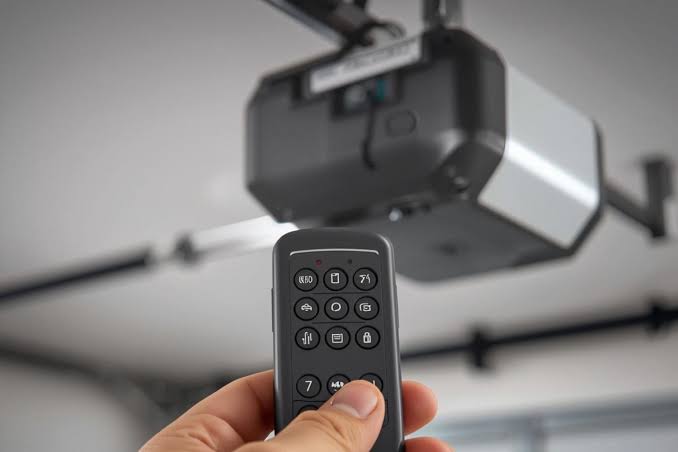
Losing your garage door opener can feel like a minor inconvenience that quickly spirals into a major headache. Whether you’re locked out during a rainstorm or worried about unauthorized access, knowing what to do if you lost garage door opener is essential for every homeowner. This guide provides clear, actionable steps to help you regain control of your garage door safely and efficiently.
Immediate Steps: Securing Your Home After Losing the Opener
The moment you realize your garage door opener is missing, your primary concern should be security. A lost remote isn’t just an inconvenience; it’s a potential vulnerability. If someone finds it, they could gain easy access to your home, especially if your address is visible on the remote or if it’s a universal model.
First, assess the situation. Did you lose it in a public place, or do you suspect it was stolen? If theft is suspected, act immediately. Even if it was simply misplaced, treating it as a security breach is the safest approach.
Disable the Lost Remote
Most modern garage door openers allow you to disable specific remotes without affecting others. Consult your owner’s manual for instructions on clearing codes. Typically, this involves pressing a “Learn” or “Smart” button on the motor unit located in your garage. Holding this button for 6–10 seconds usually erases all paired remotes, requiring you to reprogram them.
Pro Tip: If you cannot access your garage to reach the motor unit, consider using the wall-mounted keypad inside your garage (if equipped) to close and lock the door manually until you can address the issue.
How to Reprogram Your Garage Door Opener
Once you’ve secured your home by disabling the lost remote, the next step is restoring functionality. Reprogramming ensures that only authorized devices can operate your garage door. The process varies slightly depending on the brand and model, but most follow a similar pattern.
Step-by-Step Reprogramming Guide
- Locate the Motor Unit: Find the garage door opener motor hanging from your ceiling. Look for a small button labeled “Learn,” “Smart,” or “Program.” It’s often near the light lens or antenna wire.
- Clear Old Codes: Press and hold the “Learn” button until the indicator light turns off (usually 6–10 seconds). This deletes all previously paired remotes and keypads.
- Prepare Your New Remote: Have your replacement remote ready. Ensure it has fresh batteries.
- Pair the Remote: Press the “Learn” button once briefly. The indicator light will blink or stay solid. Within 30 seconds, press and hold the button on your remote you wish to program. Release when the motor unit’s light blinks or you hear a click.
- Test the Connection: Stand outside your garage and press the newly programmed button. The door should respond immediately.
If you have multiple remotes, repeat step 4 for each device. Remember, clearing codes means all previous remotes must be reprogrammed, including those used by family members.
| Brand | Typical Learn Button Location | Reset Time |
|---|---|---|
| Chamberlain | Back or side panel | 6 seconds |
| LiftMaster | Near antenna wire | 10 seconds |
| Genie | Under light cover | 5–7 seconds |
| Craftsman | Similar to Chamberlain | 6–10 seconds |
Alternative Access Methods When You’re Locked Out
What if you’re standing outside your garage with no way in? Don’t panic. Several backup methods can help you regain entry without damaging your door.
Use the Manual Release Cord
Every garage door has a manual release mechanism, typically a red cord hanging from the trolley that connects to the door. Pulling this cord disengages the opener, allowing you to lift the door manually. Be cautious: garage doors are heavy. Lift steadily and ensure the area is clear.
Once inside, you can reconnect the trolley by pulling the release handle toward the door until it clicks back into place. This restores automatic operation once you’ve reprogrammed your remotes.
Enter Through the House
If your garage is attached to your home, check for an interior door leading into the garage. Many homeowners forget this simple access point. Once inside, you can use the wall-mounted control panel to operate the door.
Contact a Professional Locksmith
If manual entry isn’t possible or you’re uncomfortable handling the door, a licensed locksmith specializing in garage doors can help. They can bypass the electronic system safely and assist with reprogramming. According to Wikipedia’s overview of garage door openers, modern systems use rolling code technology to prevent unauthorized access, making professional assistance valuable for complex issues.
Preventing Future Losses: Best Practices
Losing a garage door opener once is stressful; preventing it from happening again is smart. Implement these strategies to minimize risk:
- Attach a Tracker: Use a Bluetooth tracker like Tile or Apple AirTag on your remote. These devices cost under $30 and can save hours of searching.
- Designate a Spot: Create a dedicated hook or bowl near your entrance for keys and remotes. Consistency reduces misplacement.
- Use Smartphone Apps: Many newer openers support Wi-Fi connectivity and smartphone control. Apps like MyQ allow you to operate your door without a physical remote, reducing dependency on small devices easily lost.
- Keep a Spare: Store a backup remote in your car’s glove compartment or with a trusted neighbor. Ensure it’s programmed and tested regularly.
FAQ: Common Questions About Lost Garage Door Openers
1. Can someone else use my lost garage door opener?
Yes, if they find it and know your address. Older models with fixed codes are particularly vulnerable. Modern rolling-code systems are safer, but disabling the lost remote is still crucial.
2. How much does a replacement garage door opener cost?
Basic universal remotes range from $15 to $40. Brand-specific models may cost $30–$60. Smart openers with Wi-Fi capabilities can exceed $100.
3. Do I need a professional to reprogram my opener?
Not necessarily. Most homeowners can reprogram remotes using the steps above. However, if you’re unsure or encounter technical issues, a professional technician can help for $50–$100.
4. Will resetting my opener affect my keypad entry?
Yes, clearing codes typically removes all paired devices, including wireless keypads. You’ll need to reprogram them along with your remotes.
5. How long does it take to reprogram a garage door opener?
The actual programming takes less than 5 minutes. However, locating the manual and gathering all remotes may add time.
6. Can I use a universal remote for any garage door?
Most universal remotes work with major brands like Chamberlain, LiftMaster, and Genie. Check compatibility lists before purchasing. Older or proprietary systems may require brand-specific remotes.
Conclusion: Regain Control and Stay Secure
Losing your garage door opener doesn’t have to be a disaster. By following the steps outlined above—securing your home, reprogramming your system, and using alternative access methods—you can resolve the issue quickly and safely. Remember, prevention is key. Invest in trackers, designate storage spots, and consider smart upgrades to reduce future risks.
If you found this guide helpful, share it with friends and family on social media. Someone you know might be facing the same frustration right now. Stay safe, stay secure, and keep your garage door under your control!
Leave a Reply