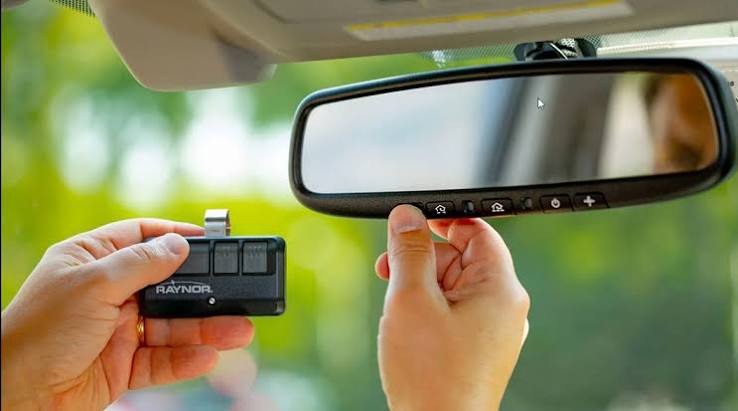
Losing your garage door opener can feel like a minor inconvenience that quickly spirals into a major headache. Whether you’ve misplaced it at work, left it in a rental car, or simply can’t find it anywhere at home, the sudden inability to access your garage creates immediate stress and security concerns. If you’re wondering what to do if I lost my garage door opener, you’re not alone—this common problem affects thousands of homeowners every year, but with the right approach, you can resolve it quickly and securely.
Immediate Steps: Securing Your Home First
Before you start searching every corner of your house or calling a locksmith, take these critical security measures immediately.
Disable the Lost Remote
The very first thing you should do is disable the lost remote from your garage door opener system. Most modern garage door openers allow you to erase all programmed remotes and reprogram only the ones you currently possess. This prevents anyone who finds your lost remote from accessing your garage.
To disable your lost remote:
- Locate the “Learn” or “Program” button on your garage door opener motor unit (usually found on the ceiling-mounted box)
- Press and hold this button for 6-10 seconds until the indicator light blinks or turns off
- This action erases all previously programmed remotes from the system
- You’ll need to reprogram your remaining remotes afterward
This simple step takes less than two minutes but provides immediate peace of mind. According to the International Door Association, approximately 30% of home burglaries occur through garage doors, making this security measure essential.
Check for Alternative Entry Methods
While you’re securing your system, verify whether you have other ways to access your garage:
- Do you have a keypad entry system installed?
- Is there a manual release cord inside the garage?
- Can you access the garage through an interior door from your house?
- Do you have a smartphone-enabled garage door controller?
Having alternative access methods can significantly reduce the urgency of your situation and give you time to properly address the lost remote issue.
How to Find Your Lost Garage Door Opener
Before purchasing a replacement, conduct a thorough search using these proven strategies.
Retrace Your Steps Systematically
Start by mentally walking through your last 24-48 hours. Ask yourself:
- When did you last use the remote successfully?
- Where were you when you used it?
- Did you visit any new locations recently?
- Were you carrying multiple items that might have displaced the remote?
Create a physical checklist of locations to check:
- Vehicle compartments: Check between seats, under floor mats, in glove boxes, and trunk areas
- Workplace: Desk drawers, break rooms, conference rooms, and parking areas
- Recent shopping locations: Shopping carts, checkout counters, and fitting rooms
- Home areas: Couch cushions, laundry baskets, kitchen counters, and bedside tables
Use Technology to Your Advantage
If your garage door opener has smart capabilities or was connected to a home automation system:
- Check your smartphone apps for recent usage logs
- Review security camera footage if you have cameras pointing at your garage
- Use Bluetooth tracking apps if your remote has tracking capabilities
Many homeowners report finding their remotes in unexpected places like jacket pockets from previous seasons, children’s toy boxes, or even in pet beds. Don’t overlook unusual locations during your search.
Replacement Options When Your Remote Is Truly Lost
If your thorough search proves unsuccessful, it’s time to explore replacement options. Understanding your choices will help you make an informed decision quickly.
Option 1: Purchase a Universal Remote
Universal garage door remotes offer an affordable and quick solution for most homeowners.
Advantages of Universal Remotes:
- Cost-effective ($15-$40 typically)
- Compatible with most major brands
- Available at hardware stores and online retailers
- Easy self-installation
Disadvantages to Consider:
- May not support advanced features like battery backup indicators
- Programming can be slightly more complex than brand-specific remotes
- Limited warranty coverage compared to OEM products
When selecting a universal remote, ensure it’s compatible with your garage door opener’s frequency (typically 315 MHz or 390 MHz) and rolling code technology. Check your existing opener’s manual or model number to confirm compatibility.
Option 2: Buy an Original Equipment Manufacturer (OEM) Remote
Purchasing a replacement directly from your garage door opener’s manufacturer ensures perfect compatibility.
Benefits of OEM Remotes:
- Guaranteed compatibility with your specific model
- Access to all original features and functions
- Better warranty support
- Professional programming assistance available
Considerations:
- Higher cost ($30-$80 depending on brand and features)
- May require ordering online or visiting specialized dealers
- Longer wait times for delivery
Major brands like Chamberlain, LiftMaster, Genie, and Craftsman all offer replacement remotes through their websites and authorized dealers. Having your opener’s model number ready will speed up the ordering process.
Option 3: Upgrade to a Smart Garage Door Controller
Consider this opportunity to upgrade to a modern smart garage door system.
Smart Controller Benefits:
- Control your garage door from anywhere via smartphone
- Receive notifications when the door opens or closes
- Grant temporary access to visitors or service providers
- Integration with home automation systems like Alexa or Google Home
- No physical remote to lose in the future
Popular smart garage controllers range from $30-$100 and can often be installed without professional help. This option transforms a frustrating loss into an opportunity for home improvement.
Programming Your New Remote: Step-by-Step Guide
Once you’ve obtained a replacement remote, proper programming ensures secure and reliable operation.
Standard Programming Process
While specific steps vary by manufacturer, most garage door openers follow this general procedure:
- Locate the Learn button on your garage door opener motor unit
- Usually colored yellow, red, purple, or green
- Found near the hanging antenna wire
- Press the Learn button once
- The indicator light will illuminate or blink
- You typically have 30 seconds to complete the next step
- Press and hold the button on your new remote
- Hold for 2-3 seconds until the opener’s lights flash or you hear a click
- Release the button immediately after
- Test the remote
- Stand clear of the door
- Press the remote button to verify operation
- Repeat for additional remotes if needed
Troubleshooting Common Programming Issues
If your remote doesn’t program successfully:
- Check the batteries: Replace with fresh batteries even if the old ones seem functional
- Verify distance: Stand within 10-15 feet of the opener during programming
- Clear old codes: Ensure you’ve erased all previous remotes before programming new ones
- Check interference: Turn off nearby electronic devices that might cause signal interference
- Consult the manual: Each brand has specific nuances in the programming process
For complex issues, contact the manufacturer’s customer support line—they often provide free technical assistance.
Preventing Future Loss: Smart Storage Solutions
Once you’ve resolved your immediate problem, implement strategies to prevent future occurrences.
Create a Dedicated Storage System
Designate a specific location for your garage door remote:
- Install a hook or magnetic holder near your garage entrance
- Use a keychain clip to attach the remote to your car keys
- Keep a spare remote in a secure, known location inside your home
- Consider a small bowl or tray by your main entrance for all frequently-used items
Invest in Backup Access Methods
Reduce dependency on a single remote by establishing multiple access options:
- Install a keypad entry system outside your garage
- Set up a smart garage controller for smartphone access
- Program multiple remotes and store them in different locations
- Ensure family members each have their own remote
Regular Maintenance Checks
Schedule quarterly reviews of your garage door security:
- Test all remotes to ensure they’re functioning properly
- Update batteries proactively rather than waiting for failure
- Review who has access to your garage and update codes as needed
- Check that your manual release mechanism works properly
FAQ: Common Questions About Lost Garage Door Openers
Q: How much does it cost to replace a lost garage door opener?
A: Replacement costs vary significantly based on your choice. Universal remotes typically cost $15-$40, while OEM replacements range from $30-$80. Smart garage controllers cost $30-$100 but offer enhanced features. Professional programming services, if needed, add $50-$100 to the total cost.
Q: Can someone use my lost remote to break into my garage?
A: Yes, this is a legitimate security concern. Modern garage door openers use rolling code technology, which changes the code with each use, making it difficult to clone. However, whoever possesses your remote can still open your garage until you disable it from your system. Always disable lost remotes immediately and consider changing your opener’s security code.
Q: How long does it take to program a new garage door remote?
A: Programming typically takes 2-5 minutes per remote if you follow the instructions correctly. The actual button-pressing process takes only seconds, but locating the Learn button, reading instructions, and testing may extend the total time. Having your opener’s manual handy speeds up the process considerably.
Q: Should I call a professional or handle this myself?
A: Most homeowners can successfully replace and program garage door remotes themselves, especially with universal remotes that include clear instructions. However, consider professional help if: your opener is older than 15 years, you’re uncomfortable working with electrical components, you’ve attempted programming multiple times without success, or you want to upgrade to a smart system and prefer professional installation.
Q: Will disabling my lost remote affect my other remotes?
A: Yes, when you press and hold the Learn button to erase all codes, it removes ALL programmed remotes from your system. You’ll need to reprogram every remote you wish to keep using, including any keypads or wireless controls. Plan for this by gathering all your remotes before starting the erasure process.
Q: Can I use my smartphone instead of a physical remote?
A: Absolutely. Smart garage door controllers allow you to operate your garage door via smartphone apps, eliminating the risk of losing a physical remote. These systems connect to your home Wi-Fi and communicate with your existing opener. Popular options include MyQ, Tailwind, and RatGDO. While you’ll need an internet connection for remote access, many systems also work via Bluetooth when you’re nearby.
Conclusion: Take Control of Your Garage Security Today
Losing your garage door opener doesn’t have to derail your day or compromise your home’s security. By following the steps outlined in this guide—disabling the lost remote, conducting a thorough search, choosing the right replacement option, and implementing preventive measures—you can resolve this common problem efficiently and effectively.
Remember that what to do if I lost my garage door opener involves both immediate security actions and long-term prevention strategies. Don’t let embarrassment or frustration delay taking action; the sooner you disable the lost remote and secure your garage, the better protected your home and belongings will be.
Take a moment today to evaluate your current garage door security setup. Do you have backup access methods? Are your remotes stored in consistent, safe locations? Would upgrading to a smart controller provide peace of mind? These small improvements can prevent future emergencies and enhance your overall home security.
Found this guide helpful? Share it with friends and family on social media—they might need this information someday too! Bookmark this page for future reference, and don’t hesitate to return if you have additional questions about garage door maintenance and security.
Leave a Reply