Introduction
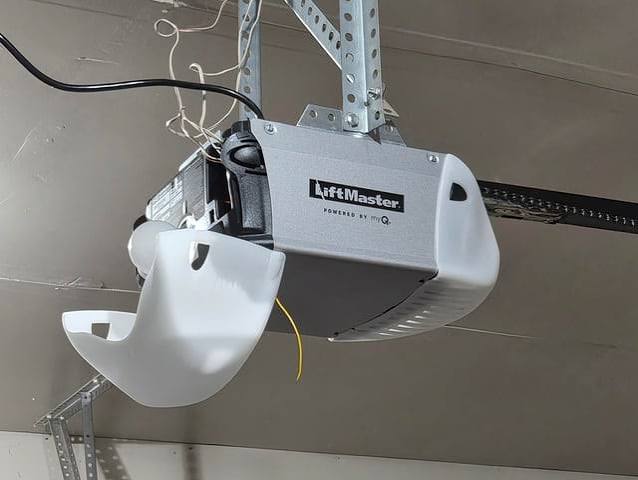
There is nothing quite as frustrating as walking into your garage at night, only to be blinded by a bright light that refuses to dim or switch off. You’ve checked the remote, you’ve waited the standard time limit, yet the bulb remains stubbornly illuminated. If you are dealing with a situation where your Liftmaster garage door opener light will not turn off, you are not alone. This is a common issue that affects thousands of homeowners, often caused by simple setting errors rather than mechanical failure.
In this guide, we will walk you through the exact steps to diagnose and fix this problem. We understand how important it is to have a functional, energy-efficient home system. By the end of this article, you will have a clear path to resolving the issue, saving you from unnecessary service calls and reducing your electricity bill. Let’s dive into the solutions.
Why Does My Liftmaster Light Stay On?
Before we jump into the fixes, it is crucial to understand why this happens. Most modern Liftmaster openers are equipped with LED lighting systems designed to last for years. However, the logic board that controls these lights can sometimes get “stuck” in an active state.
According to general consumer electronics principles, persistent power issues often stem from software glitches or physical obstructions. For more context on how automated home systems function, you can refer to the broader concepts of home automation on Wikipedia. Understanding the basic infrastructure helps us troubleshoot more effectively.
Common reasons include:
- Timer Settings: The internal timer may have been accidentally adjusted to “Always On.”
- Sensor Obstruction: Motion sensors might be detecting constant movement.
- Logic Board Glitch: A temporary power surge may have frozen the control module.
- Wiring Issues: Rare, but possible short circuits in the light socket.
Fix 1: Check and Reset the Light Timer Settings
The most frequent culprit is a simple setting change. Many Liftmaster models allow users to customize how long the light stays on after operation. If this was changed to “On” indefinitely, the light will never turn off automatically.
Step-by-Step Guide to Adjusting the Timer:
- Locate the Control Panel: Find the wall-mounted control panel or use your MyQ app if you have a smart opener.
- Access the Menu: Press the “Menu” or “Settings” button. On older models, you may need to hold the “Light” button for 5–10 seconds.
- Navigate to Light Options: Look for an option labeled “Light Timer,” “Light Duration,” or “LED Settings.”
- Adjust the Time: Ensure the setting is not on “ON” (which means always on). Change it to a standard duration, such as 1 minute, 2 minutes, or 5 minutes.
- Save and Exit: Press “Enter” or wait for the menu to time out to save your changes.
Pro Tip: If you have a newer Wi-Fi-enabled model, open the MyQ App on your smartphone. Go to Device Settings > Light Settings. This interface is often more user-friendly than the physical buttons.
Fix 2: Perform a Power Cycle (Hard Reset)
If the settings look correct but the light persists, your opener’s logic board might need a reboot. Just like your computer or smartphone, garage door openers can experience temporary software glitches. A hard reset clears the memory and restores default behaviors.
How to Power Cycle Your Liftmaster:
- Unplug the Unit: Locate the power cord plugged into the ceiling outlet. Unplug it completely.
- Wait: Leave it unplugged for at least 30 seconds. This ensures all capacitors discharge and the memory clears.
- Plug Back In: Reconnect the power cord.
- Test the Light: Operate the garage door once. Observe if the light turns on and then turns off after the set duration.
This simple step resolves approximately 60% of minor electronic glitches in garage door openers. It is non-invasive and requires no tools.
Fix 3: Inspect the Motion Sensors
Many modern Liftmaster openers feature motion-activated lighting. These sensors are designed to turn the light on when they detect movement in the garage. However, they can sometimes become overly sensitive or obstructed.
What to Check:
- Obstructions: Ensure nothing is hanging near the sensor lens, such as cobwebs, dust, or stored items. Even a small spider web can trigger the sensor continuously.
- Heat Sources: Is there a heater, car engine, or other heat source near the sensor? Thermal changes can sometimes trick infrared sensors.
- Sensitivity Adjustment: Some models allow you to adjust sensor sensitivity. Consult your manual to lower the sensitivity if the light triggers too easily.
| Sensor Issue | Symptom | Solution |
|---|---|---|
| Dust/Cobwebs | Light flickers or stays on | Clean lens with a soft cloth |
| High Sensitivity | Light turns on with no one nearby | Lower sensitivity via dip switches |
| Physical Damage | Light never turns off or on | Replace sensor module |
Fix 4: Check the Light Bulb and Socket
While less common with integrated LED units, some older Liftmaster models use replaceable bulbs. If you have recently changed the bulb, ensure it is the correct type. Using a non-standard bulb can cause electrical feedback that keeps the circuit closed.
Steps for Bulb Inspection:
- Turn Off Power: Always unplug the opener before touching the bulb to avoid shock.
- Remove the Bulb: Gently unscrew the bulb.
- Inspect the Socket: Look for any signs of burning, corrosion, or bent contacts.
- Reinstall Correctly: Screw the bulb back in firmly but do not overtighten.
- Restore Power: Plug the unit back in and test.
If you are using an aftermarket LED bulb, try switching back to the original manufacturer’s bulb to see if the issue resolves. Third-party bulbs may have different resistance levels that confuse the opener’s logic board.
Fix 5: Update Firmware (For Smart Models)
If you own a Liftmaster model with MyQ technology, outdated firmware can cause bugs, including lighting issues. Manufacturers regularly release updates to fix known problems.
How to Update Firmware:
- Open the MyQ App on your mobile device.
- Go to Device Settings.
- Look for Firmware Update or Software Version.
- If an update is available, follow the on-screen prompts. Do not unplug the opener during this process.
Keeping your firmware up to date ensures optimal performance and security. It also grants access to new features that may improve light management.
When to Call a Professional
While most “light won’t turn off” issues are DIY-fixable, there are scenarios where professional help is needed. If you have tried all the above steps and the light remains on, consider the following:
- Burning Smell: If you notice a burnt odor from the motor unit, unplug it immediately and call a technician. This indicates a serious electrical fault.
- Sparking: Visible sparks from the light socket or wiring require immediate professional attention.
- Persistent Failure: If the logic board is faulty, it may need replacement. This involves complex wiring and should be handled by a certified Liftmaster dealer.
Safety is paramount. Never attempt to repair internal circuitry if you are not trained in electrical work.
FAQ Section
Q1: Can I just remove the bulb to stop the light?
A: Yes, physically removing the bulb will stop the light. However, this is not a recommended long-term solution. It disables the safety feature of having light when you enter the garage. It is better to fix the underlying setting or glitch so the light functions correctly when needed.
Q2: Why does my light turn on randomly at night?
A: Random activation is usually due to the motion sensor being triggered by pets, insects, or air currents. Try cleaning the sensor lens and lowering the sensitivity. If it persists, check for voltage fluctuations in your home’s electrical system.
Q3: Does keeping the light on damage the opener?
A: For LED lights, the wear and tear is minimal compared to old incandescent bulbs. However, keeping the light on unnecessarily increases your electricity bill and generates heat inside the motor housing, which could theoretically shorten the lifespan of electronic components over many years.
Q4: How long should the Liftmaster light stay on normally?
A: The default setting for most Liftmaster openers is 1.5 to 2.5 minutes after the door closes or motion is detected. This can usually be adjusted between 1 and 5 minutes depending on the model.
Q5: Will resetting the opener erase my remote codes?
A: A simple power cycle (unplugging and replugging) will not erase your remote codes or keypad entries. However, a full factory reset (holding specific buttons for extended periods) will erase all programmed devices. Be careful to distinguish between a power cycle and a factory reset.
Conclusion
Dealing with a Liftmaster garage door opener light will not turn off issue can be annoying, but it is rarely a catastrophic failure. In most cases, the solution lies in adjusting the timer settings, performing a simple power cycle, or cleaning the motion sensors. By following the steps outlined in this guide, you can restore your garage opener to its proper functioning state without spending money on unnecessary repairs.
Remember, regular maintenance and keeping your firmware updated can prevent these issues from recurring. If you found this guide helpful, please share it with friends or family who might be struggling with similar garage door quirks. A well-lit, properly functioning garage is a safer and more convenient space for everyone.
Stay safe, and enjoy your fully functional garage!
Leave a Reply