Introduction
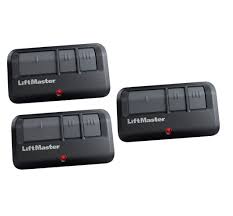
Is your old garage door remote acting up, or did you simply lose it during a move? There is nothing more frustrating than being stuck in your driveway, unable to get into your home because a small plastic device failed. You need a reliable solution that works seamlessly with your existing system without requiring a technician’s visit. This is where the LiftMaster 893LM 3 Button Garage Door Opener Remote Control comes in as a game-changer for homeowners across the US.
This guide will walk you through everything you need to know about this specific model. We will cover compatibility, step-by-step programming instructions, troubleshooting tips, and why this particular remote remains a top choice for security and convenience. Whether you are a tech-savvy DIYer or a beginner, this article ensures you get your garage door working smoothly again.
What Is the LiftMaster 893LM and Why Choose It?
The LiftMaster 893LM is not just another generic clicker; it is a premium, universal remote designed by Chamberlain Group, the industry leader in garage access solutions. Unlike basic single-button remotes, the LiftMaster 893LM 3 Button Garage Door Opener Remote Control offers versatility. It allows you to control up to three different devices, such as your main garage door, a secondary gate, or even compatible lighting systems.
Key Features at a Glance
- Security+ 2.0 Technology: This rolling code technology changes the access code every time you use the remote, preventing hackers from “capturing” your signal.
- MyQ Compatibility: It works seamlessly with the MyQ ecosystem, allowing for potential integration with smart home setups.
- Three Independent Buttons: Perfect for households with multiple entry points or vehicles.
- Visor Clip Included: Keeps your remote organized and easily accessible in your car.
According to industry standards, upgrading to a remote with Security+ 2.0 is crucial for modern home safety. Older fixed-code remotes are vulnerable to brute-force attacks, whereas the 893LM ensures that your home remains secure. For more context on how rolling codes enhance security, you can refer to the general principles of radio frequency identification security on Wikipedia.
Compatibility: Will the 893LM Work With Your Opener?
One of the most common questions users have is whether this remote will pair with their existing motor unit. The good news is that the LiftMaster 893LM is highly versatile, but it does have specific requirements.
Supported Brands and Models
The 893LM is designed to work with most Chamberlain, LiftMaster, and Craftsman garage door openers manufactured after 1993. Specifically, it is compatible with openers that feature:
- Yellow Learn Button: Most common in newer models.
- Purple Learn Button: Common in mid-2000s models.
- Red/Orange Learn Button: Some older Security+ models.
Note: It is generally not compatible with openers that use DIP switches (tiny rows of switches inside the remote and motor) unless they are very specific legacy models. If your opener was made before 1993, you likely need a different universal remote.
Quick Compatibility Check Table
| Opener Brand | Compatible? | Learn Button Color |
|---|---|---|
| LiftMaster | Yes | Yellow, Purple, Red |
| Chamberlain | Yes | Yellow, Purple, Red |
| Craftsman | Yes | Yellow, Purple, Red |
| Genie | No | N/A |
| Sommer | No | N/A |
Always check the back of your motor unit for the model number and learn button color before purchasing.
How to Program the LiftMaster 893LM Step-by-Step
Programming this remote is straightforward if you follow the correct sequence. Many users fail because they miss the timing window. Follow these precise steps to ensure success.
Prerequisites
- A sturdy ladder to reach the motor unit.
- The LiftMaster 893LM remote with fresh batteries.
- Access to the garage door opener motor head.
Programming Instructions
- Locate the Learn Button: On your garage door opener motor unit, find the “Learn” button. It is usually located on the back or side panel and is colored yellow, purple, or red.
- Clear Old Codes (Optional but Recommended): Press and hold the Learn button for about 6–10 seconds until the indicator light next to it turns off. This clears all previously programmed remotes and keypads. Warning: You will need to reprogram all other devices if you do this.
- Initiate Pairing Mode: Press and release the Learn button quickly. The indicator light will turn on or blink, signaling that the opener is ready to receive a new code. You have 30 seconds to complete the next step.
- Program the Remote: Within 30 seconds, press and hold the button on your LiftMaster 893LM 3 Button Garage Door Opener Remote Control that you wish to use. Keep holding it until the opener’s lights blink or you hear two clicks. This confirms the code has been accepted.
- Test the Remote: Press the programmed button again. The garage door should activate. If it does, you are done!
Pro Tip: If you are programming multiple buttons on the same remote for different doors, repeat steps 3 and 4 for each button, ensuring you press the corresponding Learn button on each respective motor unit.
Troubleshooting Common Issues
Even with a high-quality device like the 893LM, issues can arise. Here are the most common problems and their solutions.
Remote Not Programming
If the remote fails to pair, check the following:
- Battery Power: Ensure the battery is inserted correctly with the positive (+) side facing up. A weak battery may not send a strong enough signal.
- Timing: Did you press the remote button within the 30-second window? If the light on the motor unit stops blinking, you must start over.
- Interference: LED light bulbs in the garage opener can sometimes interfere with radio signals. Try turning off the garage lights and programming again.
Remote Works Intermittently
- Range Issues: The 893LM has a standard range of up to 1,500 feet. However, metal roofs, thick walls, or nearby radio towers can reduce this. Try standing closer to the door.
- Antenna Position: Ensure the hanging wire antenna on your motor unit is not tucked behind the metal casing. It should hang down freely for optimal signal reception.
Door Reverses Immediately After Closing
This is rarely a remote issue but rather a safety sensor problem. Check the photo-eye sensors at the bottom of your garage door tracks. Ensure they are aligned and clean. If the green light on the sensor is blinking, the beam is blocked or misaligned.
LiftMaster 893LM vs. Other Remotes: A Comparison
Why choose the 893LM over cheaper alternatives? Let’s look at the facts.
| Feature | LiftMaster 893LM | Generic Universal Remote | Smartphone App Only |
|---|---|---|---|
| Reliability | High (OEM Quality) | Variable | Dependent on Wi-Fi |
| Security | Security+ 2.0 | Often Fixed Code | Encrypted |
| Ease of Use | Instant Click | Complex DIP Switches | Requires Phone Unlock |
| Battery Life | 1–2 Years | 6–12 Months | N/A |
| Price | Mid-Range | Low | Free (with Hub) |
While smartphone apps are convenient, they rely on your internet connection and phone battery. A physical remote like the LiftMaster 893LM 3 Button Garage Door Opener Remote Control provides immediate, offline access that is crucial for emergencies or when your phone is dead.
Expert Tips for Maximizing Remote Lifespan
To ensure your remote lasts as long as possible, consider these maintenance tips:
- Avoid Extreme Temperatures: Do not leave the remote on the dashboard of your car during summer or winter extremes. Heat can damage the internal circuitry, and cold can drain the battery faster.
- Clean the Contacts: If the buttons feel sticky or unresponsive, open the case and gently clean the contact points with a cotton swab dipped in rubbing alcohol.
- Use Quality Batteries: Stick to reputable brands like Duracell or Energizer. Cheap batteries may leak acid over time, corroding the remote’s internal components.
FAQ Section
Q1: Can I program the LiftMaster 893LM to work with a Genie opener?
A: Generally, no. The LiftMaster 893LM is designed specifically for Chamberlain Group products (LiftMaster, Chamberlain, Craftsman). Genie openers use a different frequency and coding protocol. You would need a Genie-specific universal remote.
Q2: How do I know if my battery is dead?
A: If the LED light on the remote does not flash when you press a button, the battery is likely dead or inserted incorrectly. Replace it with a CR2032 lithium coin cell battery.
Q3: Can I use the 893LM if I don’t have a MyQ hub?
A: Yes. The remote functions perfectly as a standard RF remote without the MyQ hub. The MyQ compatibility is an added bonus for smart home integration but is not required for basic operation.
Q4: Is the LiftMaster 893LM compatible with Security+ 1.0 openers?
A: Yes, it is backward compatible with many Security+ 1.0 models (those with a red or orange learn button). However, it is not compatible with the very old DIP-switch models from the 1980s and early 1990s.
Q5: What is the range of the 893LM remote?
A: In ideal conditions, the range is up to 1,500 feet. However, real-world factors like building materials, weather, and radio interference typically reduce this to 100–300 feet, which is sufficient for most driveways.
Q6: Can I program multiple 893LM remotes to one opener?
A: Yes. Most modern LiftMaster and Chamberlain openers can store dozens of unique remote codes. You can program multiple 893LM remotes, keypads, and vehicle homelinks to the same unit without conflict.
Conclusion
Replacing a lost or broken garage door remote doesn’t have to be a headache. The LiftMaster 893LM 3 Button Garage Door Opener Remote Control offers a perfect blend of security, convenience, and reliability. With its Security+ 2.0 technology, you can rest easy knowing your home is protected from code-grabbing thieves. Plus, the ability to control three devices makes it a versatile tool for any household.
By following the programming steps outlined above, you can have your new remote up and running in minutes. Remember to keep your remote away from extreme temperatures and use quality batteries to extend its lifespan.
Leave a Reply