Introduction
Is your old garage door opener noisy, unreliable, or lacking modern smart features? Many homeowners struggle with outdated systems that fail to integrate with their smart home ecosystems or provide adequate security. The LiftMaster 85870 HP Head Only Wi-Fi Garage Door Opener offers a powerful solution, combining robust performance with seamless Wi-Fi connectivity to transform how you access and monitor your garage. This guide will walk you through everything you need to know about this premium opener, ensuring you make an informed decision for your home.
What Is the LiftMaster 85870 HP Head Only?
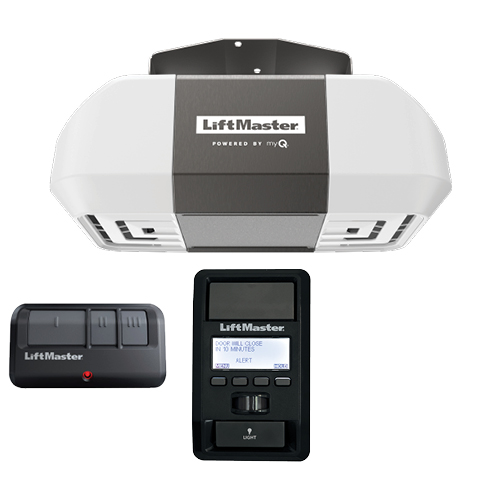
The LiftMaster 85870 is not just a standard garage door opener; it is a high-performance “head unit” designed for durability and smart integration. Unlike bundled kits that include rails and hardware, the “Head Only” designation means this package contains the motor unit itself, ideal for replacements where existing hardware is still in good condition or for custom installations.
At its core, this model features a ½ Horsepower (HP) motor, which is sufficient for most standard single-car and double-car garage doors. However, what sets it apart is its built-in Wi-Fi capability, allowing direct connection to the myQ app without needing additional gateways or hubs. This integration places control of your garage door directly at your fingertips, whether you are at home or across the country.
Key Specifications at a Glance
| Feature | Specification |
|---|---|
| Motor Power | ½ Horsepower (HP) |
| Connectivity | Built-in Wi-Fi (myQ enabled) |
| Drive Type | Chain Drive (typically robust and reliable) |
| Security | Security+ 2.0® Rolling Code Technology |
| Lighting | LED Lighting System |
| Warranty | Limited Lifetime Motor Warranty |
Why Choose Wi-Fi Integration for Your Garage?
In today’s connected world, security and convenience are paramount. Traditional openers operate in isolation, but a Wi-Fi-enabled opener like the LiftMaster 85870 bridges the gap between your physical home and your digital life.
Enhanced Security and Monitoring
One of the primary reasons users upgrade to Wi-Fi openers is peace of mind. With the myQ app, you receive real-time alerts whenever your garage door opens or closes. If you forget to close the door after leaving for work, you can check the app and close it remotely. This feature is invaluable for preventing unauthorized access or protecting stored items from weather elements.
According to cybersecurity experts, integrating smart devices with strong encryption protocols like Security+ 2.0® significantly reduces the risk of code grabbing, a common method used by thieves to clone remote signals. You can learn more about rolling code technology and its importance in home security on Wikipedia.
Seamless Smart Home Compatibility
The LiftMaster 85870 works effortlessly with major smart home platforms, including Amazon Alexa, Google Assistant, and Apple HomeKit (via compatible bridges). This means you can use voice commands to open or close your garage door, or create routines that automatically close the garage when you arm your home security system.
Installation Considerations for the Head Only Unit
Since the LiftMaster 85870 is sold as a “Head Only” unit, installation differs slightly from buying a complete kit. It is crucial to understand what is included and what you might need to source separately.
What’s in the Box?
Typically, the head-only package includes:
- The motor unit with integrated Wi-Fi
- Remote controls (usually 1-2)
- Wall-mounted control panel
- Safety sensors
- Mounting brackets for the motor
What Might You Need Separately?
If you are replacing an old opener, you may be able to reuse your existing rail, trolley, and spring system if they are compatible and in good condition. However, if you are starting from scratch or your old hardware is worn, you will need to purchase a separate rail kit. Always consult the manufacturer’s compatibility guide before proceeding.
Step-by-Step Installation Overview
- Safety First: Disconnect power to the old opener and release tension from the springs if necessary. Note: Spring adjustment can be dangerous; consider professional help.
- Remove Old Unit: Unbolt the existing motor head from the ceiling bracket.
- Prepare New Head: Attach the mounting brackets to the LiftMaster 85870 motor unit.
- Connect to Rail: Secure the new motor head to your existing or new rail system.
- Wire Safety Sensors: Install and align the safety eyes near the floor on both sides of the door.
- Power Up and Program: Plug in the unit, sync your remotes, and connect to the myQ app via Wi-Fi.
Performance and Durability: Is ½ HP Enough?
A common question among buyers is whether a ½ HP motor can handle heavy wooden or insulated doors. For most residential applications, ½ HP is perfectly adequate. It provides enough torque to lift standard steel doors up to 7 feet high smoothly and quietly.
However, if you have an extra-heavy custom door or a particularly tall door, you might consider LiftMaster’s higher horsepower models. For the average homeowner, the 85870 strikes an excellent balance between power, energy efficiency, and cost.
Noise Levels and Maintenance
Chain-drive openers, like the 85870, are known for their durability but can be noisier than belt-drive models. To minimize noise:
- Ensure all bolts and nuts are tightened securely.
- Lubricate the chain and rollers regularly with a silicone-based lubricant.
- Check the alignment of the rail to prevent binding.
Troubleshooting Common Issues
Even the best technology can encounter hiccups. Here are solutions to frequent problems with the LiftMaster 85870:
- Wi-Fi Connection Drops: Ensure your garage has a strong Wi-Fi signal. If not, consider a Wi-Fi extender. Restarting the router and the opener can also refresh the connection.
- Door Reverses Before Closing: This is often due to misaligned safety sensors. Check that the LED lights on both sensors are solid and not blinking. Clean the lenses and ensure nothing is blocking the beam.
- Remote Not Working: Replace the battery in the remote first. If that fails, reprogram the remote to the opener using the learn button on the motor unit.
FAQ Section
1. Can I install the LiftMaster 85870 myself?
Yes, if you are handy with tools and have experience with basic electrical wiring. However, due to the high tension of garage door springs, many experts recommend professional installation for safety reasons, especially if new springs or cables are involved.
2. Does the LiftMaster 85870 work with Apple HomeKit?
The LiftMaster 85870 natively supports the myQ platform. While it works directly with Alexa and Google Assistant, connecting to Apple HomeKit may require a myQ Smart Garage Hub or a compatible third-party bridge, depending on the current firmware and app updates.
3. What is the range of the included remote controls?
The typical range for LiftMaster remotes is up to 1,500 feet in open space. However, walls, metal structures, and interference can reduce this range inside a vehicle.
4. How do I reset the Wi-Fi on my LiftMaster 85870?
To reset the Wi-Fi, locate the Wi-Fi button on the motor unit. Press and hold it for approximately 10 seconds until the LED indicator blinks. Then, follow the setup instructions in the myQ app to reconnect to your network.
5. Is there a battery backup for this model?
The standard LiftMaster 85870 Head Only unit does not typically include an integrated battery backup. If power outage protection is critical for you, look for models specifically advertised with “Battery Backup” or purchase a compatible external backup unit if available.
6. What warranty comes with the LiftMaster 85870?
LiftMaster usually provides a limited lifetime warranty on the motor and a shorter warranty (often 1 year) on parts and accessories. Always register your product online to activate the full warranty coverage.
Leave a Reply