Introduction
Getting into your garage without fumbling for a remote should be simple, yet millions of homeowners struggle with the setup process. If you’ve been wondering how to set up Genie garage door opener to car, you’re not alone—the process can feel confusing without clear, step-by-step guidance. The good news? Most modern vehicles equipped with HomeLink or Car2U systems can pair with your Genie opener in under 10 minutes
www.geniecompany.com. Whether you drive a new Tesla, a Toyota, or a Ford F-150, this comprehensive guide will walk you through every step so you can enjoy seamless, secure garage access every time you pull up to your driveway.
Why Pairing Your Genie Opener to Your Car Matters
Pairing your Genie garage door opener directly to your vehicle isn’t just a convenience—it’s a security upgrade. According to industry data, the garage door opener market was valued at USD 2.88 billion in 2025, growing at 4.9% annually, with smart integration systems like HomeLink capturing roughly 30.2% of that market share
garagedoormarketers.com. This surge reflects how drivers prioritize hands-free, secure access to their homes.
When you program your car’s built-in system, you eliminate the need for bulky remotes, reduce the risk of losing your opener, and gain access to your garage from the comfort of your driver’s seat. Plus, with Genie’s patented Intellicode rolling code technology, every transmission selects a new code from billions of possible combinations, preventing unauthorized access
www.geniecompany.com.
What You Need Before You Start
Before diving into the setup, gather these essentials:
- Your Genie garage door opener remote (working battery required)
- A vehicle equipped with HomeLink or Car2U (check your owner’s manual)
- A ladder or step stool to reach the garage door motor head
- Clear line of sight between your car and the garage door opener
- Your vehicle’s owner’s manual (for model-specific instructions)
Pro Tip: Park your car inside the garage or at least 3 feet away from the motor unit during programming for the strongest signal
www.easygaragedoorrepair.com.
H2: How to Set Up Genie Garage Door Opener to Car via HomeLink
HomeLink is the most widely used vehicle integration system, available in over 90% of new vehicles sold in the United States. Here’s the proven method to pair it with your Genie opener.
Step 1: Clear Any Previous HomeLink Programming
Before programming a new button, clear any existing data to prevent interference. Press and hold the two outer HomeLink buttons simultaneously for 20 seconds until the indicator light flashes slowly and then quickly
www.justanswer.com. Release the buttons—the system is now reset.
Step 2: Train the HomeLink Button
- Choose an unused button on your HomeLink system (usually located on the rearview mirror or overhead console) www.geniecompany.com.
- Hold your Genie remote 2 inches away from the HomeLink button www.geniecompany.com.
- Simultaneously press and hold both the Genie remote button and the chosen HomeLink button.
- Watch the HomeLink indicator light—it will flash slowly at first, then rapidly once it detects the signal.
- Release both buttons when the light blinks quickly. Your HomeLink button is now programmed!
Step 3: Activate Intellicode Rolling Code (For Newer Genie Models)
Genie’s Intellicode system requires an additional “learn” step to sync properly:
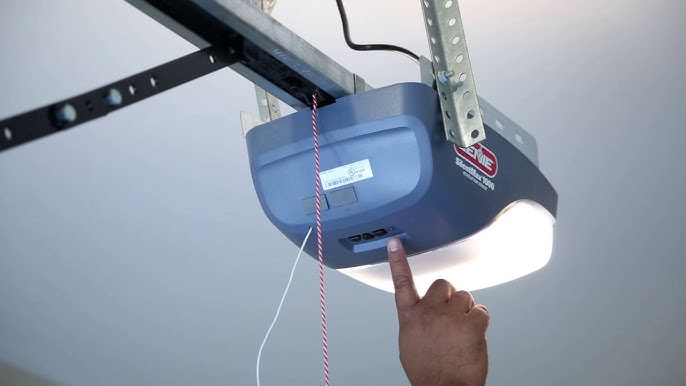
- Locate the “Learn” button on your Genie motor head (usually near the antenna wire).
- Press and release the Learn button—the LED will begin blinking.
- Within 30 seconds, press your newly programmed HomeLink button 3 times (press-hold-release each time).
- The garage door opener light will flash, confirming successful pairing creativedoor.com.
Step 4: Test the Connection
Return to your vehicle, turn the ignition to the “On” position, and press the HomeLink button. The garage door should respond immediately. If it doesn’t, repeat Step 2 and ensure you’re holding both buttons firmly.
H2: How to Set Up Genie Garage Door Opener to Car via Car2U
If your vehicle uses the Car2U system (common in older Ford, GM, and Lexus models), the pairing process differs slightly from HomeLink.
Step 1: Enter Car2U Learning Mode
Press and hold the two outer Car2U buttons on your visor or overhead console until the LED lights begin flashing—this takes about 20 seconds
www.allfordmustangs.com. Release the buttons and wait for the flashing to stop.
Step 2: Program the Genie Remote Signal
- Press and release the Learn Code button on your Genie garage door opener—the red LED will begin to blink www.geniecompany.com.
- Immediately press your chosen Car2U button one time.
- The red LED on the Genie motor head will stop blinking and stay solid, confirming successful pairing www.geniecompany.com.
Step 3: Test the System
Press the programmed Car2U button 3–4 times. The garage door should respond on the first or second press. If not, repeat the process and ensure your remote batteries are fresh.
Comparison Table: HomeLink vs. Car2U
| Feature | HomeLink | Car2U |
|---|---|---|
| Vehicle Compatibility | 90%+ of new US vehicles | Older models (Ford, GM, Lexus) |
| Programming Time | 3–5 minutes | 2–4 minutes |
| Buttons Available | 3 programmable buttons | 3 programmable buttons |
| Rolling Code Support | Yes (Intellicode compatible) | Yes (requires manual learn step) |
| Signal Range | Up to 50 feet | Up to 40 feet |
| Best For | Newer vehicles with built-in integration | Legacy vehicles and specific brands |
Troubleshooting Common Pairing Issues
Even with perfect instructions, hiccups happen. Here’s how to fix the most common problems:
Issue 1: HomeLink Light Won’t Flash
- Cause: Weak battery in Genie remote or vehicle not in “On” position.
- Fix: Replace remote batteries (CR2032 type) and ensure your car’s ignition is on.
Issue 2: Garage Door Opens but Won’t Close
- Cause: Safety sensor misalignment or obstruction.
- Fix: Check the infrared sensors on either side of the door—they must be aligned and free of debris. The LED on both sensors should glow steadily (not blink).
Issue 3: Signal Interference
- Cause: Nearby electronics (LED bulbs, Wi-Fi routers, baby monitors).
- Fix: Temporarily turn off nearby devices or move your vehicle closer to the garage door opener during programming.
Issue 4: Intellicode Won’t Learn
- Cause: You’re pressing the button too slowly or not holding it long enough.
- Fix: Press the Learn button firmly, then press your programmed button 3 times quickly (within 30 seconds) creativedoor.com.
Security & Technology: Understanding Rolling Code
One of the most critical aspects of pairing your Genie opener is understanding the technology that keeps your home safe. Genie’s Intellicode system uses rolling-code technology, which changes the access code every time the opener is activated
www.homedepot.com. According to Wikipedia, a rolling code is used in keyless entry systems to prevent a simple form of replay attack, where an eavesdropper records the transmission and replays it at a later time
en.wikipedia.org.
This means even if someone captures your garage door signal, they cannot use it to gain entry—the code has already expired. Genie has been manufacturing garage door openers since 1923 and continues to lead the industry in security innovations
en.wikipedia.org.
Expert Tips for a Flawless Setup
Professional installers recommend these best practices to ensure your system works reliably for years:
- Keep remotes fresh: Replace remote batteries annually to prevent signal degradation.
- Reprogram annually: Reset and re-pair your system every 12 months to maintain signal integrity.
- Use the latest Genie model: Newer Intellicode 2 systems offer enhanced security over older Intellicode 1 models, typically identified by the color of the Learn button (blue for Intellicode 2, red for Intellicode 1) garagedoorflorida.com.
- Park inside the garage when possible: This reduces signal interference and improves programming success rates.
- Label your buttons: Use a small sticker or marker to identify which HomeLink/Car2U button controls your garage door.
When to Call a Professional
While most setups are DIY-friendly, contact a certified technician if:
- Your Genie opener is over 15 years old and lacks a Learn button
- The motor head doesn’t respond to any remote signals
- Safety sensors are damaged or misaligned
- You’ve tried troubleshooting 3+ times without success
Professional Genie service technicians typically charge between $75–$150 for programming assistance, depending on your location and the complexity of the issue.
FAQ: Frequently Asked Questions
Q1: Can I program my Genie garage door opener to multiple cars?
A: Yes! You can program your Genie opener to up to 7 different HomeLink buttons across multiple vehicles, plus any number of handheld remotes. Each car will have its own dedicated button.
Q2: Do I need a special remote to set up Genie garage door opener to car?
A: No special remote is required for basic pairing. You only need your existing Genie handheld remote (with working batteries) and a vehicle with HomeLink or Car2U built in.
Q3: Why does my HomeLink work sometimes but not always?
A: Intermittent performance usually stems from one of three issues: (1) weak remote batteries, (2) signal interference from nearby electronics, or (3) the vehicle being parked too far from the opener. Try programming while parked inside the garage for the most reliable results.
Q4: Is rolling code technology mandatory for HomeLink compatibility?
A: While not legally mandatory, rolling code (Intellicode) is now standard on all Genie openers manufactured after 1996. It’s strongly recommended for security, as it prevents code-grabbing attacks.
Q5: Can I use a universal remote instead of my car’s built-in system?
A: Yes, Genie sells universal remotes that work with most vehicles, but built-in HomeLink or Car2U systems offer better integration, longer range, and hands-free convenience.
Q6: What if my car doesn’t have HomeLink or Car2U?
A: You can purchase a HomeLink Retrofit Kit (approximately $100–$150) that plugs into your vehicle’s cigarette lighter or USB port, adding HomeLink functionality to any car.
Conclusion
Learning how to set up Genie garage door opener to car is one of the most rewarding home automation tasks you can tackle this weekend. In less than 10 minutes, you can eliminate remote clutter, enhance your home’s security with rolling code technology, and enjoy seamless, hands-free access to your garage.
Whether you’re using HomeLink for its broad compatibility or Car2U for its simplicity, the key is following each step carefully and testing your system multiple times before relying on it daily. With over $2.88 billion invested in garage door opener technology in 2025 alone, your investment in a smart setup will pay dividends in convenience and peace of mind.
Did this guide help you? Share it with friends, family, and fellow homeowners on Facebook, Twitter, and Pinterest! Tag us in your posts and let us know how your setup went—we love hearing success stories from our readers. Don’t forget to bookmark this page for future reference and subscribe to our newsletter for more expert home improvement tips delivered straight to your inbox.
Happy driving, and safe garage-ing! 🚗🏠
Leave a Reply