Introduction
There is nothing quite as frustrating as pulling into your driveway after a long day, only to realize you still have to dig through your center console for a separate garage remote. If you are a new owner of this capable truck, figuring out how to set up garage door opener in Ram 1500 models is likely high on your priority list for daily convenience. The good news is that the integrated Homelink system is designed to be user-friendly, and with the right guidance, you can sync your vehicle to your home in under ten minutes. This guide will walk you through every step with empathy and precision, ensuring you get it right the first time without technical headaches.
Understanding the Homelink System in Your Ram 1500
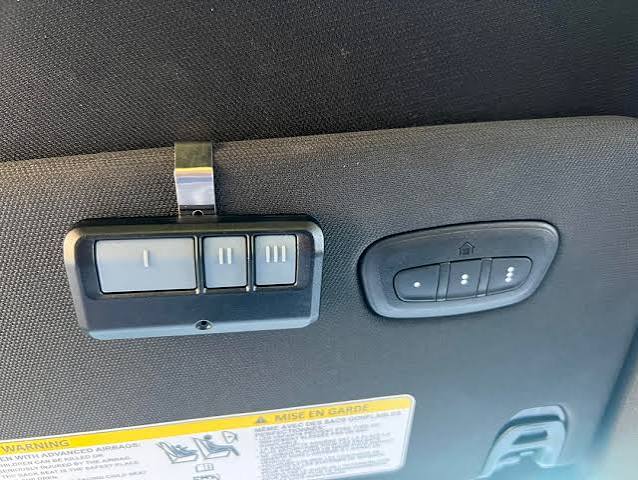
Before diving into buttons and sequences, it is vital to understand what you are actually programming. The Ram 1500 utilizes the Homelink Wireless Control System, typically located in the overhead console or the rearview mirror assembly, depending on your trim level (Tradesman, Big Horn, Laramie, etc.).
This system acts as a universal transceiver. According to technical documentation referenced in Wikipedia’s entry on Home automation, these systems bridge the gap between automotive controls and residential security, replacing up to three different handheld remotes. Knowing this helps you understand why the programming sequence requires specific timing; the truck is essentially learning a unique radio frequency code from your existing handheld remote.
Compatibility Check: Rolling Code vs. Fixed Code
Most modern garage door openers (manufactured after 1996) use “rolling code” technology for security. Older models may use “fixed code.” The Ram 1500 Homelink supports both, but the programming steps differ slightly.
- Rolling Code: The signal changes every time you press the button. This is the industry standard for safety.
- Fixed Code: The signal remains static. Common in pre-1996 openers.
If your handheld remote has a purple, orange, or yellow learn button on the back of the motor unit, you almost certainly have a rolling code system.
Step-by-Step: How To Set Up Garage Door Opener In Ram 1500
Follow this precise tutorial to program a rolling-code garage door opener. Ensure your truck’s ignition is in the ON/RUN position (engine running or accessory mode) throughout this process.
Phase 1: Clearing Previous Codes (Recommended)
Even if your truck is new, clearing old memory prevents signal conflicts.
- Press and hold the two outer Homelink buttons simultaneously.
- Hold for approximately 20 seconds.
- Release when the indicator light begins to flash rapidly. Your system is now factory reset.
Phase 2: Training the Homelink Button
- Choose which of the three Homelink buttons you wish to program.
- Hold your original handheld remote 1–3 inches away from the selected Homelink button.
- Simultaneously press and hold both the handheld remote button and the chosen Homelink button.
- Watch the Homelink indicator light. It will flash slowly at first, then transition to a rapid flash (or solid light, depending on year). This usually takes 10–30 seconds.
- Once the light flashes rapidly, release both buttons. The slow-to-rapid flash confirms the truck has learned the signal.
Phase 3: Synchronizing with the Garage Motor Unit
This is the step most people miss when asking how to set up garage door opener in Ram 1500 vehicles. You must complete the handshake at the source.
- Locate the “Learn” or “Smart” button on your garage door opener motor unit (usually near the antenna wire or light cover).
- Press and release the Learn button. Note: You typically have exactly 30 seconds to complete the next step before the motor exits learning mode.
- Return to your Ram 1500 immediately.
- Press and hold the programmed Homelink button for 2 seconds, then release. Repeat this press-hold-release cycle up to three times.
- Test the system. The garage door should activate.
Pro Tip: If the door does not respond after three attempts, verify that the LED on the motor unit did not turn off prematurely. You may need an assistant to press the Homelink button while you stand by the motor unit to confirm the synchronization light blinks.
Troubleshooting Common Programming Issues
Sometimes, despite following the steps, the system won’t pair. Here is a data-driven breakdown of common failures and solutions.
| Symptom | Probable Cause | Solution |
|---|---|---|
| Light never flashes rapidly | Weak battery in handheld remote | Replace CR2032/AA batteries in original remote before retrying |
| Light flashes rapidly but door won’t open | Failed motor-unit sync | Re-do Phase 3; ensure you are within the 30-second window |
| Works intermittently | Signal interference or range issue | Reprogram holding remote closer (1 inch); check for LED bulb interference |
| Solid light instead of flash | Fixed-code opener detected | Follow fixed-code training procedure (hold until solid, no motor sync needed) |
| No response at all | Homelink module fuse blown | Check interior fuse panel; consult Ram 1500 owner’s manual for fuse location |
The LED Bulb Interference Factor
A frequently overlooked issue involves aftermarket LED bulbs in the garage opener itself. Cheap or non-shielded LED bulbs emit electromagnetic interference that blocks Homelink frequencies. If your setup worked previously but suddenly stopped, try removing the LED bulb and testing with an incandescent bulb. If functionality returns, replace the LED with a garage-door-opener-specific LED rated for RF shielding.
Safety Precautions During Setup
Your safety matters more than convenience. Always adhere to these guidelines:
- Never program while the garage door is moving. Wait for full open or close cycles.
- Keep hands clear of pinch points when reaching toward the motor unit during Phase 3.
- Ensure the safety reversal sensors are functional after programming. Place a 2×4 board on the floor under the door path; the door should reverse upon contact. If it doesn’t, do not use Homelink until sensors are repaired.
- Do not leave the truck running unattended in a closed garage during extended troubleshooting to avoid carbon monoxide buildup.
Frequently Asked Questions (FAQ)
Can I program my Ram 1500 Homelink without an original remote?
Generally, no. The Homelink system requires cloning an existing signal. However, some newer Chamberlain/LiftMaster openers allow direct-to-Homelink pairing via the motor unit’s learn button without a handheld remote. Consult your specific opener’s manual for “direct Homelink programming” instructions.
How many devices can I store in my Ram 1500 Homelink?
The system stores up to three distinct devices. These can be any combination of garage doors, gates, lighting systems, or security alarms. If you need more, consider upgrading to a Homelink repeater kit or using a smart home hub as an intermediary.
Will programming Homelink erase my existing garage door remotes?
No. Programming your Ram 1500 adds a new authorized transmitter to the opener’s memory. Your existing wall consoles and handheld remotes will continue to function normally. Most modern openers support 20+ remotes simultaneously.
Why does my Homelink work outside but not inside the garage?
This indicates signal attenuation, often caused by metal-backed insulation, radiant barrier sheathing, or electronic interference. Solutions include installing a Homelink signal repeater/extender or repositioning the opener’s antenna. Also verify that Wi-Fi routers or baby monitors aren’t mounted directly adjacent to the opener motor.
Does the Ram 1500 Homelink work with smart garage openers like MyQ?
Yes, but indirectly. Homelink operates on radio frequency, while MyQ uses Wi-Fi/cloud. You program Homelink to the physical opener just like a traditional remote. The MyQ app will then detect the door movement triggered by Homelink, giving you status feedback on your phone even though the activation method is RF-based.
What if my Ram 1500 is a 2025+ model with the digital rearview mirror Homelink?
Newer Ram 1500 trims integrate Homelink into the auto-dimming digital rearview mirror rather than the overhead console. The programming sequence is identical, but the buttons are located on the mirror housing. Refer to your specific year’s supplement guide, as button placement varies slightly between analog and digital mirror assemblies.
Conclusion
Mastering how to set up garage door opener in Ram 1500 trucks transforms your daily arrival experience from fumbling frustration to seamless automation. By understanding the difference between rolling and fixed codes, following the precise three-phase programming sequence, and troubleshooting methodically when issues arise, you leverage the full potential of your vehicle’s integrated technology. Remember to prioritize safety checks and address signal interference proactively for reliable long-term performance.
Now that your Homelink is synced and working perfectly, why keep this knowledge to yourself? Share this guide on Facebook, X (Twitter), or your favorite Ram truck forum to help fellow owners skip the confusion and enjoy hands-free garage access today. Your friends and fellow enthusiasts will thank you!
Leave a Reply