Introduction
There is nothing quite as frustrating as sitting in your driveway, rain pouring down, realizing you cannot remember how to sync your new garage remote to your vehicle. If you are searching for how to set up garage door opener in Acura MDX, you are likely dealing with this exact inconvenience or preparing to move into a new home. We understand that vehicle technology can sometimes feel overly complicated, but programming your built-in HomeLink system is actually a straightforward process that will save you daily hassle. This guide breaks down the exact steps, safety precautions, and troubleshooting tips you need to get your Acura MDX connected to your garage door securely and efficiently.
Understanding HomeLink Technology in Your Acura MDX
Before diving into the buttons, it is vital to understand what you are actually programming. The Acura MDX utilizes the HomeLink Wireless Control System, an integrated universal transceiver that replaces multiple handheld remotes. Unlike older generic openers, modern HomeLink systems (version 5.0 and above) use rolling-code technology for enhanced security.
According to automotive electronics standards, HomeLink operates on radio frequencies between 288–394 MHz. This means compatibility is broad, but not infinite. Before starting, verify your garage door opener’s manufacturing date. Openers made after 1996 typically use rolling codes, while older models use fixed codes. Knowing this distinction prevents wasted time during the pairing process. For a deeper technical understanding of how these radio frequency transmitters function within vehicular systems, you can refer to the Wikipedia entry on Garage Door Openers, which details the evolution of safety sensors and frequency modulation in residential automation.
Pre-Programming Checklist: Safety and Preparation
Never skip preparation. Programming requires your vehicle to be outside the garage to prevent accidental activation while the door is obstructed.
- Clear the Area: Ensure no people, pets, or objects are near the garage door path.
- Fresh Batteries: Replace the battery in your handheld garage remote before starting. Weak signals cause programming failures.
- Ignition Status: For most Acura MDX model years (2014–2025), the ignition must be in the ON/RUN position (engine running or accessory mode active).
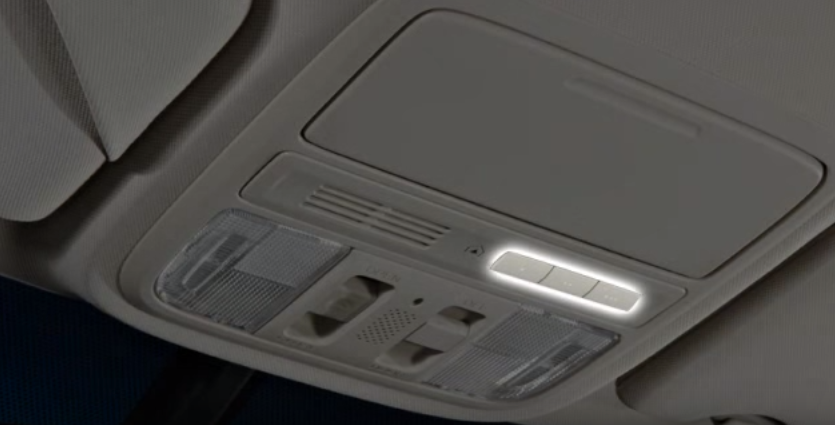
- Locate Buttons: In the Acura MDX, HomeLink buttons are typically located in the overhead console near the rearview mirror or integrated into the lower dashboard left of the steering wheel, depending on the trim level.
- Identify Opener Type: Check if your motor unit has a “Learn” or “Smart” button. Note its color (yellow, purple, orange, or red), as this dictates the final synchronization step.
Step-by-Step: How To Set Up Garage Door Opener In Acura MDX
Follow these precise instructions. Timing matters; do not rush the hold durations.
Phase 1: Clearing Previous Codes (Recommended)
If this is a used vehicle or you are reprogramming a button, always clear old data first.
- Press and hold the two outer HomeLink buttons simultaneously.
- Hold for approximately 10 seconds until the indicator light flashes rapidly (green or amber, depending on year).
- Release both buttons. The system is now reset and ready for new programming.
Phase 2: Training the HomeLink Button
- Hold your handheld garage remote 1–3 inches away from the HomeLink buttons on your MDX dashboard/overhead console.
- Simultaneously press and hold the handheld remote button AND the desired HomeLink button.
- Watch the HomeLink indicator light. It will flash slowly at first, then rapidly when training is complete. This usually takes 5–20 seconds.
- Release both buttons once the rapid flash occurs.
- Test: Press the programmed HomeLink button. If the garage door moves, you have a fixed-code opener and are finished. If the light flashes but the door does not move, proceed to Phase 3 (Rolling Code Synchronization).
Phase 3: Rolling Code Synchronization (Most Modern Openers)
This step bridges the communication between your car and the garage motor’s security protocol.
- Locate the “Learn” or “Smart” button on your garage door motor unit (usually hanging from the ceiling).
- Press and release the Learn button. You typically have 30 seconds to complete the next step before the motor exits learning mode.
- Return to your Acura MDX and press the programmed HomeLink button firmly for 2 seconds, then release.
- Repeat this press-hold-release cycle up to three times. On many LiftMaster/Chamberlain units, the second or third press completes the handshake.
- Test the HomeLink button again. The garage door should now activate reliably.
Quick Reference: Fixed Code vs. Rolling Code Indicators
Understanding visual feedback eliminates guesswork. Use this table to diagnose your status:
| Indicator Light Behavior | Meaning | Required Action |
|---|---|---|
| Slow Flash → Rapid Flash | Training Successful | Test door operation |
| Rapid Flash Only (No Slow) | Already Programmed / Rolling Code Detected | Proceed to Phase 3 Sync |
| No Light / Dim Light | Power Issue or Button Fault | Check ignition; inspect fuse |
| Solid Light After Training | Fixed Code Successfully Paired | No further action needed |
| Flashes But Door Won’t Move | Rolling Code Not Synced | Complete Phase 3 within 30 sec |
Common Programming Challenges and Expert Solutions
Even professionals encounter hiccups. Here are evidence-based solutions for the most frequent issues Acura MDX owners face.
Problem: HomeLink trains but garage door won’t respond. Solution: You likely have a rolling-code opener and skipped Phase 3. Additionally, some Canadian and European-spec openers operate on different frequencies. Verify your opener’s FCC ID matches HomeLink’s supported range.
Problem: Intermittent operation (works sometimes, fails others). Solution: This is almost always a weak handheld remote battery used during training. Replace the battery and retrain from Phase 2. Also, ensure you held the remote at the correct 1–3 inch distance; holding it too far degrades signal integrity during the learning phase.
Problem: Indicator light never flashes during training. Solution: Confirm your ignition is ON. Some Acura MDX trims disable HomeLink when the vehicle is completely off to preserve battery. If ignition is confirmed ON, try a different handheld remote or test with a neighbor’s compatible remote to isolate whether the issue is your remote or the vehicle’s receiver.
Problem: Programmed button works for garage but not gate/community entrance. Solution: Community gates often use fixed-code systems even when residential garages use rolling codes. Program a separate HomeLink button specifically for the gate using only Phase 2 (skip Phase 3). Do not attempt to sync a gate transmitter via the garage motor’s Learn button.
FAQ: Your Top Questions Answered
Can I program my Acura MDX HomeLink without the original handheld remote?
Generally, no. The handheld remote acts as the signal donor during initial training. However, if your garage opener supports direct Wi-Fi or app-based integration (like MyQ or Aladdin Connect), some newer Acura MDX models with connected services may allow cloud-based provisioning. Check your AcuraLink subscription tier and opener compatibility. Without either option, you will need to purchase a compatible replacement remote solely for programming purposes.
How many devices can my Acura MDX HomeLink store?
Most Acura MDX vehicles feature three programmable HomeLink buttons. Each button can store one device frequency. You can mix device types: one button for your primary garage, one for a secondary garage or gate, and one for outdoor lighting or a smart plug adapter. If you need more than three devices, consider upgrading to a HomeLink repeater kit or using a dedicated smart home hub.
Will programming HomeLink erase my existing garage remote codes?
No. Programming your Acura MDX adds a new authorized transmitter to your garage opener’s memory; it does not delete previously paired remotes or keypads. However, if you press the Learn button on your garage motor during Phase 3 and hold it for 10+ seconds (instead of a quick press), you will factory-reset the opener and erase all remotes. Always use a brief press-and-release unless intentionally clearing all devices.
Is HomeLink compatible with all garage door opener brands?
HomeLink is compatible with over 95% of garage door openers sold in North America, including LiftMaster, Chamberlain, Genie, Craftsman, and Overhead Door. Compatibility issues primarily arise with very old pre-1996 fixed-code units or certain international-frequency models. If your opener uses dip switches instead of a Learn button, you may need a HomeLink Compatibility Bridge (sold separately) to translate signals.
Why did my programmed HomeLink stop working after a battery change?
Vehicle battery disconnection or replacement rarely affects HomeLink memory, as it is stored in non-volatile memory. However, if your garage opener’s backup battery died or the motor lost power, the rolling-code seed may have desynchronized. Simply repeat Phase 3 (rolling code sync) to re-establish the secure handshake. This takes less than 30 seconds and does not require retraining from scratch.
Does the Acura MDX HomeLink work with smart home systems like Alexa or Google Home?
HomeLink itself is a direct RF transmitter and does not natively integrate with voice assistants. However, if your garage opener has built-in Wi-Fi (e.g., MyQ-enabled), you can control the same physical door through Alexa/Google independently of HomeLink. Think of them as parallel control paths: HomeLink for in-car convenience, smart home apps for remote monitoring and voice commands. They coexist without conflict.
Conclusion: Enjoy Seamless Access Every Day
Learning how to set up garage door opener in Acura MDX transforms a daily annoyance into effortless convenience. By following the phased approach outlined above—clearing old codes, training with proper proximity, and completing rolling-code synchronization—you ensure reliable, secure operation for years to come. Remember that patience during the 30-second Learn window and fresh batteries in your donor remote solve the vast majority of issues.
Your time is valuable, and your vehicle’s technology should serve you, not frustrate you. Now that your HomeLink is programmed, enjoy the simple luxury of pulling into your garage without fumbling for a remote. Found this guide helpful? Share it on Facebook, X (Twitter), or Reddit to help fellow Acura owners reclaim their driveways! Have a unique setup challenge we didn’t cover? Drop a comment below—we read every question and update our guides based on real owner experiences. Safe driving and seamless entries ahead!
Leave a Reply