Introduction
There is nothing quite as frustrating as pulling into your driveway in the rain, only to realize you still have to fumble for a plastic remote or get out of your warm vehicle to open the garage manually. If you are searching for how to set up garage door opener in Acura MDX, you are likely ready to embrace the convenience of integrated vehicle technology but might feel intimidated by the programming process. Rest assured, syncing your Acura’s built-in HomeLink system is a straightforward task that takes less than ten minutes, and this guide will walk you through every button press with confidence and clarity.
Understanding HomeLink Technology in Your Acura MDX
Before diving into the buttons, it is helpful to understand what you are actually programming. The Acura MDX utilizes the HomeLink Universal Transceiver System, which is an integrated wireless control system designed to replace hand-held remotes. Unlike older radio frequency systems, modern HomeLink versions (typically version 4.0 or 5.0 in newer MDX models) support rolling code security protocols.
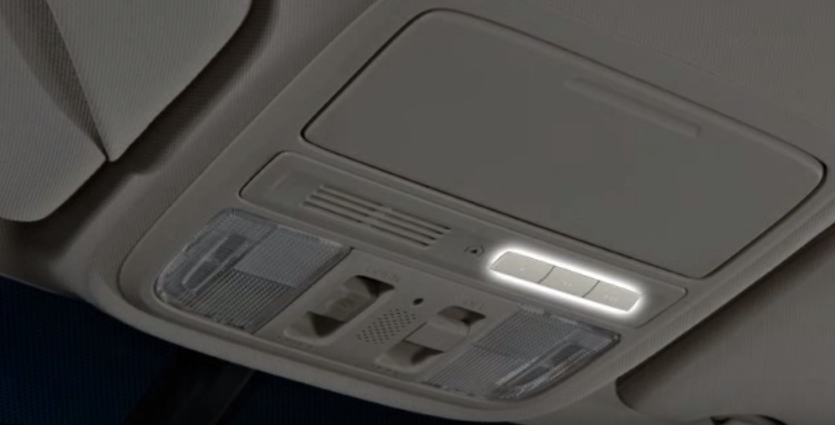
According to technical documentation referenced on Wikipedia, rolling code technology changes the signal transmission every time the button is pressed, preventing thieves from capturing and replaying your garage door signal. This means when you learn how to set up garage door opener in Acura MDX, you are not just adding convenience; you are maintaining a high level of home security. Most Acura MDX vehicles feature three programmable buttons located either on the overhead console near the rearview mirror or integrated directly into the lower dashboard panel, depending on the model year.
Pre-Programming Checklist: What You Need First
To ensure a seamless setup experience, gather the following items before sitting in the driver’s seat. Skipping this preparation is the most common reason for failed programming attempts.
- Original Garage Door Remote: Even if you plan to discard it later, you need the original transmitter to sync frequencies during the initial handshake.
- Fresh Batteries: Replace the battery in your handheld remote before starting. Weak signals cause intermittent programming failures.
- Clear Line of Sight: Park outside the garage, facing the door, at least 20 feet away to prevent signal interference from concrete walls.
- Ignition Status: Ensure the Acura MDX ignition is in the “ON” (II) position or the engine is running. Accessory mode often does not provide sufficient power to the HomeLink module.
- Safety Clearance: Verify no people, pets, or objects are in the path of the garage door. The door will cycle multiple times during testing.
Expert Tip: If your Acura MDX is a 2019 or newer model, check your infotainment settings first. Some newer trims include a digital HomeLink setup wizard in the vehicle settings menu that provides on-screen visual cues alongside the physical buttons.
Step-by-Step: How To Set Up Garage Door Opener In Acura MDX
Follow these precise instructions to program your primary garage door. This method applies to standard rolling-code openers manufactured after 1996, which covers the vast majority of US residential units.
Step 1: Clear Previous Codes (Recommended for Used Vehicles)
If your MDX is pre-owned or you are reprogramming a button, clear old data first to prevent conflicts.
- Press and hold the two outer HomeLink buttons simultaneously.
- Hold for approximately 10–20 seconds until the indicator light flashes rapidly.
- Release both buttons. The system is now reset.
Step 2: Initiate Handheld Remote Training
- Hold your handheld garage door remote 1–3 inches away from the HomeLink button you wish to program.
- Simultaneously press and hold the handheld remote button AND the chosen HomeLink button.
- Watch the HomeLink indicator light closely. It will flash slowly at first, then transition to a rapid, solid flash.
- Once the rapid flash appears (usually within 30 seconds), release both buttons.
Step 3: Program the Garage Door Motor Unit
This step synchronizes the car to the actual motor, not just the remote.
- Locate the “Learn” or “Smart” button on your garage door opener motor unit (usually on the back or side panel).
- Press and release the Learn button. You typically have 30 seconds to complete the next action.
- Return to your Acura MDX and firmly press and hold the programmed HomeLink button for 2 seconds, then release.
- Repeat this press-hold-release cycle up to three times until the garage door activates.
Step 4: Test and Verify Operation
Press the HomeLink button once briefly. The door should respond immediately. If there is a delay or no response, repeat Step 3, ensuring you are within the 30-second window after pressing the motor’s Learn button.
Troubleshooting Common Programming Failures
Even professionals encounter hiccups. Use this diagnostic table to resolve issues quickly without visiting a dealership.
| Symptom | Likely Cause | Recommended Solution |
|---|---|---|
| Light never flashes rapidly | Dead remote battery or wrong frequency | Replace battery; verify remote is compatible with HomeLink |
| Light flashes rapidly but door won’t move | Rolling code sync failed | Repeat Step 3; ensure Learn button was pressed recently |
| Door opens partially then stops | Safety sensor misalignment | Check photo-eye sensors at floor level; clean lenses |
| Works intermittently | Signal interference or weak battery | Reprogram with fresh batteries; avoid LED bulbs near opener |
| Indicator stays solid without flashing | Button already programmed | Clear codes (Step 1) and restart process |
Special Considerations for Older vs. Newer Acura MDX Models
The location and behavior of HomeLink can vary significantly across generations. Knowing your specific generation helps avoid confusion when learning how to set up garage door opener in Acura MDX.
- 2007–2013 (Second Generation): Buttons are typically on the overhead console. These units may require a longer initial hold time (up to 60 seconds) for older fixed-code openers.
- 2014–2020 (Third Generation): Transition period where some models moved buttons to the lower dash. Firmware updates via dealer service may be required for compatibility with newest smart openers.
- 2021–Present (Fourth Generation): Often features enhanced HomeLink 5.0 with extended range and cloud connectivity options. Some trims offer smartphone app integration as a backup to physical buttons.
FAQ: Your Top Questions Answered
Can I program my Acura MDX garage door opener without the original remote?
Generally, no. The HomeLink system requires the original remote’s unique frequency signature to initiate the cloning process. However, if your garage door opener has a “Learn” button and supports direct-to-motor programming (common in Chamberlain/LiftMaster units post-2015), you may bypass the remote. Consult your opener’s manual for “direct programming” instructions.
Why does my HomeLink work for the garage but not my gate or lights?
Each HomeLink button operates independently. Gates and lighting controllers sometimes use different frequencies or require a separate receiver module. Ensure you are using a dedicated button for each device and that the external device is HomeLink-compatible. Non-compatible devices may require a HomeLink Bridge adapter.
Will disconnecting my Acura MDX battery erase my HomeLink settings?
No. HomeLink memory is stored in non-volatile memory and persists through battery disconnections, jump starts, and even ECU resets. You will only lose settings if you manually perform the factory reset procedure outlined in Step 1.
Is HomeLink compatible with all garage door brands?
HomeLink is compatible with over 95% of garage door openers sold in North America, including major brands like Chamberlain, LiftMaster, Genie, Craftsman, and Overhead Door. For European or proprietary commercial systems, compatibility varies. Check the official HomeLink compatibility database online if unsure.
My indicator light flashes continuously after programming. What does this mean?
A continuous rapid flash that doesn’t stop usually indicates the button is stuck in programming mode or the sync was incomplete. Turn the ignition off, wait 30 seconds, turn it back on, and test. If it persists, perform a full system reset and reprogram from scratch.
Can I use HomeLink to control smart home devices beyond the garage?
Yes, with limitations. Modern HomeLink 5.0 systems can integrate with certain smart home platforms via cloud services, allowing control of lights, thermostats, and locks. However, this requires additional setup through the HomeLink app or compatible hub. Basic three-button HomeLink systems are limited to RF-controlled devices only.
Conclusion
Mastering how to set up garage door opener in Acura MDX transforms your daily arrival experience from a chore into a seamless ritual. By following the systematic approach outlined above—preparing properly, executing the three-phase programming sequence, and troubleshooting methodically—you gain reliable, secure access to your home without ever reaching for a separate remote. The investment of fifteen minutes today pays dividends in convenience and safety for years to come.
Did this guide help you successfully sync your Acura MDX? Share this article on Facebook, X (Twitter), or Pinterest to help fellow Acura owners reclaim their driveway convenience! Have a unique troubleshooting tip we missed? Drop it in the comments below to build our community knowledge base. Safe driving and happy parking!
Leave a Reply